Data Domain:添加云单元时出现证书错误
Summary: 使用 System Manager 将云单元添加到 Data Domain 系统时,根 CA 证书缺失或过时可能会发生证书验证错误。
This article applies to
This article does not apply to
This article is not tied to any specific product.
Not all product versions are identified in this article.
Symptoms
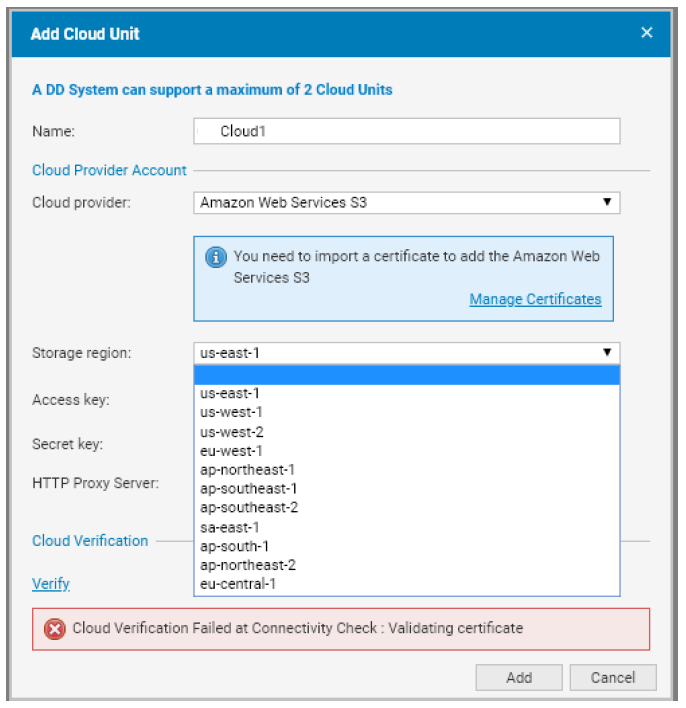
尝试在 Data Domain System Manager 中添加云单元会导致以下错误:
- 云验证在连接检查时失败:正在验证证书
- 例如:
Cause
发生该错误的原因是云提供商所需的根 CA 证书不存在或已过时。根据 Data Domain 管理指南,配置或添加云单元的前提条件包括:
- 正确的网络配置(防火墙和代理设置)
- 导入正确的 CA 证书
- 添加云单元
Resolution
1.下载所需的证书。
对于每个云提供商,下载相应的根 CA 证书:
-
AWS:
- 巴尔的摩 CyberTrust 根证书
- 提醒:同时下载并导入 2021 年 3 月发布的 Starfield Class 2 证书 。
- 请参阅 此知识库文章 ,了解如何处理 AWS S3 证书更改。
-
Virtustream:
- 从 DigiCert 下载 DigiCert High Assurance EV Root CA 证书。
-
弹性云服务器:
- 根 CA 证书因客户而异。
- 如果使用 HTTPS 端点,请确保导入负载均衡器提供商的根 CA 证书。
-
Azure:
- 下载 Baltimore CyberTrust 根证书。
- 提醒:从 2022 年 2 月开始,需要额外的证书。
- 请参阅 此知识库文章 ,了解如何处理 Azure TLS 证书更改。
- 视频:Azure 证书更新
-
S3 Flexible 提供商:
- 导入 S3 Flexible 提供商提供的根 CA 证书。
2.将证书转换为 PEM 格式(如果需要)
如果下载的证书有 .crt 扩展名,使用 OpenSSL 将其转换为 PEM 格式:
openssl x509 -inform der -in BaltimoreCyberTrustRoot.crt -out BaltimoreCyberTrustRoot.pem3.使用 Data Domain System Manager 导入证书
-
导航到:
数据管理 > 文件系统 > 云单元 -
单击工具栏中的 管理证书 。
-
在 Manage Certificates for Cloud 对话框中,单击 Add。
-
选择以下选项之一:
- 上传 .pem 文件:浏览并选择证书文件。
- 复制并粘贴证书文本:
- 打开
.pem文件。 - 复制内容并将其粘贴到对话框中。
- 打开
-
单击 添加 以完成导入。
以下视频演示了如何为 Azure Cloud Provider 导入旧版巴尔的摩证书并将 Data Domain 与其集成。
在 YouTube上观看。
Additional Information
参考:Dell PowerProtect Data Domain 核心文档
- 管理指南适用于每个 DDOS 版本
Affected Products
Data DomainArticle Properties
Article Number: 000056159
Article Type: Solution
Last Modified: 17 Oct 2025
Version: 6
Find answers to your questions from other Dell users
Support Services
Check if your device is covered by Support Services.