Data Domain:新增雲端裝置時發生憑證錯誤
Summary: 使用 System Manager 將雲端裝置新增至 Data Domain 系統時,憑證驗證錯誤可能會因為根 CA 憑證遺失或過時而發生。
This article applies to
This article does not apply to
This article is not tied to any specific product.
Not all product versions are identified in this article.
Symptoms
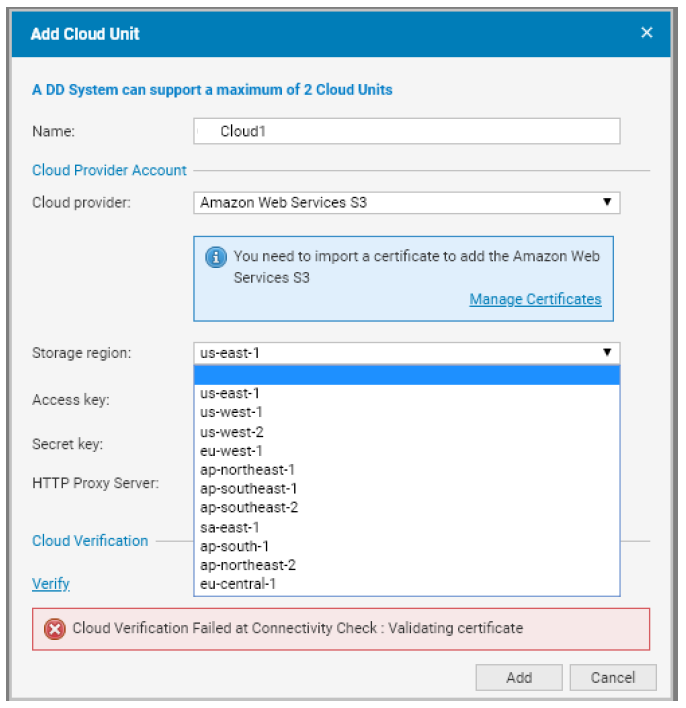
嘗試在 Data Domain System Manager 中新增雲端裝置會導致下列錯誤:
- 雲端驗證在連線能力檢查時失敗:驗證憑證
- 例如:
Cause
發生此錯誤的原因是雲供應商所需的根 CA 證書不存在或已過時。根據《 Data Domain 管理指南》,設定或新增雲端裝置的先決條件包括:
- 正確的網路組態 (防火牆和 Proxy 設定)
- 匯入正確的 CA 憑證
- 新增雲端裝置
Resolution
1.下載所需的憑證。
針對每個雲端提供商,下載適當的根 CA 憑證:
-
AWS:
- Baltimore CyberTrust 根憑證
- 注意:同時下載並匯入 2021 年 3 月發佈的 Starfield Class 2 憑證 。
- 請參閱 此 KB 文章 ,以瞭解如何處理 AWS S3 憑證變更。
-
Virtustream:
- 從 DigiCert 下載 DigiCert High Assurance EV Root CA 憑證。
-
ECS:
- 根 CA 憑證因客戶而異。
- 如果使用 HTTPS 終端節點,請確保已導入來自負載均衡器提供程式的根 CA 證書。
-
Azure:
- 下載 Baltimore CyberTrust Root 憑證。
- 注意:從 2022 年 2 月開始,需要其他證書。
- 請參閱 此 KB 文章 ,以瞭解如何處理 Azure TLS 憑證變更。
- 影片:Azure 憑證更新
-
S3 彈性供應商:
- 匯入 S3 靈活提供程式提供的根 CA 證書。
2.將憑證轉換為 PEM 格式 (如有需要)
如果下載的憑證有 .crt 擴展,使用 OpenSSL 將其轉換為 PEM 格式:
openssl x509 -inform der -in BaltimoreCyberTrustRoot.crt -out BaltimoreCyberTrustRoot.pem3.使用 Data Domain System Manager 匯入憑證
-
瀏覽至:
資料管理 > 檔案系統 > 雲端單位 -
按一下工具列中的 管理憑證 。
-
在“ 管理雲證書 ”對話框中,按兩下 “添加”。
-
選擇以下選項之一:
- 上傳 .pem 檔案:瀏覽並選取認證檔案。
- 複製並貼上憑證文字:
- 開啟
.pem檔。 - 複製內容並將其粘貼到對話框中。
- 開啟
-
按 一下新增 以完成匯入。
以下影片示範如何匯入 Azure 雲端提供商的舊版 Baltimore 憑證,以及如何將 Data Domain 與憑證整合。
在 YouTube上觀看。
Additional Information
參考資料:Dell PowerProtect Data Domain 核心文件
- 每個 DDOS 版本都有適用的管理指南
Affected Products
Data DomainArticle Properties
Article Number: 000056159
Article Type: Solution
Last Modified: 17 Oct 2025
Version: 6
Find answers to your questions from other Dell users
Support Services
Check if your device is covered by Support Services.