EN以外のSQLインスタンスでの内部またはdatetime varchar変換エラー
Summary: Dell Security Management Server(旧Dell Data Protection |Enterprise Edition)が、フランス語など英語以外のサーバー オペレーティング システムにインストールされている場合、WebUiコンソールに「internal error」または「Data access error」が表示されることがあります。
This article applies to
This article does not apply to
This article is not tied to any specific product.
Not all product versions are identified in this article.
Symptoms
対象製品:
- Dell Data Protection | Enterprise Edition
影響を受けるバージョン:
- v9.7以前
影響を受けるプラットフォーム:
- Windowsサーバー
互換性ログには、次のようなエラーが報告されます: varcharデータ型をdatetimeデータ型に変換すると、範囲外の値が作成されました。
Cause
-
Resolution
この場合:
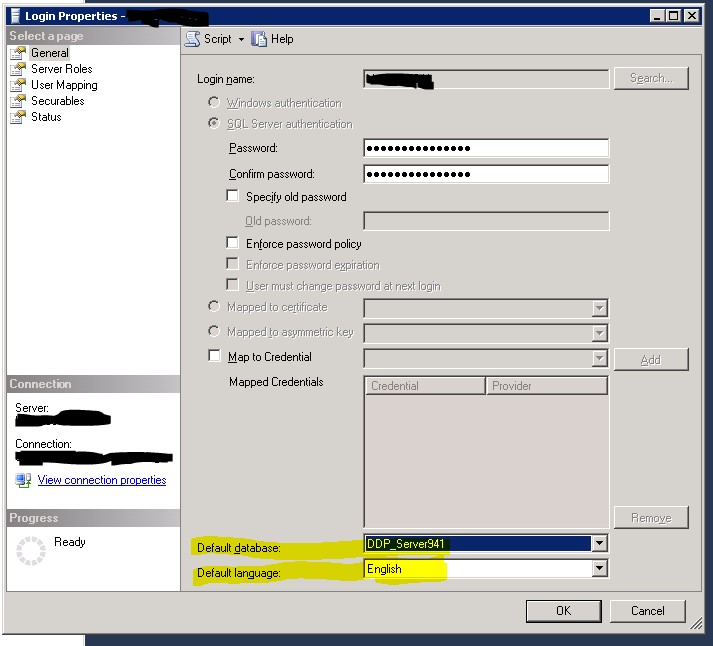
- SQL Server Management Studio を開く
- ログインのプロパティに移動します。
メモ: Dell Data Protection サービスがDell Data Protectionデータベースに接続するために使用する、データベース\Securityの ユーザー ではなく、instance\Securityのログイン
- デフォルト データベースがDell Data Protectionデータベースに設定されていることを確認します。
- デフォルトの言語は英語に設定されています。
- 次に、Security サービスと Compatibility Server サービスを再起動します。
Affected Products
Dell EncryptionArticle Properties
Article Number: 000126660
Article Type: Solution
Last Modified: 18 Sept 2026
Version: 9
Find answers to your questions from other Dell users
Support Services
Check if your device is covered by Support Services.