영어가 아닌 SQL 인스턴스에서 내부 또는 datetime varchar 변환 오류 발생
Summary: Dell Security Management Server(이전 Dell Data Protection | Enterprise Edition)가 영어가 아닌 서버 운영 체제(예: 프랑스어)에 설치된 경우 WebUI 콘솔에서 "내부 오류" 또는 "데이터 액세스 오류"가 발생할 수 있습니다.
This article applies to
This article does not apply to
This article is not tied to any specific product.
Not all product versions are identified in this article.
Symptoms
영향을 받는 제품:
- Dell Data Protection | Enterprise Edition
영향을 받는 버전:
- v9.7 이하
해당되는 플랫폼:
- Windows Server
호환성 로그는 다음과 유사한 오류를 보고합니다. varchar 데이터 형식을 datetime 데이터 형식으로 변환하면 값이 범위를 벗어났습니다.
Cause
해당 사항 없음
Resolution
이 경우:
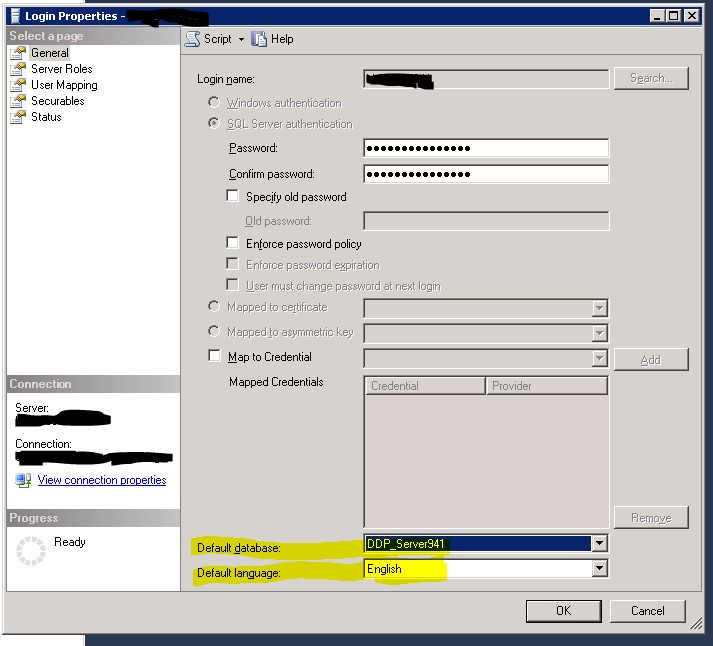
- SQL Server Management Studio를 엽니다.
- 로그인 속성으로 이동합니다.
참고: Dell Data Protection 서비스에서 Dell Data Protection 데이터베이스에 연결하는 데 사용하는 database\Security 아래의 사용자가 아닌 instance\Security 아래의 로그인
- 기본 데이터베이스가 Dell Data Protection 데이터베이스로 설정되어 있는지 확인합니다.
- 기본 언어 는 영어로 설정됩니다.
- 그런 다음 Security 및 Compatibility Server 서비스를 다시 시작합니다.
Affected Products
Dell EncryptionArticle Properties
Article Number: 000126660
Article Type: Solution
Last Modified: 18 Sept 2026
Version: 9
Find answers to your questions from other Dell users
Support Services
Check if your device is covered by Support Services.