Interne of datetime varchar-conversiefout op niet-EN SQL-instanties
Summary: Toen Dell Security Management Server (voorheen Dell Data Protection | Enterprise Edition) is geïnstalleerd op een niet-Engels serverbesturingssysteem (bijvoorbeeld Frans), kunt u een "interne fout" of een "Data access error" tegenkomen in de WebUI-console. ...
This article applies to
This article does not apply to
This article is not tied to any specific product.
Not all product versions are identified in this article.
Symptoms
Betreffende producten:
- Dell Data Protection | Enterprise Edition
Betreffende versies:
- v9.7 en lager
Betreffende platforms:
- Windows Server
Compatibiliteitslogboeken rapporteren een fout die lijkt op: De conversie van een varchar datatype naar datetime datatype heeft een waarde buiten het bereik gemaakt.
Cause
Niet van toepassing
Resolution
In dit geval:
- Open SQL Server Management Studio
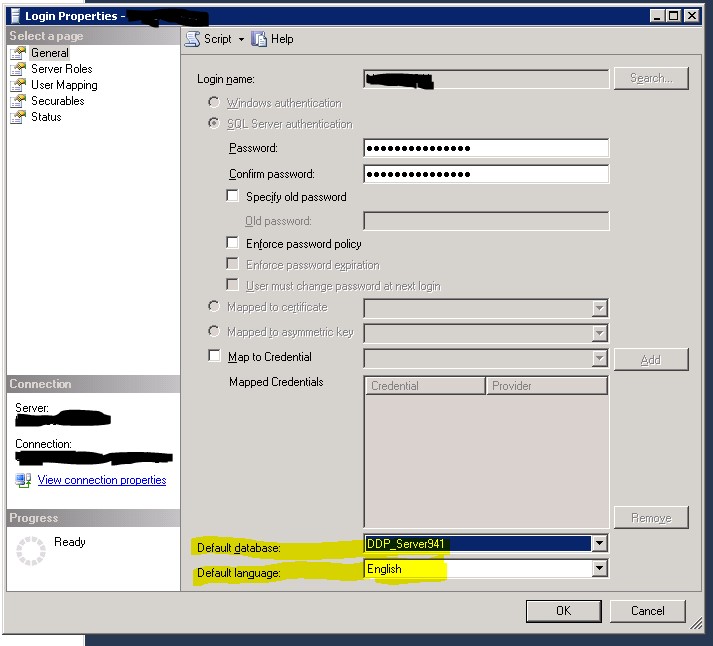
- Ga naar de eigenschappen van de login.
Opmerking: De aanmelding onder instance\Security en niet de gebruiker onder database\Security, wordt gebruikt door de Dell Data Protection Services om verbinding te maken met de Dell Data Protection database
- Zorg ervoor dat de Standaarddatabase is ingesteld op de Dell Data Protection database.
- De standaardtaal is Engels ingesteld.
- Start vervolgens de Security and Compatibility Server services opnieuw.
Affected Products
Dell EncryptionArticle Properties
Article Number: 000126660
Article Type: Solution
Last Modified: 18 Sept 2026
Version: 9
Find answers to your questions from other Dell users
Support Services
Check if your device is covered by Support Services.