Windows 凭据管理器停止工作,并显示错误代码 0x80070003
Summary: 在安装 Dell Encryption Enterprise Policy Based Encryption 和 SDE 后,Windows 凭据管理器停止工作,并且显示错误代码 0x80070003。系统无法找到指定的路径。
This article applies to
This article does not apply to
This article is not tied to any specific product.
Not all product versions are identified in this article.
Symptoms
受影响的产品:
- Dell Encryption Enterprise
受影响的版本:
- v8.15 - v8.17
在安装了 Dell Encryption Enterprise Policy Based Encryption 和 SDE 的计算机上,Windows 凭据管理器停止工作,并显示以下错误消息:
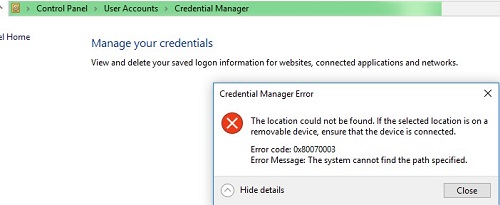
图 1:(仅限英文)凭据管理器错误
在删除 Dell Encryption Enterprise Policy Based Encryption 并将计算机解密后,该问题消失。
当重现该问题时,对于已连接用户的 policy.vpol 文件,您可能会在进程监视器日志中看到 PATH NOT FOUND(找不到路径):

图 2:(仅限英文)找不到 Policy.vpol 路径
提醒:进程监视器是 Windows
Sysinternals 工具。
在位于 C:\ProgramData\Dell\Dell Data Protection\Encryption 的 CMGShiled.log 中,对于同一 Policy.vpol 文件,您可能会看到错误 0xC000003A:
[04.10.18 11:35:16:671 CredUMES.cpp:13281 H] CmgFFE CFDE: Queue CefDb update retry for path="\Device\HarddiskVolume3\Users\ddpusr2\AppData\Local\Microsoft\Vault\4BF4C442-9B8A-41A0-B380-DD4A704DDB28\Policy.vpol", status=0xC000003A
Cause
不适用
Resolution
要解决该问题,请按照下面的步骤操作:
- 连接到 Dell Security Management Server。
- 转至 Populations ->Enterprise ->Policy-Based Encryption ->SDE Encryption Rules。
- 滚动到列表末尾,添加下面的排除项,然后单击 Save:
-^%ENV:USERPROFILE%\AppData\Local\Microsoft\Vault
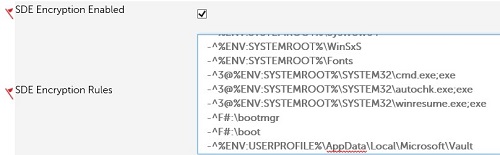
图 3:(仅限英文)SDE 排除项
- 转至 Management-Commit>,然后单击 Commit Policies以提交策略更改。
要联系支持部门,请参阅 Dell Data Security 国际支持电话号码。
转至 TechDirect,在线生成技术支持请求。
要获得更多见解和资源,请加入戴尔安全社区论坛。
Affected Products
Dell EncryptionArticle Properties
Article Number: 000130912
Article Type: Solution
Last Modified: 03 May 2024
Version: 9
Find answers to your questions from other Dell users
Support Services
Check if your device is covered by Support Services.