EQLXPerf 未啟動
Summary: 服務 EQLXPerf 未在作業系統中啟動。
This article applies to
This article does not apply to
This article is not tied to any specific product.
Not all product versions are identified in this article.
Symptoms
服務 EQLXPerf 未啟動且產生事件 ID:1023 在作業系統中的系統事件記錄中。
嘗試手動啟動,此錯誤將在幾秒鐘後顯示:
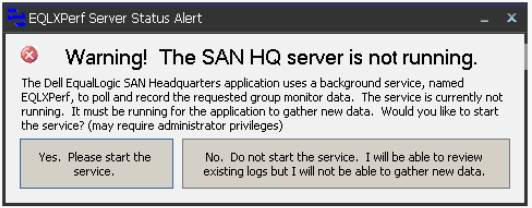
在作業系統事件日誌中,事件 ID:記錄了 1023。IP 端點 0.0.0.0:8000 上已有一個偵聽器。

嘗試手動啟動,此錯誤將在幾秒鐘後顯示:
在作業系統事件日誌中,事件 ID:記錄了 1023。IP 端點 0.0.0.0:8000 上已有一個偵聽器。
Resolution
在提示中使用 netstat -an 命令,確認連接埠和程式是否正在執行。

之後,在存檔中搜索 0.0.0.0:8000 並驗證狀態。
如果狀態為「偵聽中」,則另一個應用程式已使用此埠。
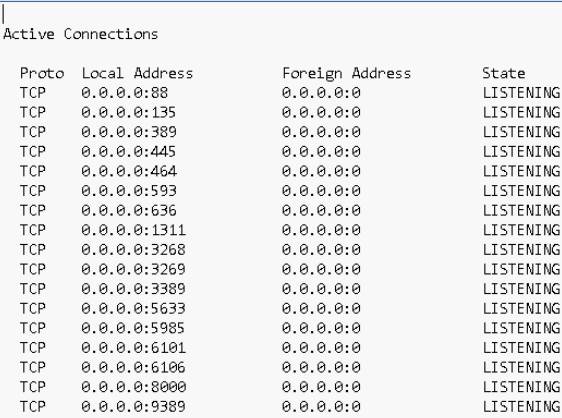
在這種情況下,我們必須更改 San 總部的埠或使用埠 8000 的應用程式。
要更改 San 總部的埠,請訪問選項:
設置 ->伺服器設置。
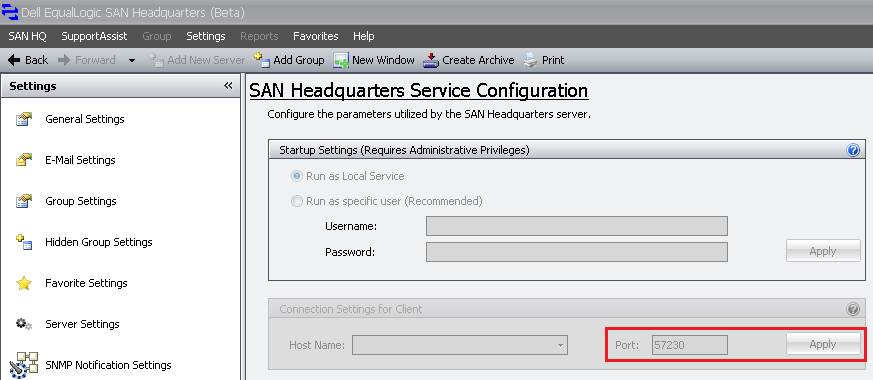
變更連接埠後,請在 Operatig 系統中啟動 EQLXPerf 服務。
之後,在存檔中搜索 0.0.0.0:8000 並驗證狀態。
如果狀態為「偵聽中」,則另一個應用程式已使用此埠。
在這種情況下,我們必須更改 San 總部的埠或使用埠 8000 的應用程式。
要更改 San 總部的埠,請訪問選項:
設置 ->伺服器設置。
變更連接埠後,請在 Operatig 系統中啟動 EQLXPerf 服務。
Affected Products
Legacy Storage ModelsArticle Properties
Article Number: 000136708
Article Type: Solution
Last Modified: 01 Jun 2026
Version: 4
Find answers to your questions from other Dell users
Support Services
Check if your device is covered by Support Services.