Unisphere for PowerMax: Unable to add Unisphere for PowerMax instance in Unisphere 360
Summary:
Not able to add Unisphere for PowerMax instance in Unisphere 360 with FQDN due to certificate error. Successful only with the IP enrollment on Unisphere 360 and not able to enroll
through FQDN. Error messages received are: "Unknown TLS error" and "Communication with Unisphere at https://:8443 failed due to certificate error"
...
This article applies to
This article does not apply to
This article is not tied to any specific product.
Not all product versions are identified in this article.
Instructions
The following are the screenshots of the error message when tried to enroll through the FQDN:

Below are the workaround and observation which can be followed:
List the certificate contents by the below openssl command output:openssl s_client -connect <fqdn>:8443 -showcerts
Decode the certificate and observe if the SAN entries have the IP address (which is corresponding to the FQDN in question), Primary DNS, and Secondary DNS listed on them.
Next, re-create the CSR certificate using the following KB article and then enroll the Unisphere instance in Unisphere 360: Embedded Unisphere for PowerMax 9.x: Replacing the default Certificate with a CA-signed certificate
NOTE: If using Unisphere for PowerMax 9.2 version, the option to delete the certificate would be disabled, hence we can ignore that step and re-create CSR certificate without deleting it.
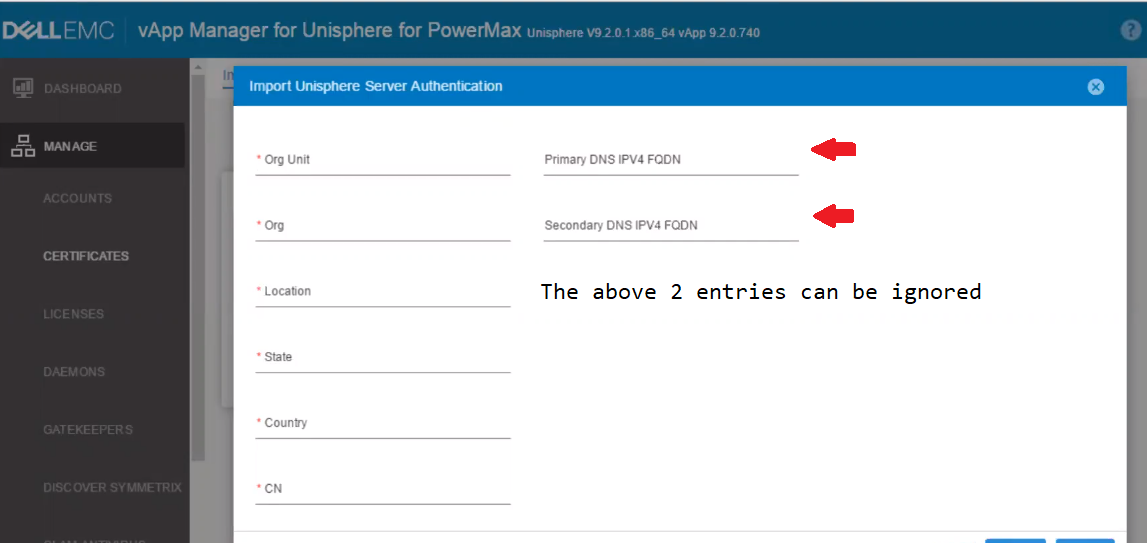
NOTE: While re-creating the CSR certificate through the vApp UI, ignore the entries of Primary DNS IPV4 FQDN and Secondary DNS IPV4 FQDN if they are listed on SAN entry when observed on decoded contents of the openssl show cert command output previously.
Affected Products
Unisphere 360, Unisphere for PowerMaxArticle Properties
Article Number: 000181081
Article Type: How To
Last Modified: 29 Jan 2025
Version: 4
Find answers to your questions from other Dell users
Support Services
Check if your device is covered by Support Services.