Dell Encryption 代理程式在 Dell Data Security 伺服器主控台中回報不同的主機名稱
Summary: 本文提供在 Windows 用戶端將清查報告視為錯誤主機名稱問題的修正步驟。
This article applies to
This article does not apply to
This article is not tied to any specific product.
Not all product versions are identified in this article.
Symptoms
受影響的產品:
- Dell Encryption
- Dell Endpoint Security Suite Enterprise
受影響的作業系統:
- Windows
Cause
如果目前主機名稱之前的主機名稱在主機檔案中存在不同的主機名稱,則 Dell Data Security 產品可能會在清查上傳至伺服器時回報錯誤的主機名稱。
Resolution
- 編輯位於 C:\Windows\System32\drivers\etc 的主機檔案。
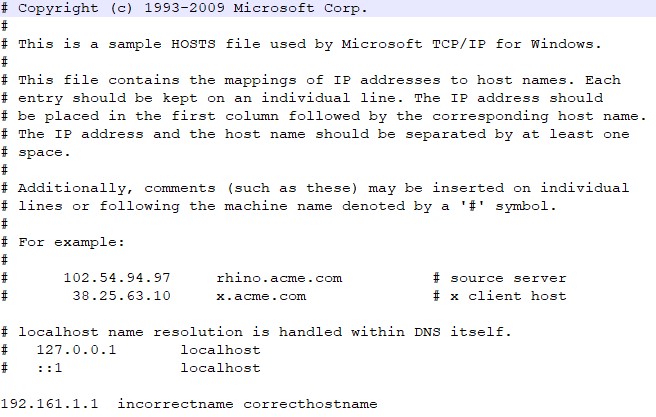
- 更改順序以反映當前主機名作為主機檔中的第一個條目。
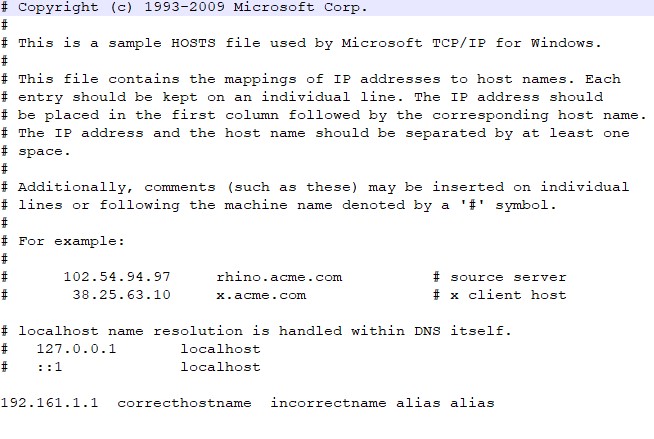
注意:主機檔中仍然可以有其他別名,這些別名必須在當前主機名之後。
- 完成時,按一下 檔案>儲存。
- 下次上傳清查時,伺服器內的主機名稱將會變更。
如要聯絡支援部門,請參閱 Dell Data Security 國際支援電話號碼。
請前往 TechDirect,以線上產生技術支援要求。
如需更多深入見解與資源,請加入 Dell 安全性社群論壇。
Additional Information
Affected Products
Dell Encryption, Dell Endpoint Security Suite EnterpriseArticle Properties
Article Number: 000187320
Article Type: Solution
Last Modified: 20 May 2024
Version: 4
Find answers to your questions from other Dell users
Support Services
Check if your device is covered by Support Services.