Latitude 9420 with Ubuntu Operating System Cannot Record Voice with a TRS Microphone
Summary: This article explains why the Latitude 9420 with an Ubuntu Operating System cannot record voice with a tip, ring, sleeve (TRS) microphone 3.5 mm connector.
This article applies to
This article does not apply to
This article is not tied to any specific product.
Not all product versions are identified in this article.
Symptoms
A laptop running the Ubuntu 20.04 Operating System (OS) cannot record from a microphone. This occurs using a microphone that is connected with a tip, ring, sleeve (TRS) 3.5 mm audio connector.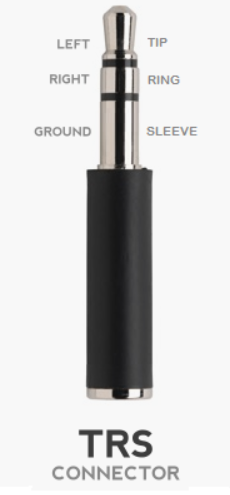
Affected Platforms:
- Latitude 9420
Cause
Systems with the soundwire design do not support 2-pin audio connections. It depends on the codec's capability and motherboard circuit. Realtek HDA codec supports this capability, but the Realtek soundwire codec does not.
Resolution
This is the expected behavior under Linux.
You must record voice by using the integrated microphone or a headset with a Tip, Ring, Ring, Sleeve (TRRS) 3.5 mm connector.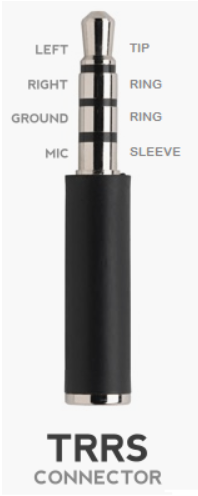
Affected Products
Latitude 9420Article Properties
Article Number: 000188007
Article Type: Solution
Last Modified: 07 May 2025
Version: 6
Find answers to your questions from other Dell users
Support Services
Check if your device is covered by Support Services.