TPM PCR 驗證錯誤,導致開機時發生 BitLocker 復原
Summary: 本文提供可信賴平台模組 (TPM) 平台組態註冊 (PCR) 驗證錯誤導致開機時發生 BitLocker 復原的相關資訊。
This article applies to
This article does not apply to
This article is not tied to any specific product.
Not all product versions are identified in this article.
Symptoms
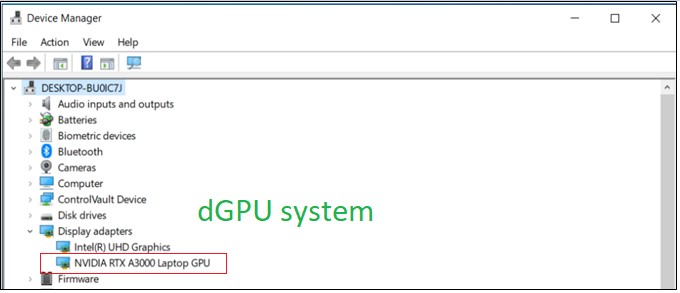
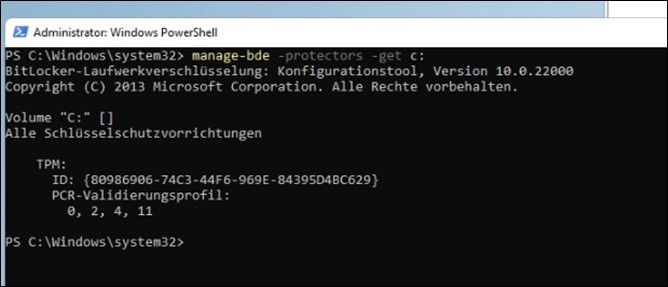
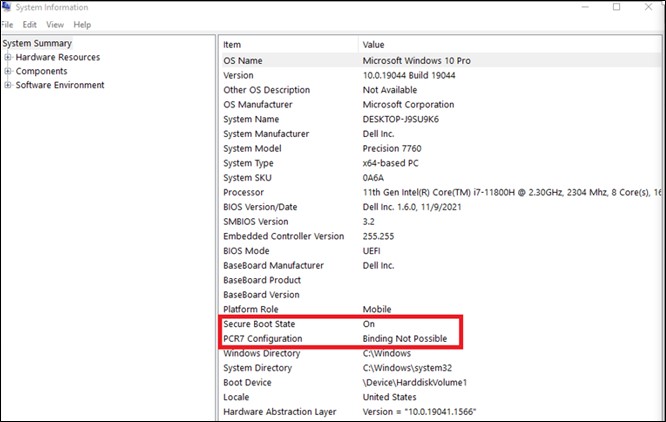
GFX 卡 電腦不使用 PCR7 繫結,並顯示為無法綁定 (0, 2, 4, 11)。
測試步驟:
- 開機以 設定
- 啟用 安全開機
- 啟用 TPM
- 開機至 作業系統
- 按下 Win + R 「Cmd」 以系統管理員身分執行。
- 輸入命令 「manage-bde-protectors-get c:」
Cause
dGPU (擴充卡) 及其 OROM/UEFI 驅動程式必須透過 TPM PCR7 進行簽署和測量。BIOS 1.6.0,透過實作遵循 TCG 和 MSFT 要求的安全機制來解決安全漏洞。
從 TCG 方面:
https://trustedcomputinggroup.org/wp-content/uploads/TCG_PCClient_PFP_r1p05_v23_pub.pdf

從作業系統端:
在 Microsoft 自己的 BitLocker 磁碟機加密說明文件中
Windows 10 中 OEM 版的 BitLocker 磁碟機加密
如果存在可擴充卡 (例如:GFX 卡) 導致 UEFI BIOS 在開機期間載入 OROM UEFI 驅動程式,則 BitLocker 不會使用 PCR7 繫結。
Resolution
根據Microsoft資訊,這是預期中的行為,沒有復原計畫。
Affected Products
Precision 3571, Precision 7560, Precision 7670, Precision 7770Article Properties
Article Number: 000204144
Article Type: Solution
Last Modified: 07 Jul 2026
Version: 7
Find answers to your questions from other Dell users
Support Services
Check if your device is covered by Support Services.