RecoverPoint for VMs:既存のクラスタへの vRPA の追加が失敗し、エラー「could not execute post deploy config VRPAs」
Summary: 既存のクラスタにvRPAを追加すると、「could not execute post deploy config VRPAs」というエラーで失敗します。
This article applies to
This article does not apply to
This article is not tied to any specific product.
Not all product versions are identified in this article.
Symptoms
既存のクラスタにvRPAを追加すると、次のエラーで失敗します。
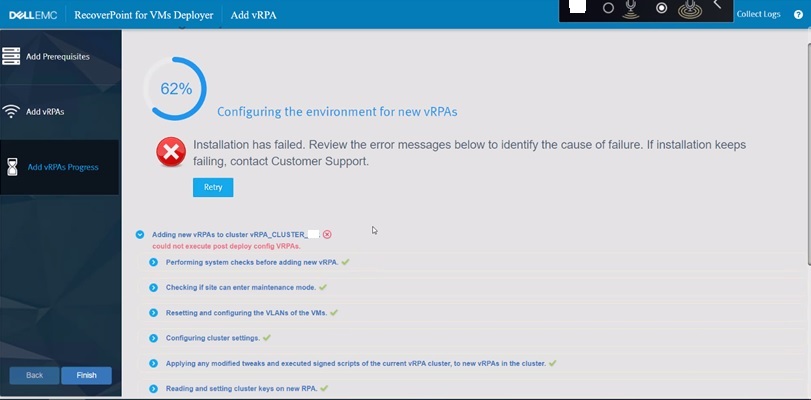
図1: vRPAを追加する際のRecoverPointの障害
RecoverPointログ:
追加される新しいvRPAからのインストール ログ:
could not execute post deploy config VRPAs.
図1: vRPAを追加する際のRecoverPointの障害
RecoverPointログ:
2022-12-07 06:31:10,455 [pool-7-thread-1] (BaseAction.java:42) ERROR - CreateAndAttachIOFilterDeviceAction Failed.
com.emc.recoverpoint.connectors.actions.infra.ActionFailedException: Failed to find JAM PBM profile
追加される新しいvRPAからのインストール ログ:
2022-09-13 04:29:11,312 [pool-7-thread-1] (GetJirafPolicyAction.java:40) WARN  - Failed to find JIRAF PBM profile for cluster ClusterUID(id=xxxxxxxxxxxxxxx)
2022-09-13 04:29:11,314 [pool-7-thread-1] (ExecutePostDeployConfigVRPAsCommand.java:85) ERROR - Failed to create RP device for vm: VmUuid(super=Uuid(uuid=aaaaaaaa-bbbb-ffff-eeee-ddddddddd), vcUuid=VcUuid(super=Uuid(uuid=eeeeee-cccc-rrrr-ssss-ffffffffff)))
2022-09-13 04:29:11,314 [CommandWorker-2] (Command.java:88) ERROR - Command#run() ServerException errorType[EXCEPTION] errorMessage[Exception. Failed executing CreateAndAttachRPDeviceAction.] failure UID: aaaaaaaa-bbbb-cccc-dddd-eeeeeeeeeee
:
2022-09-08 05:03:07,734 [pool-7-thread-1] (BasePBMCommand.java:33) DEBUG - Executing PBM Command: PbmRetrieveContentCommand BasePBMCommand(super=com.emc.recoverpoint.connectors.vi.infra.pbm.PbmRetrieveContentCommand@a50a0887, pbmProxy=com.emc.recoverpoint.connectors.vi.infra.PBMProxy@db413f60)
2022-09-08 05:03:07,774 [pool-7-thread-1] (BasePBMCommand.java:39) DEBUG - Finished executing PBM Command: PbmRetrieveContentCommand with return value: [com.vmware.pbm.PbmCapabilityProfile@ed9ba2b4,
:
2022-09-08 05:03:07,774 [pool-7-thread-1] (GetJirafPolicyAction.java:40) WARN  - Failed to find JIRAF PBM profile for cluster ClusterUID(id=xxxxxxxxxxxxxxxxxxxx)
2022-09-08 05:03:07,774 [pool-7-thread-1] (BaseAction.java:74) DEBUG - Action finished: GetJirafPolicyAction result: null
2022-09-08 05:03:07,776 [pool-7-thread-1] (BaseAction.java:42) ERROR - CreateAndAttachIOFilterDeviceAction Failed.
ClusterLogic サイトコントロール vRPA からのログ:
2022/09/13 04:29:11.498 [pool-13-thread-783] (GeneralUtils.java:75) ERROR - could not execute post deploy config VRPAs.
com.emc.recoverpoint.cluster_logic.inner_model.exception.RpaAdapterException: Exception. Failed executing CreateAndAttachRPDeviceAction.
        at com.emc.recoverpoint.cluster_logic.cl_rpa_adapter_core.calls.BaseRpaCall.logAndThrow(BaseRpaCall.java:53)
        at com.emc.recoverpoint.cluster_logic.cl_rpa_adapter_core.calls.BaseRpaCall.call(BaseRpaCall.java:39)
        at com.emc.recoverpoint.cluster_logic.cl_rpa_adapter_core.RpaAdapterImpl.executePostDeployConfigVRPAs(RpaAdapterImpl.java:182)
        at com.emc.recoverpoint.deployment.task.ExposeVirtualRepositoryAndConfigVirtualRPATask.perform(ExposeVirtualRepositoryAndConfigVirtualRPATask.java:87)
        at com.emc.recoverpoint.deployment.task.ExposeVirtualRepositoryAndConfigVirtualRPATask.perform(ExposeVirtualRepositoryAndConfigVirtualRPATask.java:28)
        at com.emc.recoverpoint.utils.javainfra.status.tasks.Task.executeSync(Task.java:91)
        at com.emc.recoverpoint.utils.javainfra.status.tasks.Task.call(Task.java:142)
        at java.util.concurrent.FutureTask.run(FutureTask.java:266)
        at java.util.concurrent.ThreadPoolExecutor.runWorker(ThreadPoolExecutor.java:1149)
        at java.util.concurrent.ThreadPoolExecutor$Worker.run(ThreadPoolExecutor.java:624)
        at java.lang.Thread.run(Thread.java:823)
Caused by: java.lang.RuntimeException: Exception. Failed executing CreateAndAttachRPDeviceAction.
        at com.emc.recoverpoint.cluster_logic.proxy.BaseInstallationServerAdapter.getResultFromTransaction(BaseInstallationServerAdapter.java:318)
        at com.emc.recoverpoint.cluster_logic.proxy.BaseInstallationServerAdapter.getTransactionResult(BaseInstallationServerAdapter.java:244)
        at com.emc.recoverpoint.cluster_logic.proxy.BaseInstallationServerAdapter.getTransactionResult(BaseInstallationServerAdapter.java:185)
        at com.emc.recoverpoint.cluster_logic.proxy.BaseInstallationServerAdapter.getTransactionResult(BaseInstallationServerAdapter.java:181)
        at com.emc.recoverpoint.cluster_logic.proxy.InstallationServerClientImpl.executePostDeployConfigVRPAs(InstallationServerClientImpl.java:405)
        at com.emc.recoverpoint.cluster_logic.cl_rpa_adapter_core.calls.ExecutePostDeployConfigVRPAsCall.innerCall(ExecutePostDeployConfigVRPAsCall.java:24)
        at com.emc.recoverpoint.cluster_logic.cl_rpa_adapter_core.calls.ExecutePostDeployConfigVRPAsCall.innerCall(ExecutePostDeployConfigVRPAsCall.java:12)
        at com.emc.recoverpoint.cluster_logic.cl_rpa_adapter_core.calls.BaseRpaCall.call(BaseRpaCall.java:37)
        ... 9 more
2022/09/13 04:29:11.498 [pool-13-thread-783] (Task.java:116) DEBUG - ExposeVirtualRepositoryAndConfigVirtualRPATask: task: Exposing repository volume to vRPA 3.old status is: RUNNING, setting status to ERROR.
2022/09/13 04:29:11.498 [pool-13-thread-783] (Task.java:98) ERROR - ExposeVirtualRepositoryAndConfigVirtualRPATask :Task failed: Exposing repository volume to vRPA 3.
Cause
RecoverPointクラスターID
RecoverPoint_JCD ストレージ ポリシーが削除されたか、誤った値に変更されました。この値は任意に変更しないでください。Resolution
対処方法:
で正しいRecoverPointクラスターID値を更新します。 RecoverPoint_JCD storage policy.
ステップス:
- vSphere Clientで、 ポリシーとプロファイルに移動します。
- 左側のリストから [VM Storage Policies ]を選択します
- 右側のペインで、RecoverPoint_JCD_xxxxxxxxxxxにチェックを入れます
- EDITをクリックして、Edit VM Storage Policy画面を表示します
- [3-Host-based services]の横にある をクリックします。
- 右側の [Replication] タブをクリックします
- RecoverPointクラスターの横にあるフィールドに正しい値を入力します
- [ 次へ ]をクリックして終了します
メモ: 元のRecoverPointクラスターIDの値が使用できなくなった場合は、Dell サポート センター またはサービス担当者にお問い合わせください。このDell記事IDを参照してください。
Affected Products
RecoverPoint for Virtual MachinesProducts
VxRail, RecoverPointArticle Properties
Article Number: 000207399
Article Type: Solution
Last Modified: 15 Oct 2025
Version: 5
Find answers to your questions from other Dell users
Support Services
Check if your device is covered by Support Services.