Sanal Makineler için RecoverPoint: Mevcut Kümeye Daha Fazla vRPA Ekleme İşlemi Başarısız Oluyor, "Could not execute post deploy config VRPAs
Summary: Mevcut bir kümeye ek bir vRPA eklerken "could not execute post deploy config VRPAs" hatasıyla başarısız oluyor.
This article applies to
This article does not apply to
This article is not tied to any specific product.
Not all product versions are identified in this article.
Symptoms
Mevcut bir kümeye ek bir vRPA eklenirken şu hatayla başarısız olur:
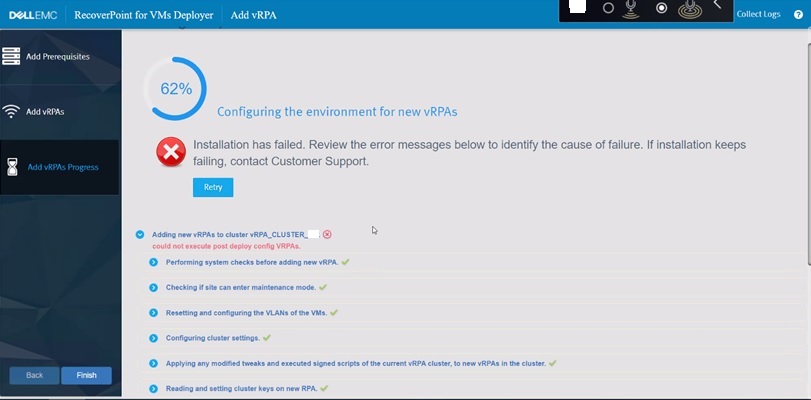
Şekil 1: Ek bir vRPA eklerken RecoverPoint hatası
RecoverPoint Günlükleri:
Eklenen yeni vRPA'dan yükleme günlükleri:
could not execute post deploy config VRPAs.
Şekil 1: Ek bir vRPA eklerken RecoverPoint hatası
RecoverPoint Günlükleri:
2022-12-07 06:31:10,455 [pool-7-thread-1] (BaseAction.java:42) ERROR - CreateAndAttachIOFilterDeviceAction Failed.
com.emc.recoverpoint.connectors.actions.infra.ActionFailedException: Failed to find JAM PBM profile
Eklenen yeni vRPA'dan yükleme günlükleri:
2022-09-13 04:29:11,312 [pool-7-thread-1] (GetJirafPolicyAction.java:40) WARN  - Failed to find JIRAF PBM profile for cluster ClusterUID(id=xxxxxxxxxxxxxxx)
2022-09-13 04:29:11,314 [pool-7-thread-1] (ExecutePostDeployConfigVRPAsCommand.java:85) ERROR - Failed to create RP device for vm: VmUuid(super=Uuid(uuid=aaaaaaaa-bbbb-ffff-eeee-ddddddddd), vcUuid=VcUuid(super=Uuid(uuid=eeeeee-cccc-rrrr-ssss-ffffffffff)))
2022-09-13 04:29:11,314 [CommandWorker-2] (Command.java:88) ERROR - Command#run() ServerException errorType[EXCEPTION] errorMessage[Exception. Failed executing CreateAndAttachRPDeviceAction.] failure UID: aaaaaaaa-bbbb-cccc-dddd-eeeeeeeeeee
:
2022-09-08 05:03:07,734 [pool-7-thread-1] (BasePBMCommand.java:33) DEBUG - Executing PBM Command: PbmRetrieveContentCommand BasePBMCommand(super=com.emc.recoverpoint.connectors.vi.infra.pbm.PbmRetrieveContentCommand@a50a0887, pbmProxy=com.emc.recoverpoint.connectors.vi.infra.PBMProxy@db413f60)
2022-09-08 05:03:07,774 [pool-7-thread-1] (BasePBMCommand.java:39) DEBUG - Finished executing PBM Command: PbmRetrieveContentCommand with return value: [com.vmware.pbm.PbmCapabilityProfile@ed9ba2b4,
:
2022-09-08 05:03:07,774 [pool-7-thread-1] (GetJirafPolicyAction.java:40) WARN  - Failed to find JIRAF PBM profile for cluster ClusterUID(id=xxxxxxxxxxxxxxxxxxxx)
2022-09-08 05:03:07,774 [pool-7-thread-1] (BaseAction.java:74) DEBUG - Action finished: GetJirafPolicyAction result: null
2022-09-08 05:03:07,776 [pool-7-thread-1] (BaseAction.java:42) ERROR - CreateAndAttachIOFilterDeviceAction Failed.
ClusterLogic site denetimi vRPA'sından günlük:
2022/09/13 04:29:11.498 [pool-13-thread-783] (GeneralUtils.java:75) ERROR - could not execute post deploy config VRPAs.
com.emc.recoverpoint.cluster_logic.inner_model.exception.RpaAdapterException: Exception. Failed executing CreateAndAttachRPDeviceAction.
        at com.emc.recoverpoint.cluster_logic.cl_rpa_adapter_core.calls.BaseRpaCall.logAndThrow(BaseRpaCall.java:53)
        at com.emc.recoverpoint.cluster_logic.cl_rpa_adapter_core.calls.BaseRpaCall.call(BaseRpaCall.java:39)
        at com.emc.recoverpoint.cluster_logic.cl_rpa_adapter_core.RpaAdapterImpl.executePostDeployConfigVRPAs(RpaAdapterImpl.java:182)
        at com.emc.recoverpoint.deployment.task.ExposeVirtualRepositoryAndConfigVirtualRPATask.perform(ExposeVirtualRepositoryAndConfigVirtualRPATask.java:87)
        at com.emc.recoverpoint.deployment.task.ExposeVirtualRepositoryAndConfigVirtualRPATask.perform(ExposeVirtualRepositoryAndConfigVirtualRPATask.java:28)
        at com.emc.recoverpoint.utils.javainfra.status.tasks.Task.executeSync(Task.java:91)
        at com.emc.recoverpoint.utils.javainfra.status.tasks.Task.call(Task.java:142)
        at java.util.concurrent.FutureTask.run(FutureTask.java:266)
        at java.util.concurrent.ThreadPoolExecutor.runWorker(ThreadPoolExecutor.java:1149)
        at java.util.concurrent.ThreadPoolExecutor$Worker.run(ThreadPoolExecutor.java:624)
        at java.lang.Thread.run(Thread.java:823)
Caused by: java.lang.RuntimeException: Exception. Failed executing CreateAndAttachRPDeviceAction.
        at com.emc.recoverpoint.cluster_logic.proxy.BaseInstallationServerAdapter.getResultFromTransaction(BaseInstallationServerAdapter.java:318)
        at com.emc.recoverpoint.cluster_logic.proxy.BaseInstallationServerAdapter.getTransactionResult(BaseInstallationServerAdapter.java:244)
        at com.emc.recoverpoint.cluster_logic.proxy.BaseInstallationServerAdapter.getTransactionResult(BaseInstallationServerAdapter.java:185)
        at com.emc.recoverpoint.cluster_logic.proxy.BaseInstallationServerAdapter.getTransactionResult(BaseInstallationServerAdapter.java:181)
        at com.emc.recoverpoint.cluster_logic.proxy.InstallationServerClientImpl.executePostDeployConfigVRPAs(InstallationServerClientImpl.java:405)
        at com.emc.recoverpoint.cluster_logic.cl_rpa_adapter_core.calls.ExecutePostDeployConfigVRPAsCall.innerCall(ExecutePostDeployConfigVRPAsCall.java:24)
        at com.emc.recoverpoint.cluster_logic.cl_rpa_adapter_core.calls.ExecutePostDeployConfigVRPAsCall.innerCall(ExecutePostDeployConfigVRPAsCall.java:12)
        at com.emc.recoverpoint.cluster_logic.cl_rpa_adapter_core.calls.BaseRpaCall.call(BaseRpaCall.java:37)
        ... 9 more
2022/09/13 04:29:11.498 [pool-13-thread-783] (Task.java:116) DEBUG - ExposeVirtualRepositoryAndConfigVirtualRPATask: task: Exposing repository volume to vRPA 3.old status is: RUNNING, setting status to ERROR.
2022/09/13 04:29:11.498 [pool-13-thread-783] (Task.java:98) ERROR - ExposeVirtualRepositoryAndConfigVirtualRPATask :Task failed: Exposing repository volume to vRPA 3.
Cause
RecoverPoint Küme Kimliği
RecoverPoint_JCD Depolama politikası silindi veya yanlış bir değerle değiştirildi. Bu değer keyfi olarak değiştirilmemelidir.Resolution
Geçici Çözüm:
Şurada doğru RecoverPoint Küme Kimliği değerini güncelleştirin: RecoverPoint_JCD Storage Policy.
Adım -ları:
- vSphere Client'ta İlkeler ve Profiller öğesine gidin
- Soldaki listeden VM Storage Policies öğesini seçin
- Sağ bölmede, RecoverPoint_JCD_xxxxxxxxxxx işaretleyin
- Edit VM Storage Policy ekranını açmak için EDIT öğesine tıklayın
- 3-Host based services öğesinin yanındaki simgesine tıklayın
- Sağ taraftaki 'Çoğaltma' sekmesine tıklayın
- RecoverPoint kümesinin yanındaki alana doğru değeri girin
- Bitirmek için İleri'ye tıklayın
NOT: Orijinal RecoverPoint Küme Kimliği değeri artık mevcut değilse yardım için Dell Dell Destek Merkezi veya servis temsilcinizle iletişime geçin. Bu Dell makalesinin kimliğine başvurun.
Affected Products
RecoverPoint for Virtual MachinesProducts
VxRail, RecoverPointArticle Properties
Article Number: 000207399
Article Type: Solution
Last Modified: 15 Oct 2025
Version: 5
Find answers to your questions from other Dell users
Support Services
Check if your device is covered by Support Services.