PowerFlex 3.x: During NDU the SDS panics and stops the upgrade
Summary: During NDU the SDS might experience a rolling kernel panic.
Symptoms
An upgrade from VxFlex OS 3.0.x.x to PowerFlex 3.5.x.x or 3.6.0.x
A rolling kernel panic of the SDS prevents the system from continuing the upgrade.
The SDS process keeps panicking and restarting with the following stack trace:
27/07 08:07:25.381223 Panic in file /data/build/workspace/ScaleIO-Common-Job/src/tgt/spef/l2p_sm/l2p_resolver/l2p_resolver_sync_services.c, line 1828, function Resolver_Inter_SyncUnmatchedVto, PID 133106.Panic Expression ALWAYS_ASSERT PANIC_ID_tgt_1588256010820.
/opt/emc/scaleio/sds/bin/sds-3.5.1100.107(mosDbg_PanicPrepare+0x13a) [0x93b62a]
/opt/emc/scaleio/sds/bin/sds-3.5.1100.107(Resolver_Inter_SyncUnmatchedVto+0x69c) [0x643ddc]
/opt/emc/scaleio/sds/bin/sds-3.5.1100.107(Resolver_Inter_SyncOffsetData+0xd2) [0x644082]
/opt/emc/scaleio/sds/bin/sds-3.5.1100.107(Resolver_SyncOffset+0x3e6) [0x6446f6]
/opt/emc/scaleio/sds/bin/sds-3.5.1100.107(Resolver_Sync+0x1e4) [0x645c54]
/opt/emc/scaleio/sds/bin/sds-3.5.1100.107(L2PGateway_Inter_Sync+0x59) [0x6542d9]
/opt/emc/scaleio/sds/bin/sds-3.5.1100.107(L2PGateway_Inter_UpdateRamCopyEx+0x163) [0x901ba3]
/opt/emc/scaleio/sds/bin/sds-3.5.1100.107(L2PGateway_Inter_Update+0x4f7) [0x9060f7]
/opt/emc/scaleio/sds/bin/sds-3.5.1100.107(L2PGateway_Sync+0x64) [0x9073d4]
/opt/emc/scaleio/sds/bin/sds-3.5.1100.107(feIo_L2PGatewayUpdate+0x3d8) [0x90cf98]
Cause
During a backward rebuild of the system, while exiting Instant Maintenance Mode (IMM), an incorrect data synchronization message is sent and received on the Primary (PRI) and Secondary (SEC) SDSs. Thus, the SEC SDS restarts the service abruptly to avoid possible data inconsistency.
It is a rare scenario during IMM where a failed write command IO may falsely lead to an internal sanity check (internal data integrity check that causes the SDS service to crash) during the rebuild after the Exit IMM completes. The failed write command IO happens before Enter IMM and during IMM there was another IO sent to a nearby offset in the same data set.
Resolution
Automated upgrade using Gateway
- Stop the upgrade using Gateway UI.
- Remove the failing SDS from the cluster, then add it back.
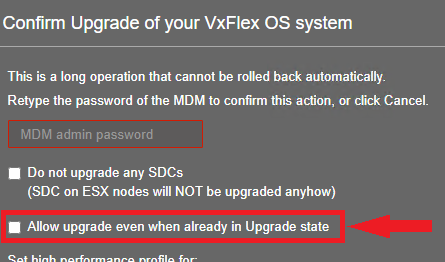
- Restart the upgrade from the IM Gateway UI and select the "Allow upgrade even when already in Upgrade state" checkbox - the upgrade should start over and proceed with not-yet-upgraded components:
Manual upgrade
Option #1
- If the same device fails on each of the occurrences, then offline that single device. If not, then remove all SDS devices from the SDS.
- Wait for the rebuild to complete.
- Once removed, upgrade the SDS and add it back to the cluster.
- Remove the next SDS that must be upgraded from the cluster which will trigger a rebalance.
- Once removed, upgrade the SDS and add it back to the cluster.
- Let rebalance continue until the system has enough capacity to remove the next SDS that must be upgraded - repeat until all SDSs are upgraded.
Option #2
Use the Protected Maintenance Mode (PMM) instead of IMM, for a full third copy creation. The issue should not happen with PMM, for example the service crash loop happens because the SDS crashes during the rebuild, comes back up, and repeat. A way out of it is to take down the crashing SDS for a long enough period so the MDM instructs a forward rebuild rather than a backward one. Once the problematic data set gets rebuilt, the SDS can be brought back up successfully.
Impacted Versions:
VxFlex OS 3.0.x.x
PowerFlex 3.5.x.x
PowerFlex 3.6.0.x-3.6.1.x
Fixed in Version:
PowerFlex 3.6.2