Fn+T를 사용할 때 MyDell 알림이 팝업되지 않음
Summary: Inspiron 14 Plus 7440 및 Inspiron 16 Plus 7640은 Fn+T를 눌러도 알림이 표시되지 않습니다.
This article applies to
This article does not apply to
This article is not tied to any specific product.
Not all product versions are identified in this article.
Symptoms
Fn+T를 누른 후 MyDell에 Ultra Performance가 켜져 있는지 여부를 나타내는 알림이 나타나지 않습니다.
MyDell 페이지에는 Application과 Color & Display의 두 가지 옵션만 표시됩니다.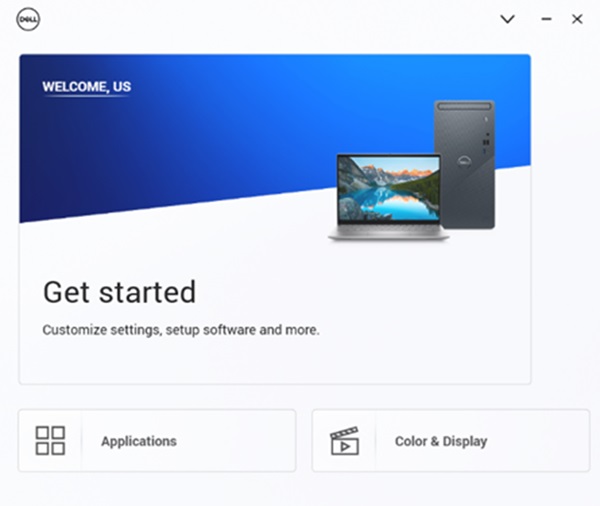
해당되는 플랫폼:
- Inspiron 14 Plus 7440
- Inspiron 16 Plus 7640
Cause
이 문제는 MyDell 3.2와 SupportAssist 4.6.5 간의 상호 운용성 문제로 인해 발생합니다. 설치 순서로 인해 구성 파일을 잘못 덮어쓰게 됩니다.
Resolution
SupportAssist를 다시 설치하여 올바른 구성 파일이 사용되는지 확인합니다.
- SupportAssist를 제거하려면 설정, 앱, 설치된 앱으로 이동합니다.

- SupportAssist가 제거되면 SupportAssist 설치 프로그램을 다운로드합니다.

- 인터넷에 연결하고 SupportAssistinstaller.exe 클릭하여 설치합니다. 다운로드 및 설치 진행률이 오른쪽 하단에 표시됩니다.

- SupportAssist 설치가 완료되면 컴퓨터를 재시작합니다. 다시 시작한 후 MyDell을 열면 페이지가 올바르게 표시됩니다.
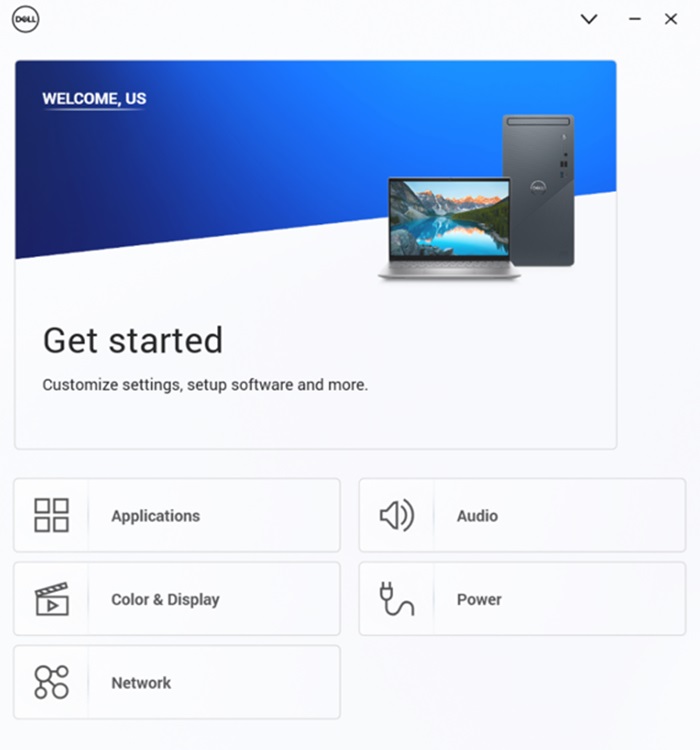
- Fn+T를 눌러 Ultra Performance 켜기 및 끄기 알림을 확인합니다.

- MyDell Power 페이지에서 열 관리가 Ultra Performance로 전환된 것을 확인할 수 있습니다.
참고: MyDell 페이지가 자동으로 새로 고쳐지지 않습니다. Fn+T를 누르면 MyDell을 다시 열어 설정을 확인해야 합니다.
Affected Products
Inspiron 14 Plus 7440, Inspiron 16 Plus 7640Article Properties
Article Number: 000287626
Article Type: Solution
Last Modified: 16 Apr 2025
Version: 2
Find answers to your questions from other Dell users
Support Services
Check if your device is covered by Support Services.