使用 Fn + T 时,MyDell 通知不会弹出
Summary: 按 Fn+T 时,Inspiron 灵越 14 Plus 7440 和 Inspiron 灵越 16 Plus 7640 不显示通知。
This article applies to
This article does not apply to
This article is not tied to any specific product.
Not all product versions are identified in this article.
Symptoms
按 Fn + T 后,MyDell 不会显示通知,指示超性能是打开还是关闭。
MyDell 页面仅显示两个选项:应用程序和颜色和显示。
受影响的平台:
- Inspiron 灵越 14 Plus 7440
- Inspiron 灵越 16 Plus 7640
Cause
出现这种情况的原因是 MyDell 3.2 和 SupportAssist 4.6.5 之间的互作性问题。安装顺序会导致配置文件被错误地覆盖。
Resolution
重新安装 SupportAssist 以确保使用正确的配置文件。
- 要卸载 SupportAssist,请转至设置、应用程序,然后单击已安装的应用程序。

- 卸载 SupportAssist 后,下载 SupportAssist 安装程序。

- 连接到互联网,然后单击SupportAssistinstaller.exe进行安装。下载和安装进度显示在右下角。

- SupportAssist 安装完成后,重新启动计算机。重新启动后,打开 MyDell,页面将正确显示。

- 按 Fn + T 可查看打开和关闭超性能通知。
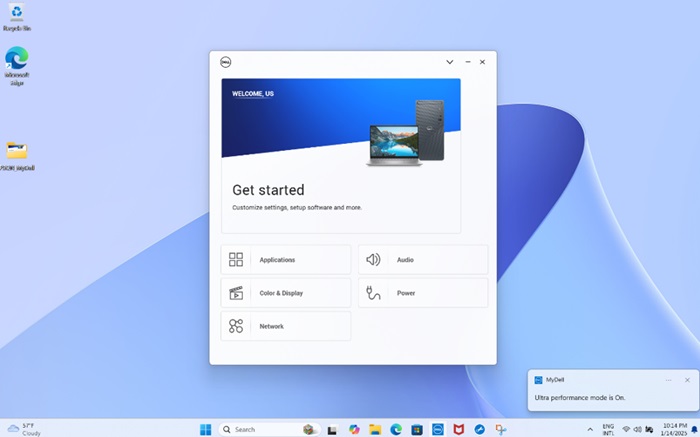
- 在 MyDell Power 页面上,您还可以看到散热管理已切换为超高性能。
提醒:MyDell 页面不会自动刷新。如果您按 Fn+T,则必须重新打开 MyDell 以确认设置。
Affected Products
Inspiron 14 Plus 7440, Inspiron 16 Plus 7640Article Properties
Article Number: 000287626
Article Type: Solution
Last Modified: 16 Apr 2025
Version: 2
Find answers to your questions from other Dell users
Support Services
Check if your device is covered by Support Services.