PowerFlex: How to change the Cache policy from RWBC to RWBD using PERCCLI
Summary: VxFlex: How to change the caching policy from RWBC to RWBD in Dell VxFlex Ready nodes servers using PERCCLI.
Instructions
1. Run the command.
./perccli64 /c0 show"
From the folder containing the perccli64 and notice the Cache Column under Virtual Drives:-
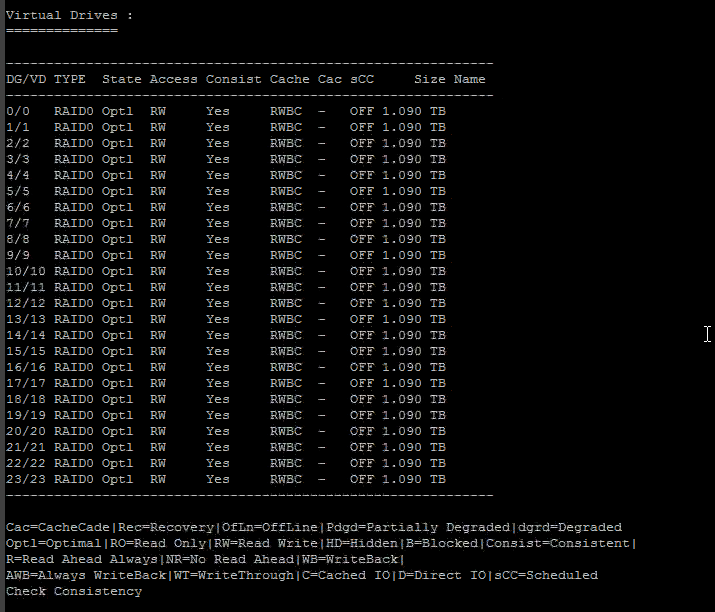
The Cache shown is RWBC, i.e., Read Ahead enabled (RA) and Write Back Enabled (WB) and Cached I/O (C). Which should be Direct I/O (D).
2. Put the SDS on that host in maintenance mode either from the UI backend or using scli.
Note: If the SDS is NOT in MM, do not use /vall in next the next command, instead use.
./perccli64 /c0/vX set iopolicy=direct ; where X is the VD , which is currently not active , in other words, which its PD was just added and not serving IOs yet.
3. Once the SDS is in maintenance mode, run the following command to change the Cache to RWBD in this scenario:-
./perccli64 /c0/vall set iopolicy=direct
4. Now you can again run the command.
./perccli64 /c0 show"
From the folder containing the perccli64, notice the Cache Column under Virtual Drives. It should have now changed to RWBD.
5. Take the SDS out of maintenance mode in the ScaleIO UI backend or using scli command.