Microsoft SQL Server Maintenance Plan Wizard
Summary: Microsoft SQL Server Maintenance Plans offer a way to compile multiple Database maintenance tasks into a single package executed manually or on an automated schedule.
This article applies to
This article does not apply to
This article is not tied to any specific product.
Not all product versions are identified in this article.
Instructions
- Using SQL Server Management Studio within the object tree go to “Maintenance Plans”
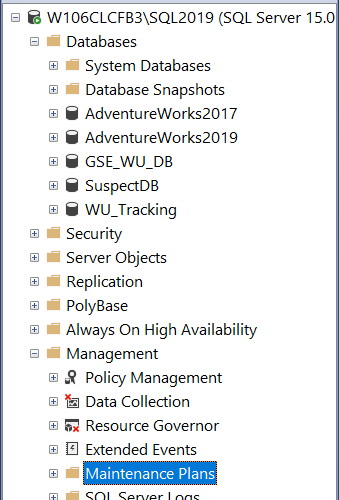
- Right Click on Maintenance Plans and Select “Maintenance Plan Wizard”
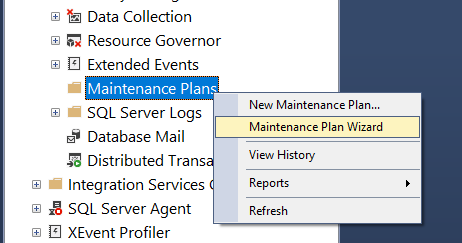
- Click on “Next >” button to begin configuring a new Maintenance Plan.

- On “Select Plan Properties” palate assign name to the Plan, by default name given is “MaintenancePlan”. Also, here the Maintenance Plan can be scheduled to run automatically depending on the tasks being setup and desired run times.

- Tasks to be executed by the Maintenance Plan are defined on “Select Maintenance Tasks” section of wizard. Needed tasks are selected here and defined in later steps of the wizard.

- Screenshot below involves Database selection of a Database Integrity Task. Targets for the tasks must be defined prior to completing and running the Maintenance job.

- After the Databases have been selected for the each of the individual tasks chosen for the Maintenance Plan, the “Select Report Options” section comes up offering a choice of where to have reports generated reflecting Maintenance Plan activity.

- Finally, on the “Complete the Wizard” palate a list of items selected appears with detail. Any changes can be made by selecting the “< Back” button and going to section involving the desired change. “Finish” button when selected completes creation of the Plan.

- If no issues are found the Plan should successfully created.

- After creation the new Maintenance Plan should appear under “Maintenance Plans” section. Right clicking on the new Maintenance Plan presents a menu with multiple options. Clicking “Execute” will run the Plan immediately. “Modify” brings up an interface to make changes to the Plan.

Note: The SQL Server Agent Service must be running to execute any SQL Server Maintenance Plans whether running them automatically or manually.
Videos
Create an MS SQL Server Maintenance Plan
Duration: 00:09:35 (hh:mm:ss)
When available, closed caption (subtitles) language settings can be chosen using the CC icon on this video player.
Affected Products
SoftwareArticle Properties
Article Number: 000196357
Article Type: How To
Last Modified: 18 Mar 2025
Version: 3
Find answers to your questions from other Dell users
Support Services
Check if your device is covered by Support Services.