VxRail:使用共用見證部署 vSAN 2 節點叢集時,確認 vSAN 磁碟上的格式版本
Summary: ESXi 節點版本和共用見證 vSAN 磁碟上的格式版本必須相容。
This article applies to
This article does not apply to
This article is not tied to any specific product.
Not all product versions are identified in this article.
Symptoms
使用客戶提供的 vCenter 和共用見證部署 vSAN 2 節點叢集時,部署失敗,並顯示錯誤「無法將標準叢集轉換為延伸叢集 LAG-NAM」。
檢查 VxRail Manager /var/log/microservice_log/dayone.log,有關於「無法滿足共用見證的功能要求」的 vim.fault.VsanFault。
2022-05-05-14:01:57 microservice.do-cluster "[2022-05-05 14:01:57,066: WARNING/MainProcess] pyVmomi.VmomiSupport.vim.fault.VsanFault: (vim.fault.VsanFault) {"
2022-05-05-14:01:57 microservice.do-cluster "   dynamicType = <unset>,"
2022-05-05-14:01:57 microservice.do-cluster "   dynamicProperty = (vmodl.DynamicProperty) [],"
2022-05-05-14:01:57 microservice.do-cluster "   msg = 'cannot meet the capability requirement of shared witness.'"
Cause
ESXi 節點版本與共用見證 vSAN 磁碟上的格式版本不相容。
Resolution
1.檢查共用見證的 vSAN 磁碟上的格式版本: vSphere Web Client:[vSAN 叢集] >設定 > vSAN > 磁碟管理。
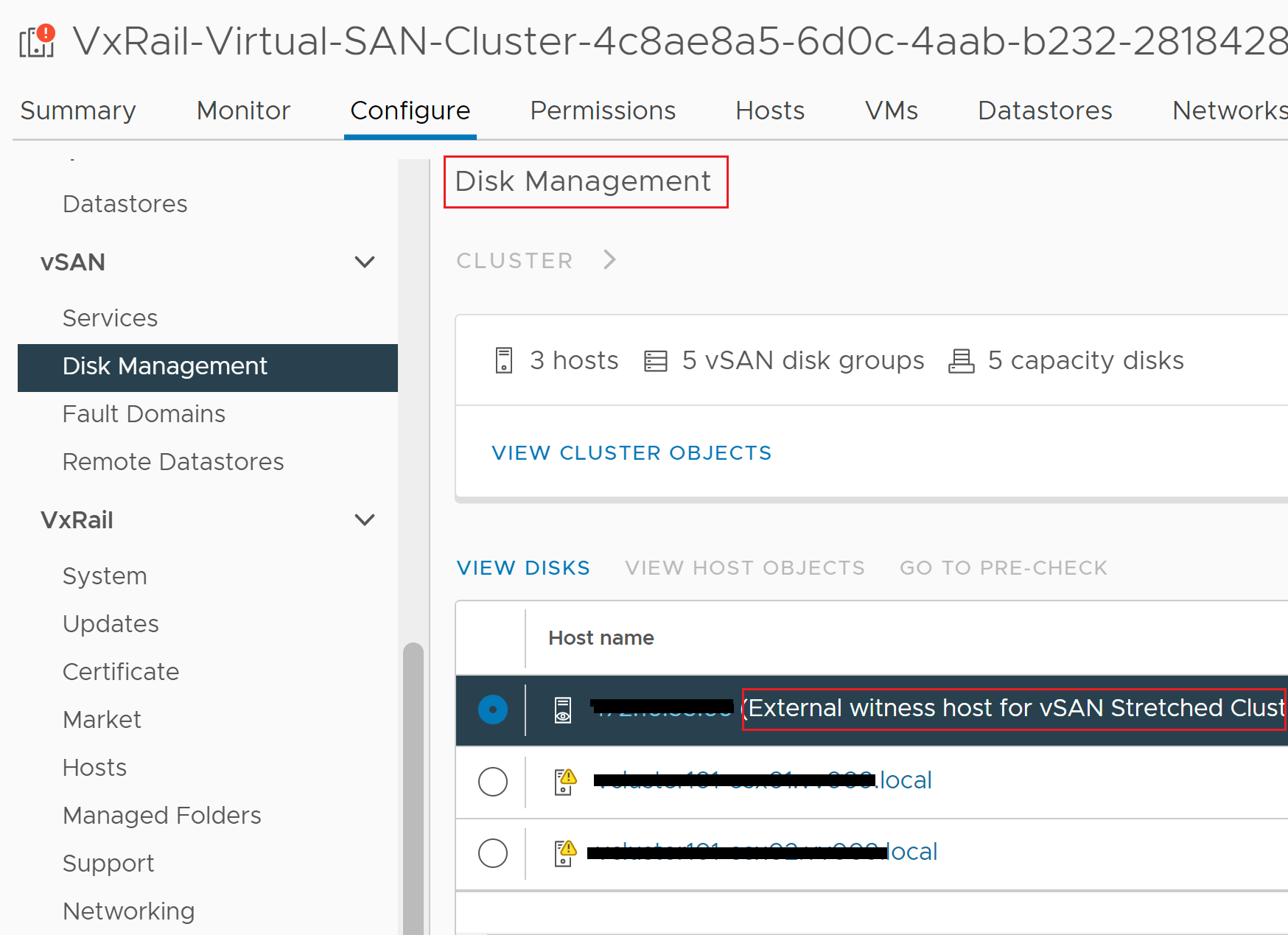
選取共用見證 > 檢視磁碟。
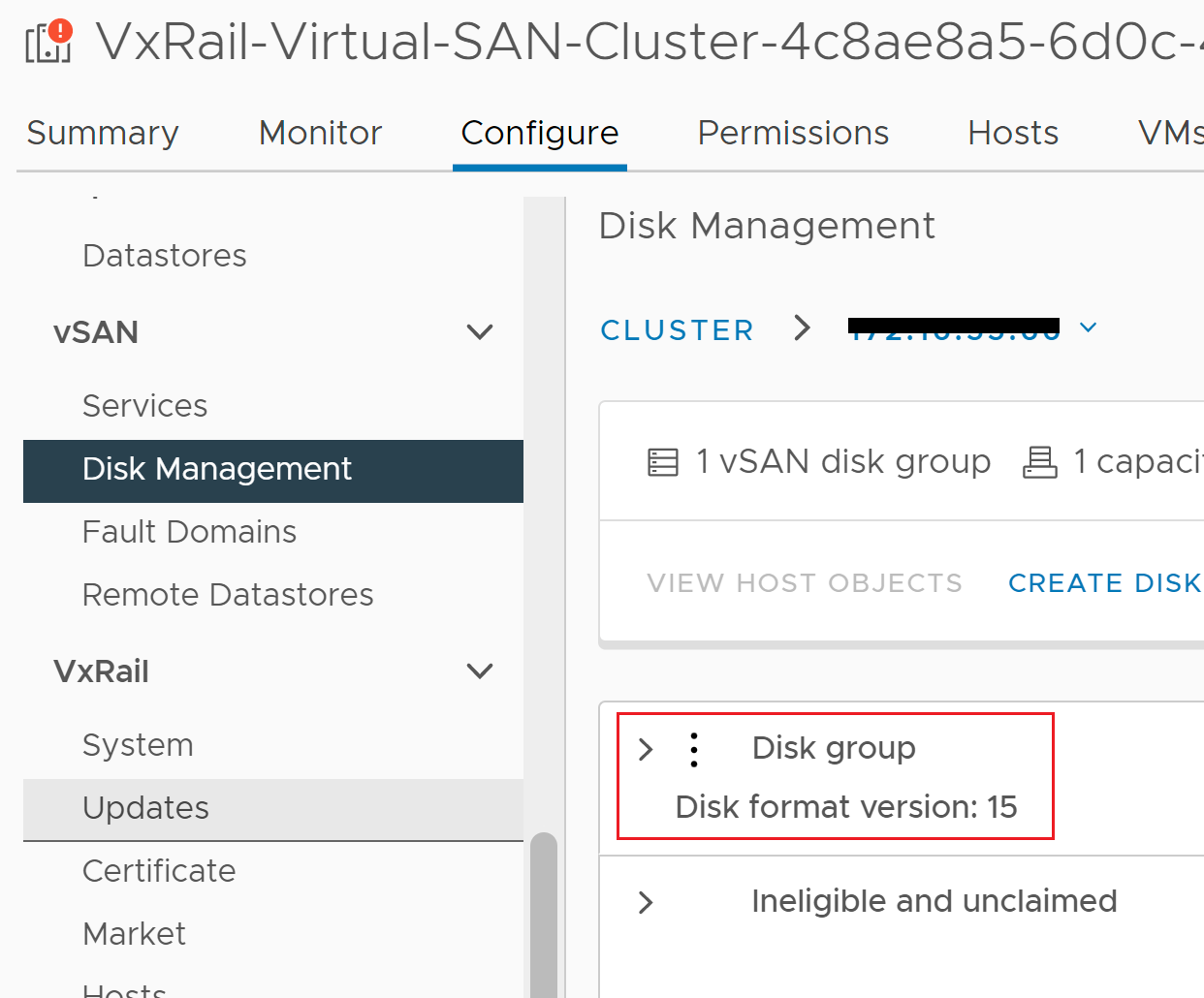
選取共用見證 > 檢視磁碟。
2.檢查 vSAN 磁碟上格式版本支援矩陣 ,以判斷哪個 ESXi 版本與共用見證 vSAN 磁碟上格式版本相容。
3.如果 ESXi 節點不支援共用見證的 vSAN 磁碟上格式版本,則有兩個選項可解決此問題:
選項 1.升級 ESXi 節點版本以支援共用見證 vSAN 磁碟上的格式。
聘請 Dell 支援工程師,使用「Rapid Appliance Self-Recovery (RASR) 原廠映像升級程序」升級 ESXi 節點
然後使用新的程式碼版本部署 vSAN 2 節點叢集。
選項 2.使用獨立見證部署 vSAN 2-node 叢集。
Article Properties
Article Number: 000204180
Article Type: Solution
Last Modified: 30 Jun 2025
Version: 2
Find answers to your questions from other Dell users
Support Services
Check if your device is covered by Support Services.