NetWorker backup command field parameters interpreted differently after upgrade to NetWorker 9 (or 8.2.4) on Windows
This article applies to
This article does not apply to
This article is not tied to any specific product.
Not all product versions are identified in this article.
Symptoms
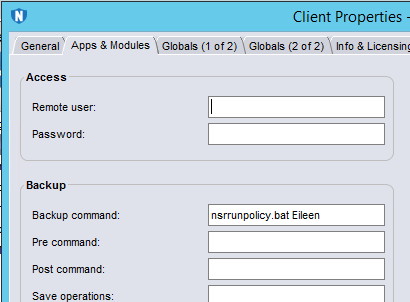
In the NetWorker client configuration 'backup command' field, you can specify a customized command (or script) to be run at the time of the backup. You can specify parameters to send to this script as it runs. These parameters can be called from within the script as, for example, %1 is the first parameter that is sent to the script and %2 is the second parameter.
In Windows, the interpretation of the script parameters within NetWorker has changed between versions 9 (and 8.2.4) and previous versions. Therefore, scripts will need to be modified after an upgrade if they call script parameters by number (for example: %1).
Resolution
Previous to NetWorker 9 (or NetWorker 8.2.4): You call the parameter 'Eileen' as the first parameter with %1.
From NetWorker 9 (or NetWorker 8.2.4): You call the parameter 'Eileen' as the second parameter with %2.
For example, a NetWorker 9 nsrrunpolicy.bat to run a policy with the name of the parameter 'Eileen' would be:
nsrpolicy -p %2
For Info:
From NetWorker 9 (or NetWorker 8.2.4): You call the parameter 'Eileen' as the second parameter with %2.
For example, a NetWorker 9 nsrrunpolicy.bat to run a policy with the name of the parameter 'Eileen' would be:
nsrpolicy -p %2
For Info:
- The %0 is the name of the script itself - in this case: C:\Program Files\EMC NetWorker\nsr\bin\nsrrunpolicy.bat
- The %1 is the parameter -LL which is given to the script automatically
- The %2 is the parameter as specified in the 'backup command' field (above it's the word 'Eileen')
- The %3 is the parameter after the %2 parameter (there is none in this example).
Additional Information
Please note that this change in NetWorker behaviour only applies to Windows operating systems. For unix/linux, the parameter interpretation has not changed between NetWorker versions.
Linux example:
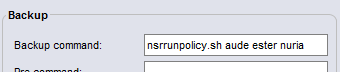
In this case:
$0 is /usr/sbin/nsrrunpolicy.sh
$1 is aude
$2 is ester
$3 is nuria
Linux example:
In this case:
$0 is /usr/sbin/nsrrunpolicy.sh
$1 is aude
$2 is ester
$3 is nuria
Affected Products
NetWorkerProducts
NetWorker, NetWorker SeriesArticle Properties
Article Number: 000052846
Article Type: Solution
Last Modified: 11 Oct 2024
Version: 3
Find answers to your questions from other Dell users
Support Services
Check if your device is covered by Support Services.