Latitude 7350 可卸離電腦未偵測到其後置攝影機
Summary: 下列文章提供 Latitude 7350 可卸離筆記型電腦後置攝影機問題的相關資訊。
This article applies to
This article does not apply to
This article is not tied to any specific product.
Not all product versions are identified in this article.
Symptoms
Latitude 7350 可卸離筆記型電腦未偵測到後置攝影機
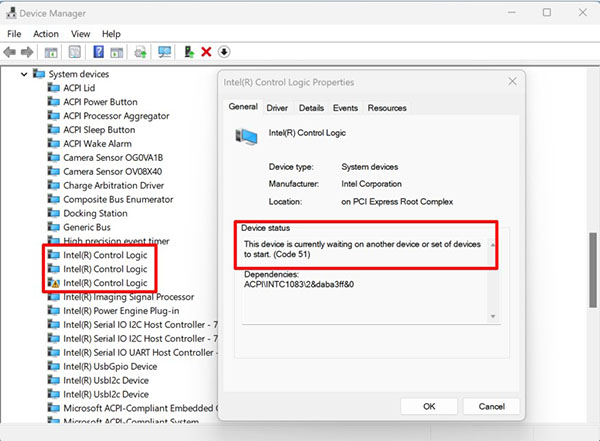
您可能會遇到 Latitude 7350 可卸離筆記型電腦的移動產業處理器介面 (MIPI) 後置攝影機偵測問題。任何缺少或安裝不正確的驅動程式,都可能導致攝影機無法運作,或無法從前視圖切換至後視圖。必須正確安裝下列驅動程式,以確保前置和後置攝影機正常運作:
- 影片:Intel Graphics、Arc Graphics 驅動程式及 Intel 顯示晶片控制中心應用程式
- 晶片組:Intel 序列輸入/輸出驅動程式
- 晶片組:Intel Integrated Sensor Solution 驅動程式
- 相機:Intel 2D 影像處理,USB 橋接器驅動程式
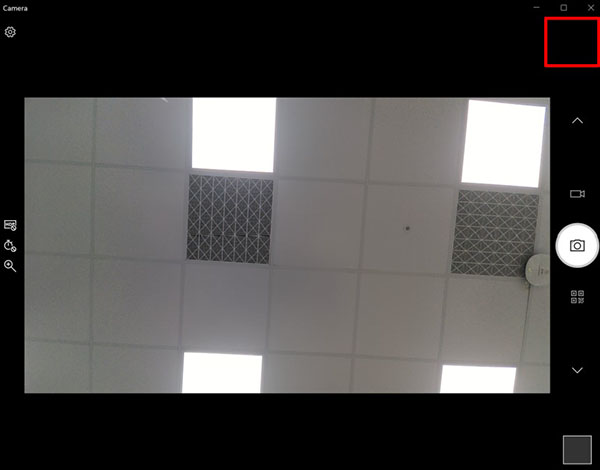
相機應用程式的右上角沒有顯示相機開關圖示。發生此問題時,應用程式不允許您在前置和後置攝影機之間切換。
Cause
缺少或無法正確安裝四個驅動程式中的任何一個,都會導致問題發生。
Resolution
請依下列順序安裝四個驅動程式以解決此問題:
-
將視訊卡驅動程式更新至 Intel 顯示卡、Arc 顯示卡驅動程式和 Intel 顯示晶片控制中心應用程式,版本 31.0.101.5234、A01 或更新版本。下載並安裝
Intel-Graphics-Arc-Graphics-Driver-and-Intel-Graphics_N7YX3_WIN64_31.0.101.5234_A01.exe。 -
將晶片組驅動程式更新至 Intel 序列輸入/輸出驅動程式30.100.2318.58、A00 版或更新版本。下載並安裝
Intel-Serial-IO-Driver_HNDHH_WIN64_30.100.2318.58_A00_02.exe。 -
將晶片組驅動程式更新至 Intel Integrated Sensor Solution 驅動程式3.10.100.7681、A01 或更新版本。下載並安裝
Intel-Integrated-Sensor-Solution-Driver_830GM_WIN64_3.10.100.7681_A01_01.exe。 -
將攝影機驅動程式更新至 Intel 2D 影像、USB 橋接器驅動程式、版本 74.22000.2.18、A01 或更新版本。若要下載並安裝
Intel-2D-Imaging-USB-Bridge-Driver-for-Camera_046M7_WIN64_74.22000.2.18_A01.exe看:
Affected Products
Latitude 7350 DetachableArticle Properties
Article Number: 000226712
Article Type: Solution
Last Modified: 11 Oct 2024
Version: 2
Find answers to your questions from other Dell users
Support Services
Check if your device is covered by Support Services.