PowerProtect Data Manager:解決虛擬機器 TSDM 備份失敗與 SPIF 篩選器變更失敗
Summary: 由於缺少 VM 磁碟 (VMDK) 描述項檔案,導致 PowerProtect Data Manager (PPDM) Virtual Machine (VMDM) Virtual Machine (VMDM) Transparent Snapshot Data Mover (TSDM) 備份失敗。
This article applies to
This article does not apply to
This article is not tied to any specific product.
Not all product versions are identified in this article.
Symptoms
PPDM VM TSDM 備份無法建立 Lightweight Delta (LWD) 快照。
vmdm.2024-10-16.0.log.gz: 2024-10-15T17:10:46.013Z INFO [] [vproxyMonitor] [00000000-0000-4000-a000-000000000000][][][TRACE_ID:992f3fb9cacd7edf;JOB_ID:b32a2490186c996c][] [c.e.b.v.v.u.VPEActivityHelper.accept(113)] - Update task: 5ce8f9cf-029b-4e57-9a61-814bb27721ba, BackupJobSession(state=Running, id=d00c8938-1fbb-4f03-aa59-759927247b2b, target=20.151-WinJump), progress: 0%, desc: Unable to create LWD snapshot. vCenter task 'task-25605' failed.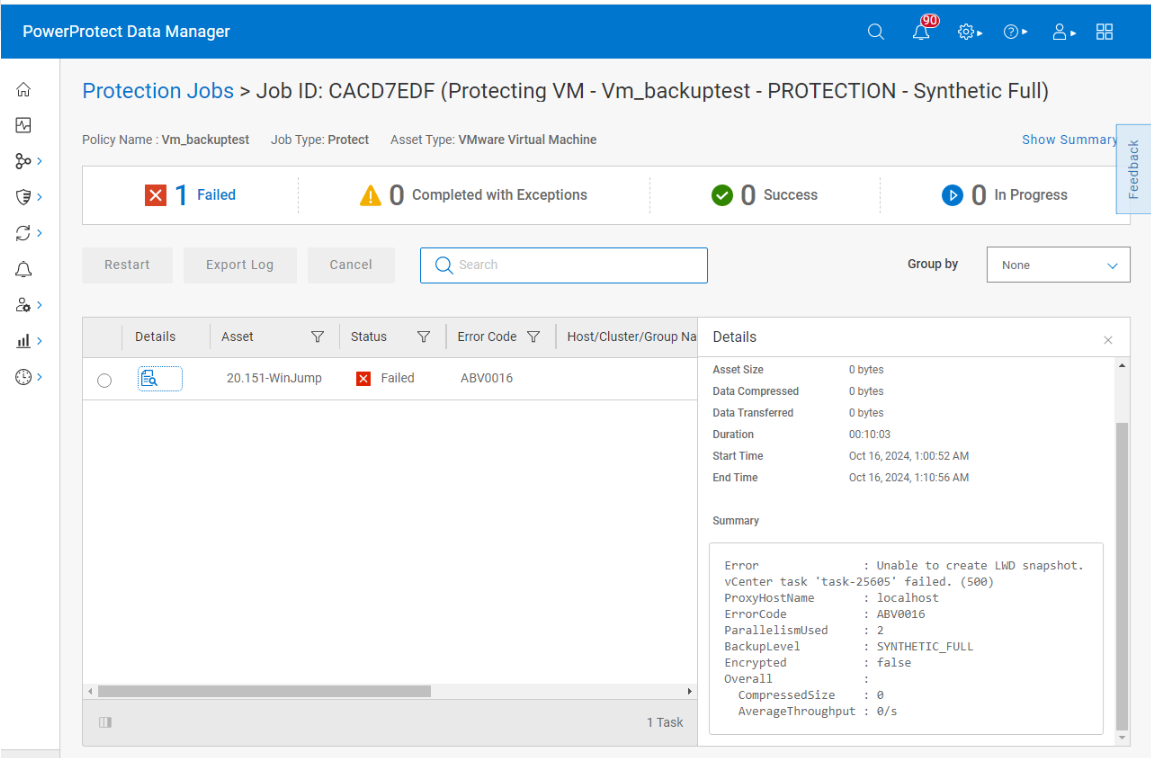
如果將 VM 移到策略之外並將其添加回來,則為 VM 配置保護將失敗,並顯示 Unable to ENABLE LWD on 20.151-WinJump - SPIF filters change failure: Object not found..Failed to attach IO Filter vmwarelwd: Object not found.
vmdm.log: 2024-11-08T02:09:29.110Z WARN [] [vpe-thread-31] [00000000-0000-4000-b000-000000000000][][][TRACE_ID:8179bb6842a67a5b;JOB_ID:8ce42f4c78a9bac6][] [c.e.b.v.v.u.SdmEnableProtectUtil.configureProtect(465)] -  Unable to ENABLE LWD on 20.151-WinJump
vmdm.log: 2024-11-08T02:09:29.110Z WARN [] [vpe-thread-31] [00000000-0000-4000-b000-000000000000][][][TRACE_ID:8179bb6842a67a5b;JOB_ID:8ce42f4c78a9bac6][] [c.e.b.v.v.u.SdmEnableProtectUtil.configureProtect(478)] -  DpSetProtection error message: SPIF filters change failure: Object not found..Failed to attach IO Filter vmwarelwd: Object not found.
vmdm.log: 2024-11-08T02:09:29.110Z WARN [] [vpe-thread-31] [00000000-0000-4000-b000-000000000000][][][TRACE_ID:8179bb6842a67a5b;JOB_ID:8ce42f4c78a9bac6][] [c.e.b.v.v.a.VPEConfigureOp.logErrorStack(64)] -  Unable to configure 20.151-WinJump
com.emc.brs.vmdm.error.ComponentException: Unable to ENABLE LWD on 20.151-WinJump - SPIF filters change failure: Object not found..Failed to attach IO Filter vmwarelwd: Object not found.
已驗證資料儲存的虛擬機器資料夾下沒有剩餘快照檔。
Cause
此問題的根本原因是資料存放區的 VM 資料夾中缺少 VMDK 描述項檔案。
PPDM TSDM 備份需要 VMDK 描述項檔案,才能建立 LWD 快照並設定虛擬機器的保護。
缺少 VMDK 描述項檔案會導致以下錯誤: SPIF filters change failure: Object not found 和 Failed to attach IO Filter vmwarelwd: Object not found 在vmdm.log檔中。
ESXi 主機上的 hostd 和 vpxa 記錄也會顯示與遺失 VMDK 描述符檔案相關的錯誤,例如 Unable to find vmdk descriptor file and VMware ESX cannot find the virtual disk "Win-Jump.vmdk". Verify the path is valid and try again.
hostd.txt:2024-11-12T01:19:29.188Z In(166) Hostd[2099508]: [Originator@6876 sub=Libs opID=m383ayh7-37975-auto-taw-h5:70010844-66-01-01-76-4d13 sid=523b10e0 user=vpxuser:VSPHERE.LOCAL\Administrator] SNAPSHOT: SnapshotConfigExtFinder: Unable to find file: 'Win-Jump.vmdk'
hostd.txt:2024-11-12T01:19:29.635Z Db(167) Hostd[2099501]: [Originator@6876 sub=Vmsvc.vm:/vmfs/volumes/6386100c-0019fc49-84a7-b49691f824a2/Win-Jump/Win-Jump.vmx] Handling vmx message 142534359: VMware ESX cannot find the virtual disk "Win-Jump.vmdk". Verify the path is valid and try again.
vpxa.txt:2024-11-12T01:17:44.260Z Er(163) Vpxa[2099754]: -->          message = "VMware ESX cannot find the virtual disk "Win-Jump.vmdk". Verify the path is valid and try again. "
瀏覽資料存放區上的 VM 資料夾時,VMDK 描述項檔案遺失,但平面 VMDK 檔案存在。
Resolution
請聯絡 VMware 支援,並依照 KB https://knowledge.broadcom.com/external/article?legacyId=1002511
還原 VMDK 描述項檔案後,請重新執行 PPDM TSDM 備份。
Affected Products
PowerProtect Data ManagerArticle Properties
Article Number: 000248751
Article Type: Solution
Last Modified: 26 Aug 2025
Version: 3
Find answers to your questions from other Dell users
Support Services
Check if your device is covered by Support Services.