PowerProtect: Backup di OpenShift K8s utilizzando un'interfaccia diversa
Summary: Impossibile eseguire il backup di PersistentVolumeClaims (PVC), il backup ha restituito un errore
Instructions
Ambiente: Cluster OpenShift di PowerProtect Data Manager 19.16
: 4.14
Versione OADP: 1.27
I backup hanno esito negativo con codici diversi (ABK0018 e ABK0002) dopo aver configurato il nuovo cluster OpenShift K8s.
"PVC backup returned with an error Unable to backup PVC 'pvc-mysql-0' BackupPvSessions completed with errors: Unable to open DD Boost connection to PowerProtect DD System host "DD_IP": [5203] The call timed out"
OpenShift viene eseguito utilizzando diverse interfacce e reti IP.
Uno di questi si trova nella stessa rete di Data Domain e PowerProtect Data Manager.
La seconda interfaccia è in esecuzione in una rete senza accesso a PowerProtect Data Manager-DataDomain.
In OpenShift K8s, è necessario creare una NAD (Network Attachment Definition) utilizzando l'interfaccia nella stessa rete di Data Domain e PowerProtect Data Manager. In questo esempio, utilizzare eno12409np1 come interfaccia
apiVersion: k8s.cnicncf.io/v1 [k8s.cni.cncf.io]
kind: NetworkAttachmentDefinition
Metadata:
  Name: eno12409np1-network
Spec:
  Config: '{
    "cniVersion": "0.3.1",
    "type": "macvlan",
    "Active": "eno12409np1",
    "mode": "bridge",
    "ipam": {
      "type": "host-local",
      "subnet": network_subnet_dd_ppdm/mask [network_subnet_dd_ppdm]",
      "rangeStart": "192.168.10.10",
      "rangeEnd": "192.168.10.50",
      "routes": [{"dst": "0.0.0.0/0 [0.0.0.0]"}],
      "gateway": "192.168.10.1"
    }
  }'
Modificare il deployment di PowerProtect e Velero aggiungendo la definizione di rete Annotazioni:k8s.v1.cni.cncf.io/networks [k8s.v1.cni.cncf.io]: eno12409np1-network
Aggiungere le stesse informazioni nel cluster K8s di PowerProtect Data Manager (modificare > le opzioni avanzate)
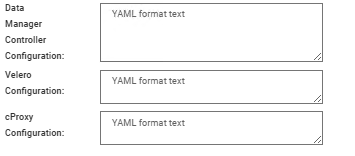
In ogni configurazione, aggiungere le informazioni per YAML utilizzando il formato:
spec:
template:
metadata:
 annotations:
   k8s.v1.cni.cncf.io/networks: kube-system/macvlan-conf
spec:
 dnsConfig:
 nameservers:
    - "10.235.95.21" ## Customer DNS
 searches:
    - "domain.local.customre"
Eseguire un Verify e Salva.
Dopo aver apportato tutte le modifiche, eseguire un Discovery ed eseguire un nuovo backup.