Isilon: 전면 패널 LED/표시등 막대 상태
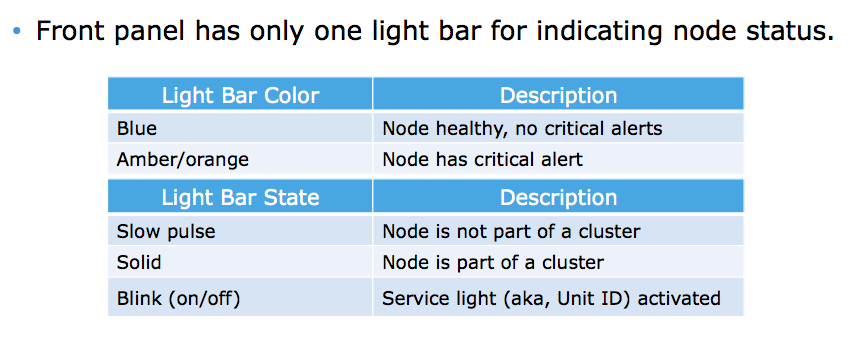
Summary: 현재 Isilon 노드의 전면 패널 LED 또는 표시등 막대에는 노드의 상태를 나타내는 2가지 색상과 3가지 상태가 있습니다.
This article applies to
This article does not apply to
This article is not tied to any specific product.
Not all product versions are identified in this article.
Instructions
표시등 및 설명은 다음과 같습니다.
LED/표시등 막대 색상
파란색 = 노드 정상, 위험 경고
없음 황색/주황색 = 노드에 위험 경고
가 있음 LED/표시등 막대 상태
느린 펄스 = 노드가 클러스터
의 일부가 아님 솔리드 = 노드가 클러스터
의 일부임 깜박임 = 서비스 표시등(장치 ID) 활성화
됨 색상과 상태를 혼합할 수 있습니다. 예를 들어, 주황색으로 깜박이는 LED/표시등 막대는 서비스 표시등이 활성화된 중요 알림이 있는 노드를 나타냅니다.
Affected Products
IsilonProducts
Isilon, Isilon HD400, Isilon NL-Series, Isilon NL400, Isilon NL410, Isilon S-Series, Isilon S200, Isilon S210, Isilon X-Series, Isilon X200, Isilon X210, Isilon X400, Isilon X410Article Properties
Article Number: 000019536
Article Type: How To
Last Modified: 17 Apr 2026
Version: 6
Find answers to your questions from other Dell users
Support Services
Check if your device is covered by Support Services.