Isilon:前面板 LED/指示燈條狀態
Summary: 目前 Isilon 節點的前面板 LED 或指示燈條有兩種顏色和三種狀態,表示節點的健全狀況及/或狀態。
This article applies to
This article does not apply to
This article is not tied to any specific product.
Not all product versions are identified in this article.
Instructions
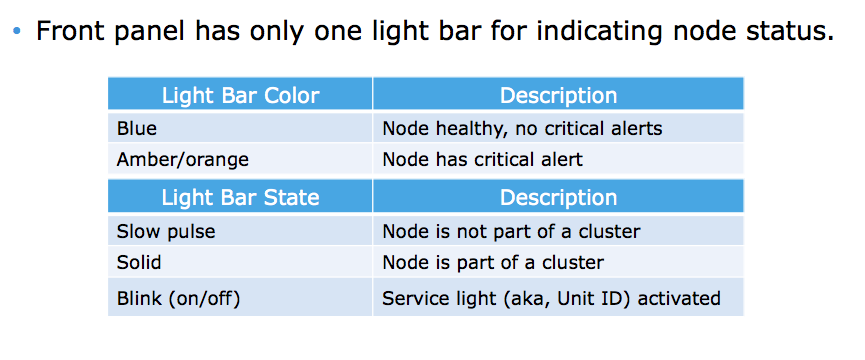
以下為指示燈和說明:
LED/燈條顏色
藍色 = 節點狀況良好,無嚴重警示
琥珀色/橘色 = 節點有嚴重警示
LED/指示燈狀態
慢脈衝 = 節點不是叢集的一部分 穩定 = 節點是叢集
的一部分 閃爍 = 服務指示燈 (又稱裝置 ID) 已啟動
顏色和狀態可以混合使用。例如,琥珀色閃爍的 LED/指示燈條表示節點具有嚴重警示,且已啟動維修燈號。
Affected Products
IsilonProducts
Isilon, Isilon HD400, Isilon NL-Series, Isilon NL400, Isilon NL410, Isilon S-Series, Isilon S200, Isilon S210, Isilon X-Series, Isilon X200, Isilon X210, Isilon X400, Isilon X410Article Properties
Article Number: 000019536
Article Type: How To
Last Modified: 17 Apr 2026
Version: 6
Find answers to your questions from other Dell users
Support Services
Check if your device is covered by Support Services.