Data Domain: DD Boost – Konfigurationsvejledning til CommVault
Summary: Denne artikel indeholder grundlæggende oplysninger om konfiguration af DD Boost med CommVault-programmet. Denne artikel beskriver også de forudsætninger, der kræves for at konfigurere DD Boost med CommVault og understøttede konfigurationer/arbejdsgange med CommVault 11.30.x- og 11.32.x-softwareversioner. ...
This article applies to
This article does not apply to
This article is not tied to any specific product.
Not all product versions are identified in this article.
Instructions
Konfiguration af software
Tabel: Forudsætninger for påkrævede versioner af Data Domain (DD) og Commvault.
| DDOS-version | DDBoostSDK | CommServe/Media Agent-version |
| DDOS 7.8 eller nyere | DD Boost SDK 7.11 – integreret i Commvault 11.30.x og 11.32.x Media Agent-pakke | 11.30.x (DD Boost-adgang) |
| DDOS 7.8 eller nyere | DD Boost SDK 7.11 – integreret i Commvault 11.30.x og 11.32.x Media Agent-pakke | 11.32.x (DD Boost Client Direct) |
Bemærk: DD Boost-klienten understøttes med nye implementeringer, ingen migrering understøttes hverken fra DD Boost Access (CV 11.30.x) eller fra tidligere CV-versioner.
Understøttede konfigurationer/arbejdsgange med Commvault 11.30.x
Arbejdsproces I: Datastimedieagent til Data Domain

Arbejdsproces II: Datastiklient til Data Domain
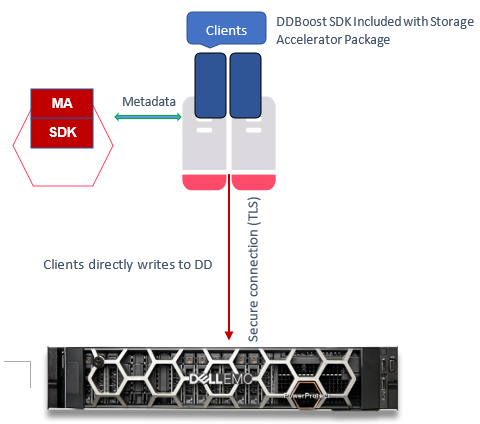
Understøttede arbejdsprocesser for 11.32.x
Arbejdsproces I: Datastien er klient til Data Domain (DD-deduplikering på klientsiden)
Bemærk: Kun for fuld sikkerhedskopiering og trinvise sikkerhedskopieringer, kun gendannelse.
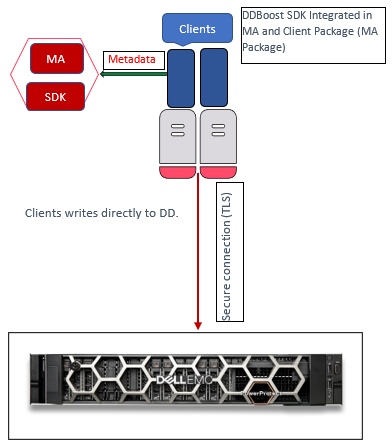
Arbejdsproces II: Datastien er klient til Data Domain (DD-deduplikering på klientsiden)
Bemærk: Kun syntetisk fuld sikkerhedskopiering (DD VS – virtuel syntetisk)
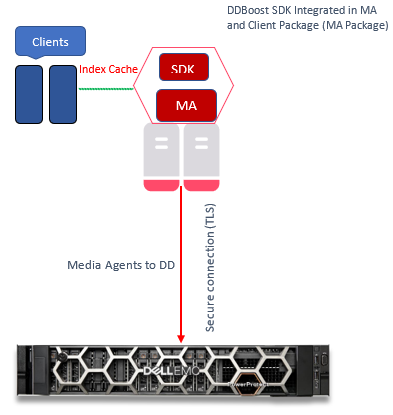
Arbejdsproces III: Klienter til Media Agent til Data Domain
Data Path er Media Agent til Data Domain.
Bemærk: Foretrukket til DD-deduplikering uden klientside
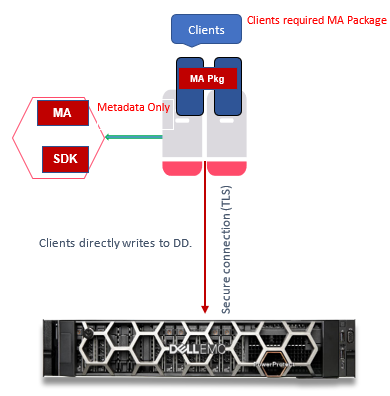
Konfigurationstrin
Dette afsnit forklarer de trin, der kræves for at konfigurere en DD-enhed.
Bemærk: DD Boost SDK installeres som standard, når CommVault Media Agent og CommServe er installeret på værter.
Kontrollér, at DD har en gyldig licens, og at filsystemet og DD Boost er aktiveret.
- Tjek licens:
sysadmin@DataDomain# elicense show Licensing scheme: EMC Electronic License Management System (ELMS) node-locked mode Capacity licenses: ## Feature Shelf Model Capacity Type State Expiration Date Note -- ------------------ ----------- ----------- --------------- ------ --------------- ---- 1 CAPACITY-ACTIVE ES40 1135.04 TiB permanent (int) active n/a 2 CLOUDTIER-CAPACITY n/a 9.09 TiB permanent (int) active n/a -- ------------------ ----------- ----------- --------------- ------ --------------- ---- Licensed Active Tier capacity: 1135.04 TiB* * Depending on the hardware platform, usable filesystem capacities may vary. Feature licenses: ## Feature Count Type State Expiration Date Note -- ------------------------- ----- --------------- ------ --------------- ---- 1 REPLICATION 1 permanent (int) active n/a 2 VTL 1 permanent (int) active n/a 3 DDBOOST 1 permanent (int) active n/a 4 RETENTION-LOCK-GOVERNANCE 1 permanent (int) active n/a 5 ENCRYPTION 1 permanent (int) active n/a - Kontrollér filsystemets status:
sysadmin@DataDomain# filesys status The filesystem is enabled and running. - Kontrollér DD Boost-status:
sysadmin@DataDomain# ddboost status DD Boost status: enabled - Kontrollér DD Boost-indstillinger for DSP:
sysadmin@DataDomain# ddboost option show Option Value ------------------------------ -------- distributed-segment-processing enabled virtual-synthetics enabled fc disabled global-authentication-mode none global-encryption-strength none ------------------------------ -------- - Opret DD Boost-storageenhed:
sysadmin@DataDomain# ddboost storage-unit create DDSTU_P2WIN_COMP_3 user sysadmin Created storage-unit "DDSTU_P2WIN_COMP_3" for "sysadmin". - Angiv DD Boost-storageenheden:
sysadmin@DataDomain# ddboost storage-unit show
Name                 Pre-Comp (GiB)   Status   User       Report Physical
                                                             Size (MiB)
------------------   --------------   ------   --------   ---------------
DDSTU_P2WIN_COMP_3              0.0   RW       sysadmin                 -
------------------   --------------   ------   --------   ---------------
 D    : Deleted
 Q    : Quota Defined
 RO   : Read Only
 RW   : Read Write
 RD   : Replication Destination
 M    : Mobile
 m    : Migratable
Bemærk: Du kan finde flere oplysninger om funktionen Commvault DD Boost Storage Library, herunder konfiguration af et DD Boost Storage Library, under Commvault Data Domain Boost Storage Library i dokumentationen til Commvault.
Oprettelse af et DD Boost-klientbibliotek med CommVault 11.32.x
Når du har klaret alle forudsætninger for konfiguration af et Commvault DD Boost-storagebibliotek, skal du oprette et Client Direct DD Boost-klientbibliotek:
- Udvid "Storage Resources" fra CommCell-browseren.
- Højreklik på Biblioteker, og klik derefter på "Add > Disk Library > Data Domain Boost Library".
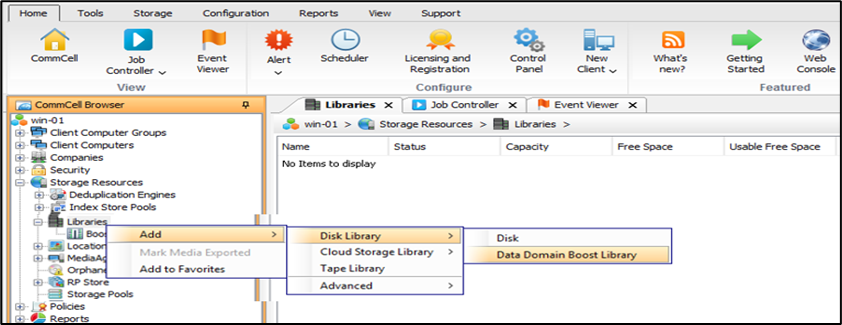
- Den "
Add DD Boost Storage" vises. - Skriv et navn til biblioteket i boksen Navn.
- I feltet Type skal du vælge
DD Boost Client. - Vælg den relevante klient på listen Media Agent.
- I boksen DD-enhedsvært skal du indtaste den IP-adresse, der er knyttet til Data Domain-biblioteket.
- Vælg en foruddefineret legitimationsoplysning på listen Legitimationsoplysninger, eller klik på
Create Newfor at oprette legitimationsoplysninger for at få adgang til DD-seriens enhedsbibliotek. - I feltet Lagerenhed skal du indtaste navnet på den storageenhed, der findes i DD-seriens enhedskonsol.
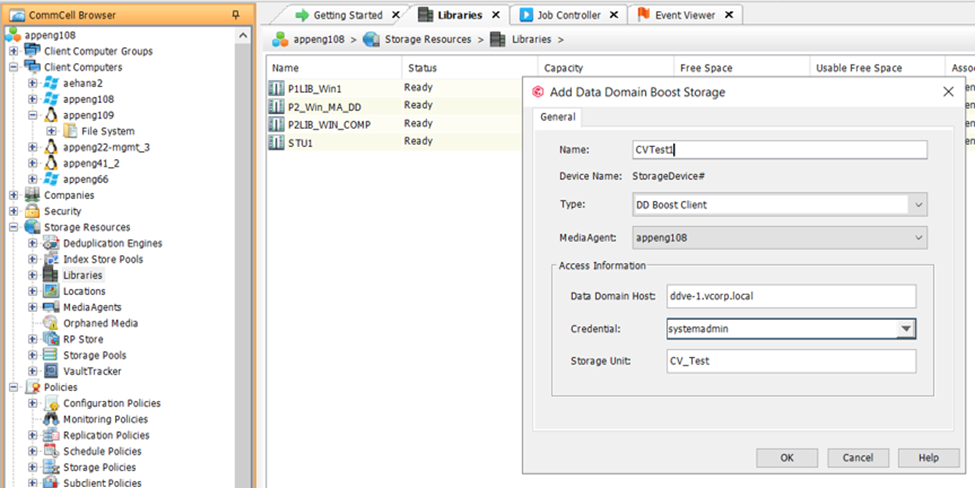
- Klik på
OK.
Det nye Client Direct DD Boost-storagebibliotek vises i CommCell-browseren under "Storageressourcer | Biblioteker."
Affected Products
Data Domain, Data Domain BoostArticle Properties
Article Number: 000219165
Article Type: How To
Last Modified: 27 Jan 2026
Version: 1
Find answers to your questions from other Dell users
Support Services
Check if your device is covered by Support Services.