PowerScale: o sistema de auditoria está inativo
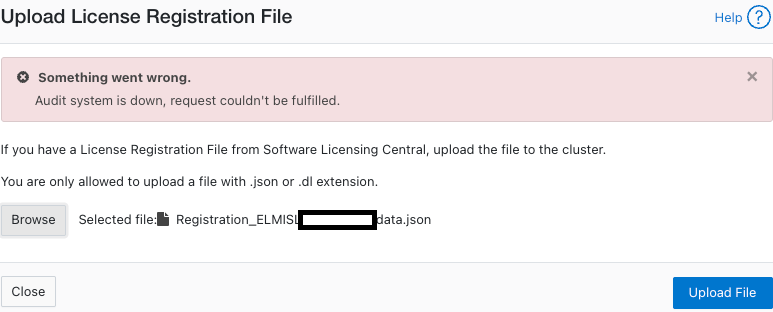
Summary: Uma mensagem de erro "O sistema de auditoria está inativo, a solicitação não pôde ser atendida" é exibida ao tentar ativar uma licença (no modo off-line ou legado).
This article applies to
This article does not apply to
This article is not tied to any specific product.
Not all product versions are identified in this article.
Symptoms
Erro nas mensagens:
powerscale-3:  2026-06-03T15:34:28.375440-07:00 <3.3> powerscale3(id20) isi_papi_d[64129]: Cannot deliver audit event to the audit daemon. Event payload size (72521) + format length is greater than allowed size (65525)
powerscale-3:  2026-06-03T15:37:33.008372-07:00 <3.3> powerscale-3(id20) isi_papi_d[65089]: Cannot deliver audit event to the audit daemon. Event payload size (72521) + format length is greater than allowed size (65525)
powerscale-3:  2026-06-03T16:18:41.035297-07:00 <3.3> powerscale-3(id20)  isi_papi_d[50492]: STACK Audit system is down, request couldn't be fulfilled.     from --- (---:0):      isi_exception::isi_exception(int, char const*, __va_list_tag*) (OFFSET:134)     api_exception::api_exception(api_error_code, char const*, ...) (OFFSET:146)     uri_manager::execute_request(request&, response&, bool, bool, bool, bool, bool, bool) (OFFSET:2181)
Na interface do usuário:
Cause
Um defeito no código em que o tamanho da carga útil excede o limite.
Resolution
A engenharia está ciente do problema e está trabalhando em uma correção.
Solução temporária:
- Verifique se a auditoria de configuração está ativada:
powerscale-3# isi audit settings global view
     Protocol Auditing Enabled: Yes
                 Audited Zones: -
               CEE Server URIs:
                      Hostname:
       Config Auditing Enabled: Yes  <<<<<<<<<<<<<<<<<<<<<<<<<<<
         Config Syslog Enabled: No
         Config Syslog Servers: -
     Config Syslog TLS Enabled: No
  Config Syslog Certificate ID:
       Protocol Syslog Servers: -
   Protocol Syslog TLS Enabled: No
Protocol Syslog Certificate ID:
         System Syslog Enabled: No
         System Syslog Servers: -
     System Syslog TLS Enabled: No
  System Syslog Certificate ID:
          Auto Purging Enabled: No
              Retention Period: 180
       System Auditing Enabled: No
powerscale-3#
Nota: Se isso estiver definido como Não, há um problema diferente envolvido. Entre em contato com o suporte da Dell Technologies.
- Defina a auditoria de configuração como desabilitada temporariamente:
powerscale-3# isi audit settings global modify --config-auditing-enabled=false
- Reaplique a licença e, em seguida, habilite-a:
powerscale-3# isi audit settings global modify --config-auditing-enabled=true
Article Properties
Article Number: 000486487
Article Type: Solution
Last Modified: 08 Jul 2026
Version: 1
Find answers to your questions from other Dell users
Support Services
Check if your device is covered by Support Services.