PowerScale: NFSv4 기본 설정이 아닌 설정 이해
Summary: PowerScale 클러스터의 NFSv4 기본 설정이 아닌 설정 이해
This article applies to
This article does not apply to
This article is not tied to any specific product.
Not all product versions are identified in this article.
Instructions
경우에 따라 기본 NFSv4 설정에서 예기치 않은 결과가 발생할 수 있습니다. 다음 문제가 발생할 수 있으며 표시된 대로 조정할 수 있습니다. 기본이 아닌 설정은 NFSv4 ACL(Access Control List) 지원을 중단하는 경우가 많으므로 피하는 것이 좋습니다.
- NFSv4 도메인이 구성되지 않음:
- 루트 소유권은 다음과 같이 표시됩니다.
nobody:nobody, 루트가 아닌 사용자는 올바른user:group문맥. 도메인 정보가 없으면 마운트에서 ACL을 지원하지 않을 수 있습니다. 자세한 내용은 PowerScale: NFSv4 클라이언트가 리소스에 액세스할 수 없습니다. 소유자/그룹이 nobody/nogroup으로 나열되기 때문입니다.
- 루트 소유권은 다음과 같이 표시됩니다.
- NFSv4 도메인이 구성되어 있습니다.
- 루트 소유권은 다음과 같이 표시됩니다.
root:wheel대신root:root. 이 문제는 NFSv4가 서버에서 UID 및 GID 이름을 반환하기 때문에 발생합니다. OneFS에서 UID 0 및 GID 0은root:wheel. Linux 시스템에 휠 그룹이 없거나 GID 10으로 할당될 수 있습니다. 잠재적인 해결 방법은 Linux 클라이언트의 휠 그룹에 루트를 추가하는 것입니다. 이렇게 하려면 모든 클라이언트를 변경해야 하지만 서버 쪽 구성은 변경할 수 없습니다. 클러스터 측 대안은 다음과 같습니다.nfsv4-no-names예, 하지만 여기에는 주의 사항이 있습니다.
- 루트 소유권은 다음과 같이 표시됩니다.
- NFSv4 기본값이 아닌 예로 설정된 이름 없음:
- 이 설정은
user@domain. 루트 소유권은 다음과 같이 표시됩니다.root:root하지만 프로토콜에 다음이 필요하기 때문에 ACL 지원이 실패합니다.user@domainRFC당 구문 . 이 설정은 NFSv4 ACL 기능을 손상시키므로 영구적인 해결 방법으로 권장되지 않습니다.
- 이 설정은
NFS 존 설정에 대한 기술 세부 정보는 다음 명령을 실행하여 확인할 수 있습니다.
# isi nfs settings zone modify -h
Description:
    Change the default NFS zone options.

Required Privileges:
    ISI_PRIV_NFS

Usage:
    isi nfs settings zone modify
        [--nfsv4-domain <string>]
        [--revert-nfsv4-domain]
        [--nfsv4-replace-domain <boolean>]
        [--revert-nfsv4-replace-domain]
        [--nfsv4-no-domain <boolean>]
        [--revert-nfsv4-no-domain]
        [--nfsv4-no-domain-uids <boolean>]
        [--revert-nfsv4-no-domain-uids]
        [--nfsv4-no-names <boolean>]
        [--revert-nfsv4-no-names]
        [--nfsv4-allow-numeric-ids <boolean>]
        [--revert-nfsv4-allow-numeric-ids]
        [--zone <string>]
        [{--verbose | -v}]
        [{--help | -h}]

Options:
    --nfsv4-domain <string>
        NFSv4 domain name.
    --revert-nfsv4-domain
        Set value to system default for --nfsv4-domain.
    --nfsv4-replace-domain <boolean>
        Replace owner/group domain with nfs domainname. (v4).
    --revert-nfsv4-replace-domain
        Set value to system default for --nfsv4-replace-domain.
    --nfsv4-no-domain <boolean>
        Send owners/groups without domainname (v4).
    --revert-nfsv4-no-domain
        Set value to system default for --nfsv4-no-domain.
    --nfsv4-no-domain-uids <boolean>
        Send UIDs/GIDs without domainname (v4).
    --revert-nfsv4-no-domain-uids
        Set value to system default for --nfsv4-no-domain-uids.
    --nfsv4-no-names <boolean>
        Always send owners/groups as UIDs/GIDs (v4).
    --revert-nfsv4-no-names
        Set value to system default for --nfsv4-no-names.
    --nfsv4-allow-numeric-ids <boolean>
        Send owners/groups as UIDs/GIDs when lookups fail or if no_names=1 (v4).
    --revert-nfsv4-allow-numeric-ids
        Set value to system default for --nfsv4-allow-numeric-ids.
    --zone <string>
        Access zone.

  Display Options:
    --verbose | -v
        Display more detailed information.
    --help | -h
        Display help for this command.
명령줄 인터페이스의 기본값:
# isi nfs settings zone view
           NFSv4 Domain: localhost
   NFSv4 Replace Domain: Yes
        NFSv4 No Domain: No
   NFSv4 No Domain UIDs: Yes
         NFSv4 No Names: No
NFSv4 Allow Numeric IDs: Yes
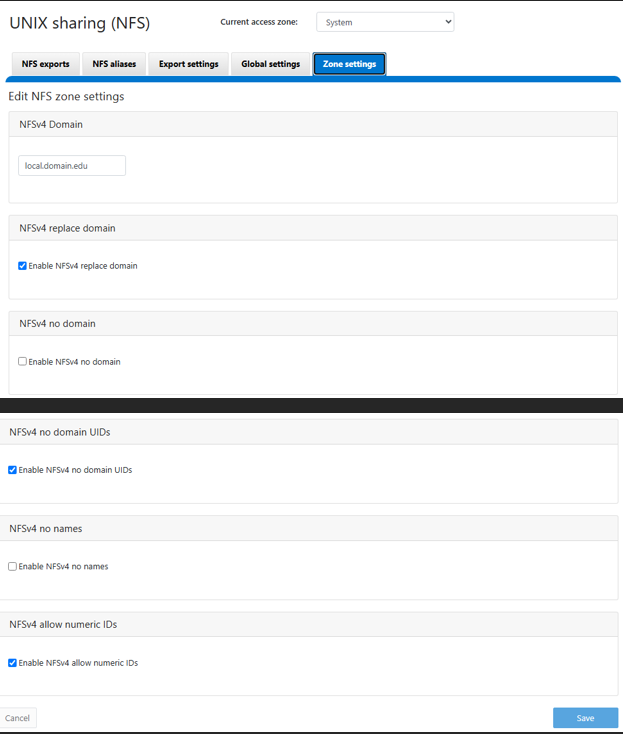
OneFS WebU에 표시된 기본값으로, 이 이미지는 OneFS 9.13 WebUI에서 가져온 것이지만 이전 릴리스와 유사해야 합니다.
Additional Information
Affected Products
PowerScale OneFSProducts
IsilonArticle Properties
Article Number: 000023023
Article Type: How To
Last Modified: 16 Sep 2026
Version: 5
Find answers to your questions from other Dell users
Support Services
Check if your device is covered by Support Services.