PowerScale:了解 NFSv4 非默认设置
Summary: 了解 PowerScale 群集上的 NFSv4 非默认设置。
This article applies to
This article does not apply to
This article is not tied to any specific product.
Not all product versions are identified in this article.
Instructions
有时,默认 NFSv4 设置会产生意外结果。可能会出现以下问题,并根据指示进行调整。最佳实践建议避免使用非默认设置,因为它们通常会破坏 NFSv4 访问控制列表 (ACL) 支持。
- 未配置 NFSv4 域:
- 根所有权显示为
nobody:nobody,而非 root 用户显示正确的user:group上下文。如果没有域信息,则装载上的 ACL 支持不太可能。有关更多详细信息 ,请参阅 PowerScale:NFSv4 客户端无法访问资源,导致所有者/组列为 nobody/nogroup。
- 根所有权显示为
- NFSv4 域已配置:
- 根所有权显示为
root:wheel而不是root:root。 发生这种情况是因为 NFSv4 从服务器返回 UID 和 GID 名称。在 OneFS 中,UID 0 和 GID 0 映射到root:wheel。Linux 系统可能缺少滚轮组或为其分配 GID 10。潜在的解决方法是在 Linux 客户端上将根添加到滚轮组。这需要对每个客户端进行更改,但可避免服务器端配置更改。群集端备选方案是将nfsv4-no-names是,但这有注意事项。
- 根所有权显示为
- NFSv4 No Names 设置为非默认值 YES:
- 此设置发送 UID/GID,而不是
user@domain。根所有权显示为root:root,但 ACL 支持失败,因为协议需要user@domain每个 RFC的语法。不建议将此设置作为永久解决方法,因为它会中断 NFSv4 ACL 功能。
- 此设置发送 UID/GID,而不是
通过运行以下命令,可以获得有关 NFS 分区设置的技术详细信息:
# isi nfs settings zone modify -h
Description:
    Change the default NFS zone options.

Required Privileges:
    ISI_PRIV_NFS

Usage:
    isi nfs settings zone modify
        [--nfsv4-domain <string>]
        [--revert-nfsv4-domain]
        [--nfsv4-replace-domain <boolean>]
        [--revert-nfsv4-replace-domain]
        [--nfsv4-no-domain <boolean>]
        [--revert-nfsv4-no-domain]
        [--nfsv4-no-domain-uids <boolean>]
        [--revert-nfsv4-no-domain-uids]
        [--nfsv4-no-names <boolean>]
        [--revert-nfsv4-no-names]
        [--nfsv4-allow-numeric-ids <boolean>]
        [--revert-nfsv4-allow-numeric-ids]
        [--zone <string>]
        [{--verbose | -v}]
        [{--help | -h}]

Options:
    --nfsv4-domain <string>
        NFSv4 domain name.
    --revert-nfsv4-domain
        Set value to system default for --nfsv4-domain.
    --nfsv4-replace-domain <boolean>
        Replace owner/group domain with nfs domainname. (v4).
    --revert-nfsv4-replace-domain
        Set value to system default for --nfsv4-replace-domain.
    --nfsv4-no-domain <boolean>
        Send owners/groups without domainname (v4).
    --revert-nfsv4-no-domain
        Set value to system default for --nfsv4-no-domain.
    --nfsv4-no-domain-uids <boolean>
        Send UIDs/GIDs without domainname (v4).
    --revert-nfsv4-no-domain-uids
        Set value to system default for --nfsv4-no-domain-uids.
    --nfsv4-no-names <boolean>
        Always send owners/groups as UIDs/GIDs (v4).
    --revert-nfsv4-no-names
        Set value to system default for --nfsv4-no-names.
    --nfsv4-allow-numeric-ids <boolean>
        Send owners/groups as UIDs/GIDs when lookups fail or if no_names=1 (v4).
    --revert-nfsv4-allow-numeric-ids
        Set value to system default for --nfsv4-allow-numeric-ids.
    --zone <string>
        Access zone.

  Display Options:
    --verbose | -v
        Display more detailed information.
    --help | -h
        Display help for this command.
命令行界面中的默认值:
# isi nfs settings zone view
           NFSv4 Domain: localhost
   NFSv4 Replace Domain: Yes
        NFSv4 No Domain: No
   NFSv4 No Domain UIDs: Yes
         NFSv4 No Names: No
NFSv4 Allow Numeric IDs: Yes
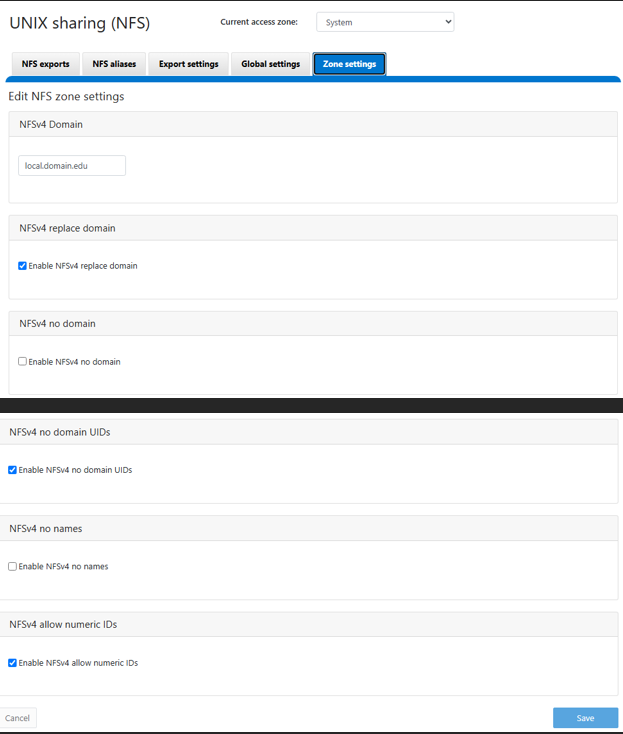
默认值如 OneFS WebU 中所示,此映像来自 OneFS 9.13 WebUI,但应该与早期版本类似:
Additional Information
Affected Products
PowerScale OneFSProducts
IsilonArticle Properties
Article Number: 000023023
Article Type: How To
Last Modified: 16 Sep 2026
Version: 5
Find answers to your questions from other Dell users
Support Services
Check if your device is covered by Support Services.