Dell Unity:UEMCLI 配額樹狀圖建立失敗,並顯示0x100b1b2錯誤
Summary: 如果命令語法不正確,配額樹狀圖建立作業可能會失敗,並顯示錯誤代碼0x100b1b2。
This article applies to
This article does not apply to
This article is not tied to any specific product.
Not all product versions are identified in this article.
Symptoms
13:19:41 service@(none) spb:~> uemcli /quota/tree create -fs fs1 -path /qtree1 -softLimit 922M -hardLimit 1024M
Storage system address: 127.0.0.1
Storage system port: 443
HTTPS connection

Operation failed. Error code: 0x100b1b2
The specified storage resource not found. (Error Code:0x100b1b2)
Cause
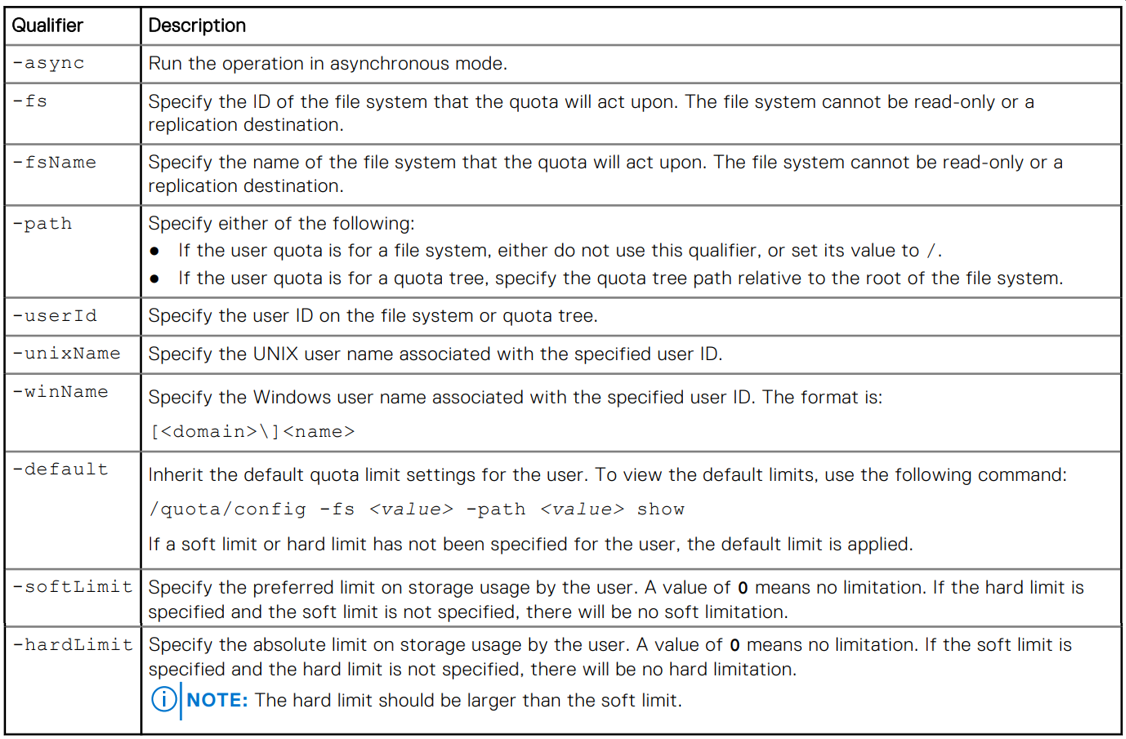
命令結構不正確。對於上面的示例,使用者正在使用文件系統 name 而不是 ID 的檔案系統 -fs 限定符。
下表包含可用限定符及其用途的完整清單。
Resolution
驗證命令結構是否正確。
針對以上範例,請驗證檔案系統 ID 使用下列命令,然後將該號碼用於 -fs 建立配額樹狀結構時的限定符。
13:31:30 service@(none) spb:~> uemcli /stor/prov/fs show
Storage system address: 127.0.0.1
Storage system port: 443
HTTPS connection

3:    ID                   = res_12
      Name                 = fs1
      Description          = fs1
      Health state         = OK_BUT (7)
      File system          = fs_9
      Server               = nas_5
      Storage pool ID      = pool_3
      Storage pool         = hfa Nas gold pool
      Format               = UFS64
      Protocol             = cifs
      Access policy        = windows
      Folder rename policy = forbiddenSmb
      Locking policy       = mandatory
      Size                 = 5607616675840 (5.1T)
      Size used            = 5018909868032 (4.5T)
      Maximum size         = 70368744177664 (64.0T)
      Protection size used = 11357536256 (10.5G)
13:36:52 service@(none) spb:~> uemcli /quota/tree create -fs res_12 -path /qtree1 -softLimit 1843M -hardLimit 2048M
Storage system address: 127.0.0.1
Storage system port: 443
HTTPS connection

Operation completed successfully.
13:37:23 service@(none) spb:~> uemcli /quota/tree -fs res_12 show -detail
Storage system address: 127.0.0.1
Storage system port: 443
HTTPS connection

3:    Path              = /qtree1
      Description       =
      Space used        = 15908864 (15.1M)
      Soft limit        = 1932525568 (1.7G)
      Hard limit        = 2147483648 (2.0G)
      Grace period left = 00s
      State             = OK
Additional Information
Affected Products
Dell EMC Unity, Dell EMC Unity Family |Dell EMC Unity All Flash, Dell EMC Unity HybridArticle Properties
Article Number: 000028280
Article Type: Solution
Last Modified: 11 Nov 2025
Version: 5
Find answers to your questions from other Dell users
Support Services
Check if your device is covered by Support Services.