NetWorker: Apache and tomcat versions in different NetWorker versions
Summary: List of the Apache and tomcat versions which are part of the different NetWorker Management Console (NMC) and NetWorker server versions.
Symptoms
- How are Apache and Tomcat used by NetWorker?
- Which vulnerabilities do exist with the Apache or Tomcat versions used by NetWorker?
- Is there any way to upgrade Apache or Tomcat versions on NetWorker?
Cause
Identify which versions of Apache and Tomcat NetWorker is bundled with.
Resolution
Apache is used for hosting a landing site for a Java application that opens the NetWorker Management Console (NMC) authentication at startup. After NMC is launched, Apache is no longer needed or used and NetWorker authentication takes over. Apache is not used by the Client, Storage Node, or NetWorker Server after this point.
NetWorker bundles a locked down Apache server that has as few vulnerabilities as possible. NetWorker updates the version of Apache with each major release of NetWorker.
The NetWorker Management Console server uses Embedded Apache server software for only two things:
- Download of the Console jar files.
- Start-up of the Console server daemon or service
Below are the different Apache HTTPD versions used by the NetWorker Management Console server:
- NMC version 19.10.0.0 has Apache httpd
2.4.56 - NMC version 19.10.0.2 has Apache httpd
2.4.58 - NMC version 19.11.0.1 has Apache httpd
2.4.59 - NMC versions 19.10.0.5, 19.11.0.2 and 19.12.0.0 have Apache httpd
2.4.62 - NMC versions 19.13.0.0 , 19.12.0.1 and 19.11.0.5 have Apache httpd
2.4.63 - NMC version 19.13.0.2 and 19.14.0.0 has Apache httpd
2.4.65 - NMC version 19.14.0.1 and 19.15 will have Apache https
2.4.68
Below are the different Apache Tomcat versions included on a NetWorker (NW) server:
- NW versions 19.10.0.0 has Apache Tomcat
9.0.76 - NW versions 19.10.0.1 has Apache tomcat
9.0.82 - NW versions 19.10.0.3 has Apache tomcat
9.0.85 - NW version 19.11.0.1 has Apache tomcat
9.0.86 - NW versions 19.10.0.5, 19.11.0.2 and 19.12.0.0 have Apache tomcat
9.0.90 - NW version 19.13.0.0 has Apache tomcat
10.1.26 - NW version 19.13.0.1 has Apache tomcat
10.1.41 - NW version 19.14.0.0 and 19.13.0.2 have Apache tomcat
10.1.44 - NW version 19.13.0.3 has Apache tomcat
10.1.49 - NW version 19.14.0.1 has Apache tomcat
10.1.55 - NW version 19.15 will have Apache tomcat
10.1.57(or newer) - NW version 19.14.0.2 will have Apache tomcat
10.1.59(or newer)
Expand the following sections regarding component version validation:
HTTPD Version Validation:
To find your installed HTTPD version on Linux/UNIX, run:
strings /opt/lgtonmc/apache/bin/httpd | grep 'Apache/'
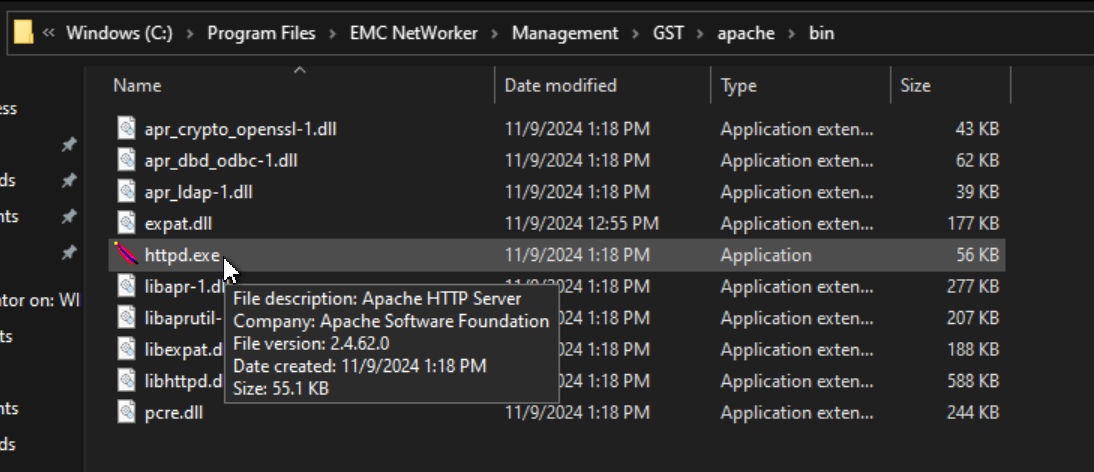
To find your installed HTTPD version on Windows, perform the following:
- Go to
C:\Program Files\EMC NetWorker\Management\GST\apache\bin - Hover your cursor over the
httpd.exe. The version is shown as seen here:
Apache Tomcat Version Validation:
Determine the Apache version used by NetWorker through the following process:
Linux:
From an elevated (root) prompt, run: JRE_HOME=/opt/nre/java/latest JAVA_HOME=/opt/nre/java/latest /opt/nsr/authc-server/tomcat/bin/version.sh
nve:~ # JRE_HOME=/opt/nre/java/latest JAVA_HOME=/opt/nre/java/latest /opt/nsr/authc-server/tomcat/bin/version.sh
Using CATALINA_BASE:   /opt/nsr/authc-server/tomcat
Using CATALINA_HOME:   /opt/nsr/authc-server/tomcat
Using CATALINA_TMPDIR: /opt/nsr/authc-server/tomcat/temp
Using JRE_HOME:        /opt/nre/java/latest
Using CLASSPATH:       /opt/nsr/authc-server/tomcat/bin/bootstrap.jar:/opt/nsr/authc-server/tomcat/bin/tomcat-juli.jar
Using CATALINA_OPTS:
Server version: Apache Tomcat/10.1.55
Server built:   May 5 2026 13:33:02 UTC
Server number:  10.1.55.0
OS Name:        Linux
OS Version:     4.12.14-122.310-default
Architecture:   amd64
JVM Version:    17.0.19+9-LTS-183
JVM Vendor:     Oracle Corporation
APR loaded:     false

Third-party libraries:
  bc-fips-1.0.2.6.jar:                   1.0.2.6
  h2-2.2.220.jar:                        2.2.220
  jakartaee-migration-1.0.10-shaded.jar: 1.0.10
  ecj-4.27.jar:                          3.33.0.v20230218-1114
Windows:
- Ensure
JAVA_HOMEenvironment variable is set:echo %JAVA_HOME% - If nothing is returned, open the system properties, and create the environment variable to identify your Java Runtime Environment (JRE) instance:
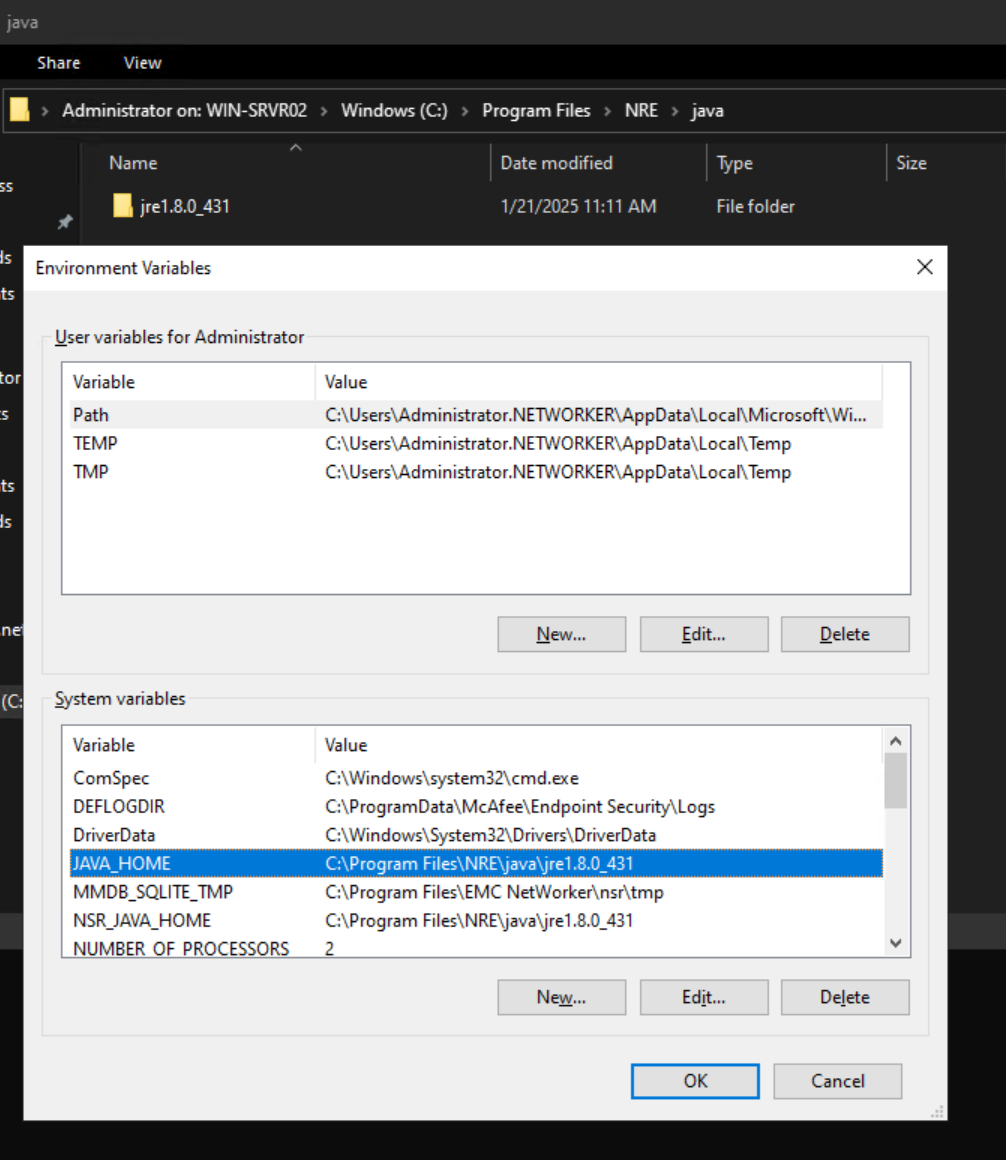
- If the variable was newly created, you must open a new command prompt to pick up the variable.
- Use the
cdcommand to navigate to your NetWorker install folder's..\nsr\authc-server\tomcat\bindirectory. For example:cd "C:\Program Files\EMC NetWorker\nsr\authc-server\tomcat\bin" - Run:
version.bat
C:\Users\Administrator.NETWORKER>cd C:\Program Files\EMC NetWorker\nsr\authc-server\tomcat\bin\

C:\Program Files\EMC NetWorker\nsr\authc-server\tomcat\bin>version.bat
Using CATALINA_BASE:   "C:\Program Files\EMC NetWorker\nsr\authc-server\tomcat"
Using CATALINA_HOME:   "C:\Program Files\EMC NetWorker\nsr\authc-server\tomcat"
Using CATALINA_TMPDIR: "C:\Program Files\EMC NetWorker\nsr\authc-server\tomcat\temp"
Using JRE_HOME:        "C:\Program Files\NRE\java\jre1.8.0_431"
Using CLASSPATH:       "C:\Program Files\EMC NetWorker\nsr\authc-server\tomcat\bin\bootstrap.jar;C:\Program Files\EMC NetWorker\nsr\authc-server\tomcat\bin\tomcat-juli.jar"
Using CATALINA_OPTS:   ""
Server version: Apache Tomcat/9.0.90
Server built:   Jun 14 2024 14:45:13 UTC
Server number:  9.0.90.0
OS Name:        Windows Server 2022
OS Version:     10.0
Architecture:   amd64
JVM Version:    1.8.0_431-b10
JVM Vendor: Oracle CorporationTo check the existence of vulnerabilities on any Apache or Tomcat version check the following URLs:
- HTTPD: https://httpd.apache.org/security_report.html
- Tomcat 10.1.x: https://tomcat.apache.org/security-10.html

Additional Information
NetWorker Security Advisories are posted under: Support for NetWorker | Advisories (You must sign-in with your Dell support account)