Dell Latitude 7370 可视指南
Summary: 以下文章提供了 Dell Latitude 7370 计算机的可视指南,并列出了笔记本电脑的外部端口和功能。
This article applies to
This article does not apply to
This article is not tied to any specific product.
Not all product versions are identified in this article.
Symptoms
Cause
顶视图

(图 1 顶视图)
| 1 | 触控板 | 2 | 指纹读取器(选配) |
| 3 | 电源按钮 |
提醒:有关键盘的指南,请参阅以下文章:
前视图
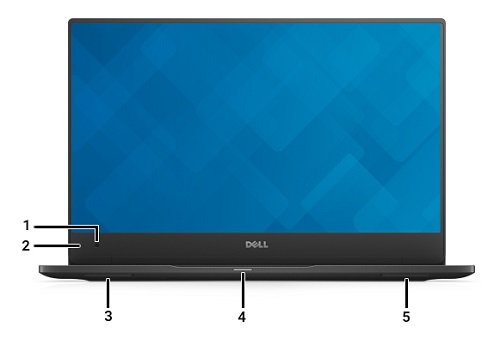
(图 2 前视图)
| 1 | 摄像头 | 2 | 摄像头状态LED指示灯 |
| 3 | 扬声器 | 4 | 状态LED |
| 5 | 扬声器 |
底部视图
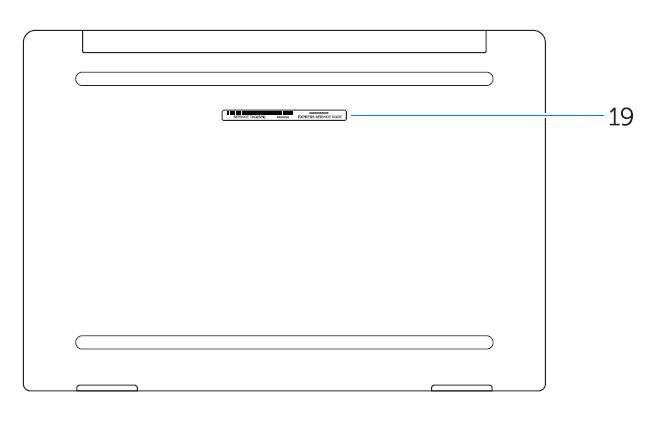
(图 3. 底部视图)
| 19 | 服务标签 |
左侧视图
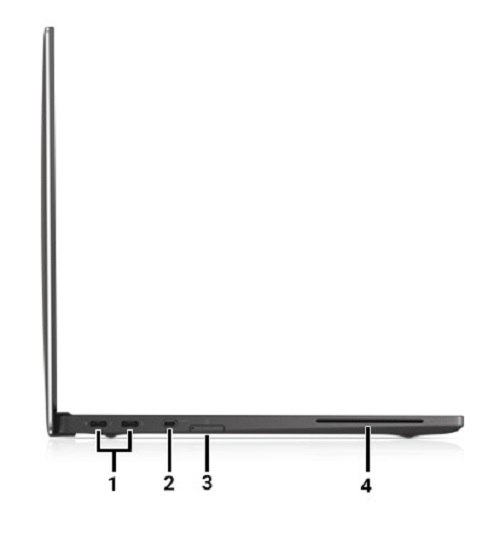
(图 4 左侧视图)
| 1 | USB Type-C 连接器 x2 | 2 | Micro HDMI 连接器 |
| 3 | Micro SIM 卡读卡器(可选) | 4 | 智能卡读卡器(可选) |
右侧视图
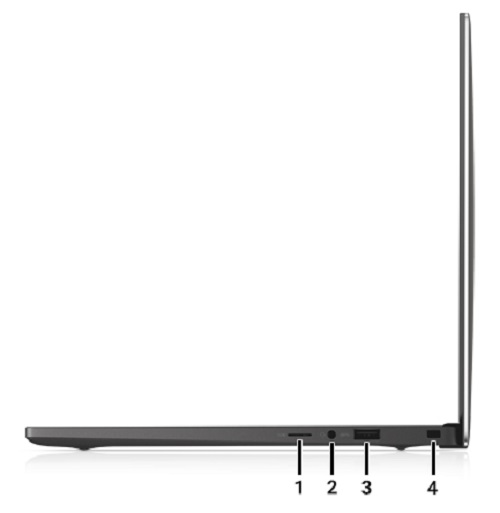
(图 5 右侧视图)
| 1 | Micro SD 卡读卡器 | 2 | 耳机接口 |
| 3 | USB 3.0 接头 | 4 | 安全缆线插槽 |
Resolution

Additional Information
Affected Products
Latitude 7370Article Properties
Article Number: 000125586
Article Type: Solution
Last Modified: 26 Jun 2023
Version: 5
Find answers to your questions from other Dell users
Support Services
Check if your device is covered by Support Services.