Dell Latitude 7370 键盘指南
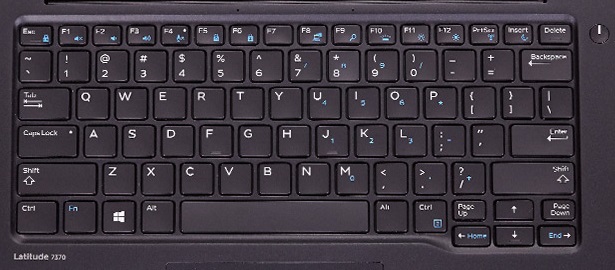
Summary: 本文提供有关可用键盘快捷方式以及它们在 Dell Latitude 13 7370 上执行的功能的信息。
This article applies to
This article does not apply to
This article is not tied to any specific product.
Not all product versions are identified in this article.
Symptoms
Cause
| 功能键组合 | 结果 |
|---|---|
| Esc 键 | Fn + Esc 锁定 Fn 键,因此所有蓝色按键均处于活动状态 |
| F1 | Fn + F1 打开/关闭静音 |
| F2 | Fn + F2 降低音量水平 |
| F3 | Fn + F3 增加声音水平 |
| F4 | Fn + F4 打开/关闭麦克风 |
| F5 | Fn + F5 打开/关闭数字锁定 |
| F6 | Fn + F6 打开/关闭滚动锁定 |
| F8 | Fn + F8 切换显示器 |
| F9 | Fn + F9 打开 Windows 中的搜索功能 |
| F10 | Fn + F10 切换液晶屏背光灯(可选) |
| F11 | Fn + F11 降低液晶屏的亮度 |
| F12 | Fn + F12 增加液晶屏的亮度 |
| PrtScr | Fn + PrtScr 切换 WIFI |
| 插入 | Fn + Insert 使计算机进入睡眠状态 |
| 左侧光标箭头 | Fn + 左侧光标箭头激活 Home 键 |
| 右侧光标箭头 | Fn + 右侧光标箭头激活 End 键 |
Resolution
 有关其他资源和信息,请访问我们的
 有关其他文章和信息,请访问
 更多文章和信息也可在我们的
Affected Products
Latitude 7370Article Properties
Article Number: 000142058
Article Type: Solution
Last Modified: 02 Oct 2023
Version: 5
Find answers to your questions from other Dell users
Support Services
Check if your device is covered by Support Services.