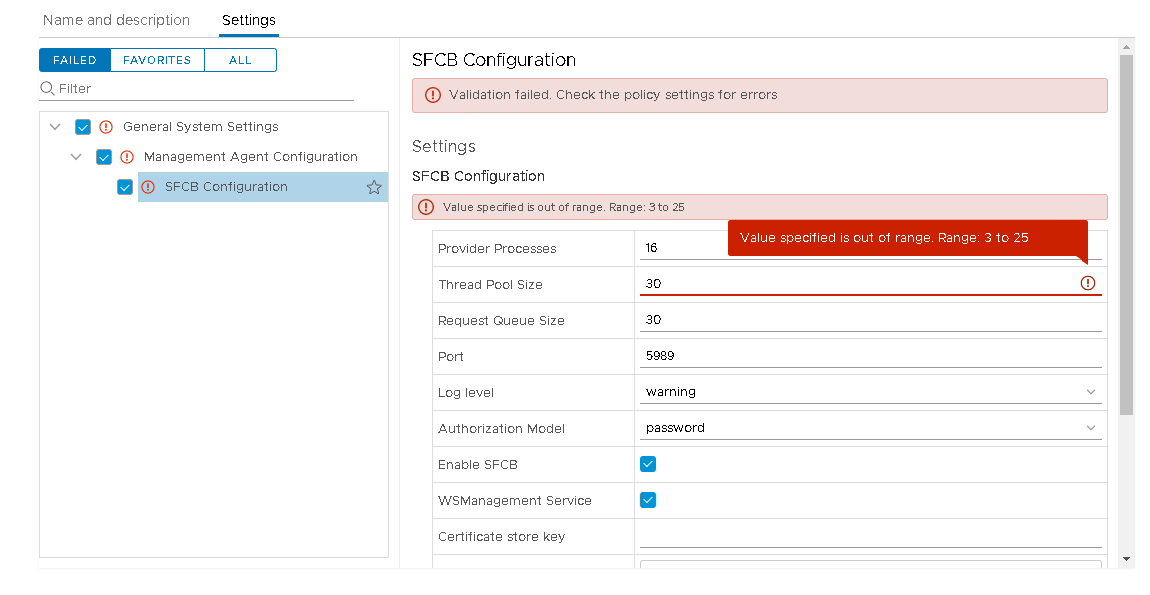
Validation fails while trying to set the Thread Pool size as 30 in Host Profile of PowerPath/VE (ESXi) host in vSphere Client and reports "Value specified is out of range"
Summary: Validation fails while trying to set the Thread Pool size as 30 in Host Profile of PowerPath/VE (ESXi) host in vSphere Client and reports "Value specified is out of range"
This article applies to
This article does not apply to
This article is not tied to any specific product.
Not all product versions are identified in this article.
Symptoms
Validation fails while trying to set the Thread Pool size as 30 in Host Profile of PowerPath/VE (ESXi) host in vSphere Client and reports "Value specified is out of range"
Cause
Due to the allowed range being 3 to 25 in vSphere, unable to set any other value out of that range in this case.
Resolution
Here are the steps performed to work-around this case:
--Detach the old Host Profile from the ESXi host
--Extract a new host profile which should contain the threadpool size as 30
--Attach this newly extracted host profile to the host
--Check Compliance and it should show the host as Compliant (even after reboot(s))
--Detach the old Host Profile from the ESXi host
--Extract a new host profile which should contain the threadpool size as 30
--Attach this newly extracted host profile to the host
--Check Compliance and it should show the host as Compliant (even after reboot(s))
Additional Information
ThreadPool size gets reset automatically post reboot of the ESXi host from Powerpath/VE v7.0 onwards.
Article Properties
Article Number: 000189238
Article Type: Solution
Last Modified: 07 Sep 2021
Version: 4
Find answers to your questions from other Dell users
Support Services
Check if your device is covered by Support Services.