IDPA: PPDP 상태 점검 툴이 다음 오류와 함께 실패합니다. 전원이 켜진 상태에서 지원되지 않는 가상 머신[AvProxy]이 있습니다.
Summary: 업그레이드 전, 업그레이드 준비 상태를 확인하기 위해 PPDP 상태 점검 툴이 실행됩니다. 내부 Avamar 프록시의 이름이 잘못되면 이 검사가 실패할 수 있습니다. 발견된 다른 명명된 가상 머신으로 인해 오류가 발생한 경우 이 KB를 따르지 마십시오.
This article applies to
This article does not apply to
This article is not tied to any specific product.
Not all product versions are identified in this article.
Symptoms
오류 메시지:
There are unsupported Virtual Machine(s) [AvProxy] in powered on state.


Cause
내부 Avamar Proxy를 수동으로 재배포하는 이전 절차에는 가상 머신의 이름을 AvProxy(소문자 "v")로 지정하는 지침이 포함되어 있습니다. 이로 인해 non_idpa_vm 검사가 실패합니다.
vSphere 웹 UI에 로그인하고 AvProxy의 이름이 잘못되었는지 확인합니다.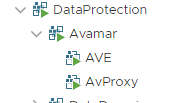
Resolution
-
vSphere 웹 UI에서 AvProxy VM을 오른쪽 클릭하고 "Rename..."을 선택합니다.

-
이 VM이 Avamar vApp의 일부이므로 이 VM 변경에 대해 경고하는 디스플레이가 표시될 수 있습니다.

-
"YES"를 선택합니다.
-
VM 이름을 "AvProxy"(소문자 v)에서 "AVProxy"(대문자 V)로 바꿉니다. 이름의 처음 세 글자는 모두 대문자 "AVP"입니다.
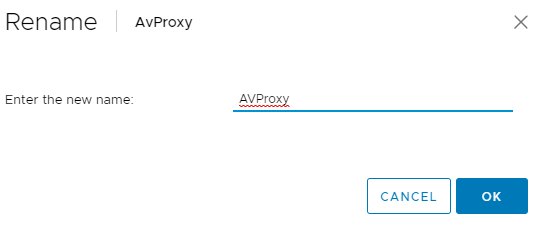
가상 머신의 이름이 변경됩니다. 상태 점검 도구는 이 오류 없이 실행되어야 합니다.
Affected Products
PowerProtect Data Protection Software, Integrated Data Protection Appliance Family, Integrated Data Protection Appliance SoftwareArticle Properties
Article Number: 000192486
Article Type: Solution
Last Modified: 04 Aug 2025
Version: 3
Find answers to your questions from other Dell users
Support Services
Check if your device is covered by Support Services.