IDPA:PPDP 執行狀況檢查工具失敗並顯示錯誤:有不支援的虛擬機器 [AvProxy] 處於開機狀態。
Summary: 升級前,會執行 PPDP 執行狀況檢查工具,以檢查升級整備度。如果內部 Avamar 代理的名稱不正確,可能會導致此檢查失敗。如果故障是由找到任何其他命名虛擬機器所導致,請勿遵循此 KB 內容。
This article applies to
This article does not apply to
This article is not tied to any specific product.
Not all product versions are identified in this article.
Symptoms
Error message:
There are unsupported Virtual Machine(s) [AvProxy] in powered on state.


Cause
先前手動重新部署內部 Avamar 代理的程序中,包含將虛擬機命名為 AvProxy 的指示 (小寫「v」)。這會導致non_idpa_vm檢查失敗。
登入 vSphere Web UI,發現 AvProxy 命名不正確: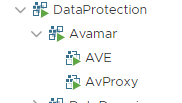
Resolution
-
在 vSphere Web UI 中,在 AvProxy VM 上按一下滑鼠右鍵,然後選取重新命名...」

-
您可能會看到顯示畫面,警告不要變更此虛擬機器,因為它是 Avamar vApp 的一部分:

-
選取「是」。
-
將 VM 從「AvProxy」(小寫 v) 重新命名為「AVProxy」(大寫 V)。名稱的前三個字母均為大寫的「AVP」。

虛擬機器已重新命名。執行狀況檢查工具應在不會發生此錯誤的情況下執行。
Affected Products
PowerProtect Data Protection Software, Integrated Data Protection Appliance Family, Integrated Data Protection Appliance SoftwareArticle Properties
Article Number: 000192486
Article Type: Solution
Last Modified: 04 Aug 2025
Version: 3
Find answers to your questions from other Dell users
Support Services
Check if your device is covered by Support Services.