AppSync:AppSync UIで、デバッグ オプションが選択されたときに[適用]ボタンが無効のままになったため、お客様はログ モードをデバッグに設定できませんでした。
Summary: AppSync UIでは、デバッグ オプションが選択されたときに[適用]ボタンが無効のままになったため、ログ レベルをデバッグに設定できませんでした。
This article applies to
This article does not apply to
This article is not tied to any specific product.
Not all product versions are identified in this article.
Symptoms
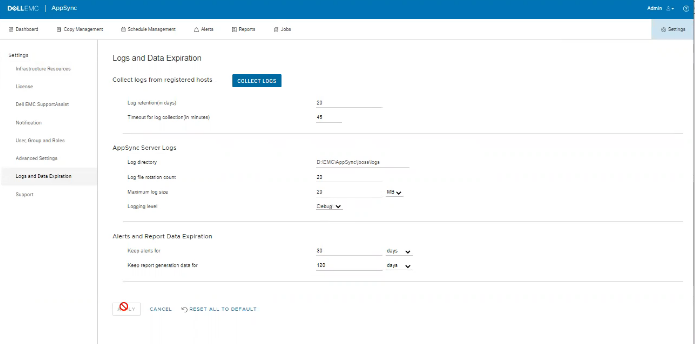
ログにエラーはありませんが、次に示すように、UIで問題が発生する可能性があります。
Cause
この問題は、お客様が同じ画面で、[Timeout for log collection(in minutes)]オプション値を無効な45に設定していたためです。
Resolution
[ログ収集のタイムアウト(分単位)]オプションの値を90および120に設定します。
Additional Information
AppSync 4.5では、「Timeout for log collection(in minutes)」
の無効な値は許可されません。有効な値は90~120です。
の無効な値は許可されません。有効な値は90~120です。
Affected Products
Data Protection, Data Backup & Protection Software, AppSync, AppSyncArticle Properties
Article Number: 000203604
Article Type: Solution
Last Modified: 09 Sep 2025
Version: 8
Find answers to your questions from other Dell users
Support Services
Check if your device is covered by Support Services.