AppSync:在 AppSync UI 中,客户无法将日志记录模式设置为调试,因为选中调试选项时,Apply 按钮保持禁用状态。
Summary: 在 AppSync UI 中,客户无法将日志记录级别设置为调试,因为选中调试选项时,Apply 按钮保持禁用状态。
This article applies to
This article does not apply to
This article is not tied to any specific product.
Not all product versions are identified in this article.
Symptoms
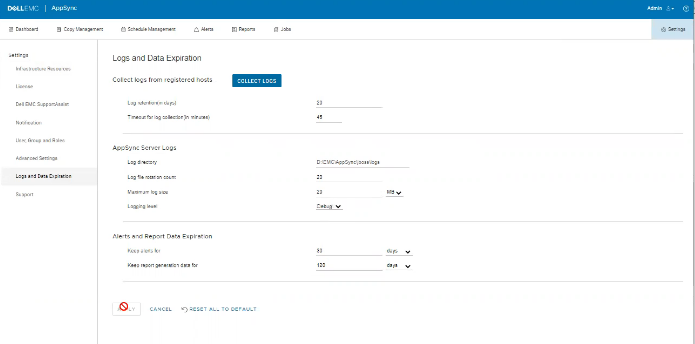
日志中没有错误,但可以在 UI 上观察到问题,如下所示。
Cause
问题在于,同一屏幕上的客户已将“Timeout for log collection(in minutes)”选项值设置为 45,这是无效的。
Resolution
将“Timeout for log collection(in minutes)”选项的值设置为有效值 90 和 120。
Additional Information
AppSync 4.5 不允许“计时日志收集(以分钟为单位)”的无效值。
有效值可以是 90 到 120。
有效值可以是 90 到 120。
Affected Products
Data Protection, Data Backup & Protection Software, AppSync, AppSyncArticle Properties
Article Number: 000203604
Article Type: Solution
Last Modified: 09 Sep 2025
Version: 8
Find answers to your questions from other Dell users
Support Services
Check if your device is covered by Support Services.