AppSync: In de AppSync UI kon de klant de loggingmodus niet instellen op foutopsporing omdat de knop Toepassen uitgeschakeld bleef toen de foutopsporingsoptie was geselecteerd.
Summary: In de AppSync UI kon de klant het logboekniveau niet instellen op foutopsporing omdat de knop Toepassen uitgeschakeld bleef toen de foutopsporingsoptie was geselecteerd.
This article applies to
This article does not apply to
This article is not tied to any specific product.
Not all product versions are identified in this article.
Symptoms
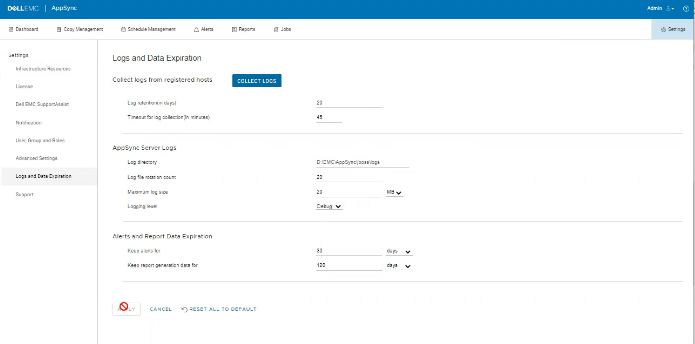
Er zijn geen fouten in de logboeken, maar het probleem kan worden waargenomen in de gebruikersinterface, zoals wordt weergegeven in de onderstaande.
Cause
Het probleem is dat de klant op hetzelfde scherm de optie "Timeout for log collection(in minutes)" had ingesteld op 45, wat ongeldig is.
Resolution
Stel de waarde voor de optie 'Timeout for log collection(in minutes)' in op een geldige waarde van 90 en 120.
Additional Information
AppSync 4.5 staat geen ongeldige waarde toe voor "Timeout for log collection(in minutes)."
Geldige waarden kunnen van 90 tot 120 zijn.
Geldige waarden kunnen van 90 tot 120 zijn.
Affected Products
Data Protection, Data Backup & Protection Software, AppSync, AppSyncArticle Properties
Article Number: 000203604
Article Type: Solution
Last Modified: 09 Sep 2025
Version: 8
Find answers to your questions from other Dell users
Support Services
Check if your device is covered by Support Services.