Mellanox MT27800 系列 ConnectX-5 連結在更換後中斷
Summary: Dell 零件編號 (DPN) 6FKDT 找到故障的網路卡更換,但連結中斷,但 TSR 或 SupportAssist 記錄中未顯示任何錯誤。
This article applies to
This article does not apply to
This article is not tied to any specific product.
Not all product versions are identified in this article.
Symptoms
問題背景:
- 在裝置設定下未偵測到 Mellanox ConnectX-5
- 更換網路卡後,可在裝置設定下偵測到 Mellanox ConnectX-5,但連結中斷或正在輪詢
提供的硬體資訊:
- 兩個相同的伺服器,但只有一個裝置遇到此問題
- 兩部伺服器的作業系統均為 CentOS 7.5。
DAC-QSFP28-100G-5.0M(DPN 0FN4FC)- Mellanox 驅動程式版本 4.5-1.0.1
- 使用者交叉交換經確認為良好的 DAC 纜線與交換器連接埠
- DPN 6FKDT 是 InfiniBand 卡,屬於無法取得介面卡資訊的非受管理配接卡的一部分。
範例:
請參閱以下範例,瞭解插卡韌體、插卡設定和連結狀態:
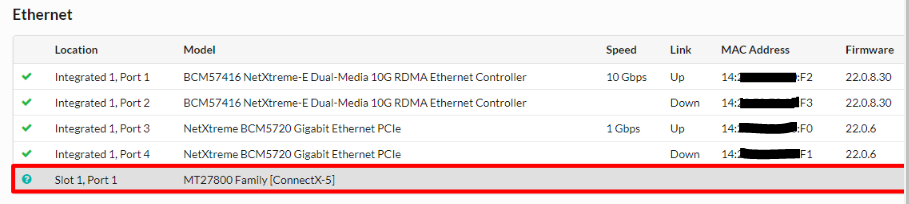 圖 1:插卡韌體層級、插卡設定和連結狀態的範例
請參閱以下範例,瞭解插卡韌體、插卡設定和連結狀態:
圖 1:插卡韌體層級、插卡設定和連結狀態的範例
提供作業系統層級資訊:
ibstat命令 - 查詢 InfiniBand 裝置的基本狀態- 使用者執行「
ibstat」命令,而該命令會從有問題的伺服器與預期運作的伺服器取得比較。
例:
有問題的 Mellanox 介面卡找到連結層,顯示「InfiniBand」
有問題的 Mellanox 介面卡找到連結層,顯示「InfiniBand」
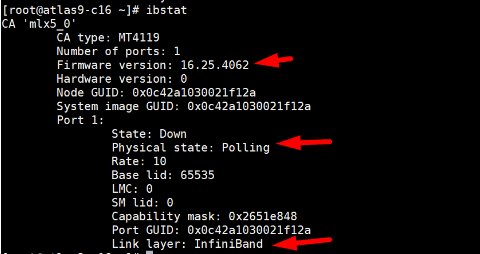
圖 2:有問題的 Mellanox 介面卡與連結「InfiniBand」的螢幕擷取畫面
按照設計工作,Mellanox 介面卡找到顯示「乙太網路」的連結層
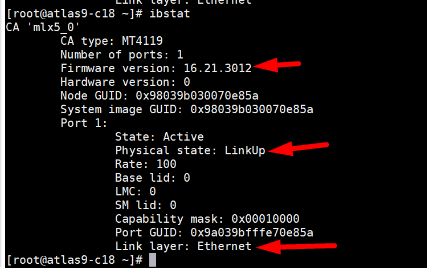
圖 3:按設計運作的螢幕擷取畫面 Mellanox 介面卡與連結「乙太網路」
向使用者確認是否連接到 InfiniBand 交換器或乙太網路交換器
- 使用者確認 Mellanox 介面卡已連接至乙太網路交換器
Cause
備註
- 由於這是一張 ConnectX-5 VPI 介面卡,表示它可以設定為執行乙太網路模式或 InfiniBand 模式。
- 如果此卡在 InfiniBand 模式上運行,則無法與乙太網路交換器連線。
- 替換介面卡的預設連結模式應一律為 InfiniBand。
Resolution
關注 NVIDIA 文章使用 mlxconfig 
IB/ETH 參數。
為了設定 IB/ETH 參數通過 mlxconfig,使用以下命令列:
# mlxconfig -d <device> set [LINK_TYPE_P1=<link_type>] [LINK_TYPE_P2=<link_type>]
例:
將兩個連接埠設定為乙太網路:
# mlxconfig -d /dev/mst/mt4119_pciconf0 set LINK_TYPE_P1=2 LINK_TYPE_P2=2

Device #1:
----------
Device type:    ConnectX5
Name:           MCX556A-ECA_Ax
Description:    ConnectX-5 VPI adapter card; EDR IB (100Gb/s) and 100GbE; dual-port QSFP28; PCIe3.0 x16; tall bracket; ROHS R6
Device:         /dev/mst/mt4119_pciconf0

Configurations:                              Next Boot       New
         LINK_TYPE_P1                        IB(1)          ETH(2)
         LINK_TYPE_P2                        IB(1)          ETH(2)

Apply new Configuration? (y/n) [n] : y
Applying... Done!
-I- Please reboot machine to load new configurations.

Remarks
P1 = Port 1
P2 = Port 2
Value 1 for InfiniBand
Value 2 for Ethernet
其他資源:
Affected Products
Rack Servers, Tower ServersArticle Properties
Article Number: 000218037
Article Type: Solution
Last Modified: 07 May 2025
Version: 2
Find answers to your questions from other Dell users
Support Services
Check if your device is covered by Support Services.