DLm:設定檔案系統時,DLm System Manager (DSM) 無法選取編號更高的 VTE
Summary: 當選取的 VTE 位於快顯視窗的第二行時,DSM 無法將檔案系統設定為 VTE。
This article applies to
This article does not apply to
This article is not tied to any specific product.
Not all product versions are identified in this article.
Symptoms
本文適用如下:
使用 DLm System Manager > 磁帶庫 > 新增 xx 檔案系統選項。
如果 VTE 候選清單跨越兩條線路,則無法在第二條線路上選取 VTE。在面板中,這會顯示為在第一行選取的 VTE:
在下列擷取中,在 DSM 中選取 VTE6 寄存器作為 VTE2 的選取: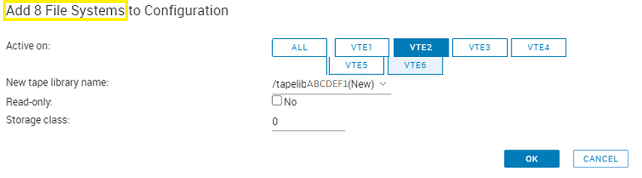
Cause
代碼錯誤
Resolution
此問題已在 DLm 韌體 V5.5.0.4 及更新版本中修正。
因應措施
逐一選取檔案系統,即可呈現更多 VTE 供第一行選擇: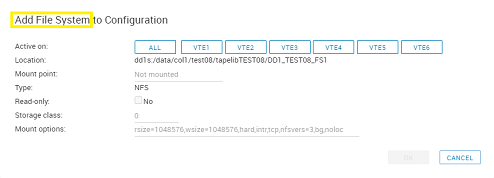
Affected Products
Disk Library for mainframe DLm8500Article Properties
Article Number: 000219127
Article Type: Solution
Last Modified: 20 Aug 2024
Version: 2
Find answers to your questions from other Dell users
Support Services
Check if your device is covered by Support Services.