Windows Server: WS2022 - 장치 관리자의 "알 수 없는 장치"에는 인텔 Tatlow LPSS 드라이버가 필요합니다.
Summary: "알 수 없는 디바이스"는 15G 및 16G 서버의 Windows Server 2022의 디바이스 관리자에 나열될 수 있습니다. 이 문제는 Dell 지원 사이트에서 다운로드할 수 있는 인텔 Tatlow LPSS 드라이버가 없기 때문에 발생할 수 있습니다.
This article applies to
This article does not apply to
This article is not tied to any specific product.
Not all product versions are identified in this article.
Symptoms
장치 관리자에 "알 수 없는 장치"가 나열됩니다. 이 장치의 속성 페이지는 아래와 비슷합니다.
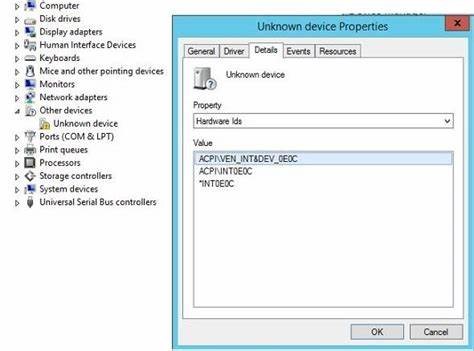 그림 1: "알 수 없는 장치" 및 이 장치의 속성 페이지를 표시하는 장치 관리자
그림 1: "알 수 없는 장치" 및 이 장치의 속성 페이지를 표시하는 장치 관리자
Cause
이는 I/O 레인 및 작업을 인식하는 인텔 문제입니다.
Resolution
이 문제를 해결하려면 서버에 인텔 Tatlow LPSS 드라이버를 설치합니다. 아래 링크에서 드라이버를 다운로드합니다.
인텔 Tatlow Platform LPSS 드라이버 | 드라이버 세부 정보
서버에서 드라이버를 추출한 후 다음을 실행합니다. SetupSerialIO.exe 을 눌러 설치를 시작합니다.
Affected Products
Microsoft Windows Server 2022, OEMR R250, OEMR XE R250, OEMR R260, OEMR XE R260, OEMR R350, OEMR XE R350, OEMR R360, OEMR XE R360, OEMR R450, OEMR R550, OEMR R650, OEMR R650xs, OEMR R660, OEMR XL R660, OEMR R660xs, OEMR R750, OEMR R750xa, OEMR R750xs
, OEMR R760, OEMR R760xa, OEMR R760XD2, OEMR XL R760, OEMR R760xs, OEMR R860, OEMR R960, OEMR T150, OEMR T350, OEMR T360, OEMR T550, OEMR XL R660xs, OEMR XL R760xs, OEMR XR11, OEMR XR12, OEMR XR5610, OEMR XR7620, PowerEdge C6525, PowerEdge C6615, PowerEdge C6620, PowerEdge HS5610, PowerEdge HS5620, PowerEdge MX750c, PowerEdge MX760c, PowerEdge R250, PowerEdge R260, PowerEdge R350, PowerEdge R360, PowerEdge R450, PowerEdge R550, PowerEdge R650, PowerEdge R650xs, PowerEdge R660, PowerEdge R660xs, PowerEdge R750, PowerEdge R750XA, PowerEdge R750xs, PowerEdge R760, PowerEdge R760XA, PowerEdge R760xd2, PowerEdge R760xs, PowerEdge R860, PowerEdge R960, PowerEdge T150, PowerEdge T160, PowerEdge T350, PowerEdge T360, PowerEdge T550, PowerEdge T560, PowerEdge XE8545, PowerEdge XE8640, PowerEdge XE9640, PowerEdge XE9680, PowerEdge XR11, PowerEdge XR12, PowerEdge XR5610, PowerEdge XR7620
...
Article Properties
Article Number: 000226471
Article Type: Solution
Last Modified: 28 Jan 2025
Version: 4
Find answers to your questions from other Dell users
Support Services
Check if your device is covered by Support Services.