Avamar Proxy Deployment Manager 失敗並顯示「並未對應所有磁碟」
Summary: 代理部署管理員 (PDM) 在代理部署期間回報錯誤:「並未對應所有磁碟。」
This article applies to
This article does not apply to
This article is not tied to any specific product.
Not all product versions are identified in this article.
Symptoms
代理建議已成功完成,並已從使用者處取得參數。
代理正在使用 ovf 進行部署,但在向 Avamar 註冊代理時失敗。
檢閱deploymanager.log時,發現磁碟無法對應至代理。出現以下錯誤:
代理正在使用 ovf 進行部署,但在向 Avamar 註冊代理時失敗。
檢閱deploymanager.log時,發現磁碟無法對應至代理。出現以下錯誤:
Log Path: /usr/local/avamar/var/log/vcs/deploymanager.log

2024-01-10T15:40:45.221+0200 DEBUG [Thread-91][worker.DeployWorker#oUploadUrlMapping]: Added (/<hostname> (19.9.100-78)/VirtualLsiLogicController0:0, https://xxxxxxxx/nfc/xxxxxxxx-xxxxxxx/disk-0.vmdk) to map
2024-01-10T15:40:45.221+0200 DEBUG [Thread-91][worker.DeployWorker#oUploadUrlMapping]: Added (/hostname (19.9.100-78)/VirtualLsiLogicController1:2, https://xxxxxxxx/nfc/xxxxxxxxx/disk-1.vmdk) to map
2024-01-10T15:40:45.221+0200 ERROR [Thread-91][worker.DeployWorker#oUploadUrlMapping]: Not all disks were mapped
Cause
出現此問題的主要原因是在 vCenter 中設定用於 VM 備份的 Avamar 備份使用者的權限。
Resolution
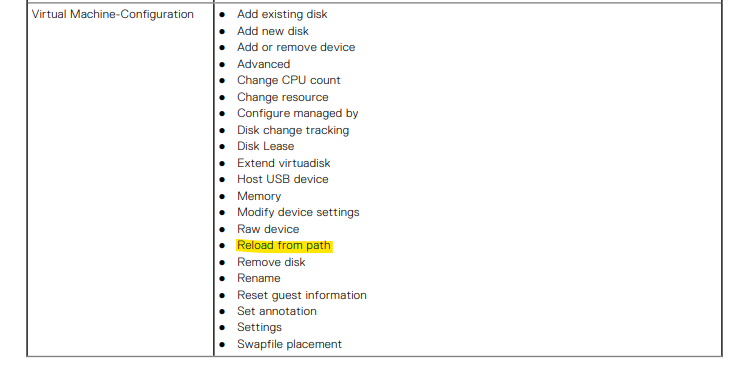
請確定用於 Avamar 整合的 vCenter 使用者具備下列所有必要權限,如 VMware 適用的 Avamar 系統管理員指南中所述。
如果問題仍然存在,請聯絡 Dell 支援 以取得進一步協助。
如果問題仍然存在,請聯絡 Dell 支援 以取得進一步協助。
Article Properties
Article Number: 000237643
Article Type: Solution
Last Modified: 23 Oct 2024
Version: 1
Find answers to your questions from other Dell users
Support Services
Check if your device is covered by Support Services.