Dell Networking:OS10 弱 ssh-rsa 演算法
Summary: 此問題是由 nmap 在執行韌體版本 10.5.6.6 的 Dell S4148F-ON 交換器上偵測到的 ssh-rsa 演算法較弱的問題。客戶回報此漏洞,並要求提供解決方案來停用弱式演算法。安全團隊確認 OpenSSH 中仍然支援 ssh-rsa 以實現向後相容性,但建議將其從預設清單中刪除。
This article applies to
This article does not apply to
This article is not tied to any specific product.
Not all product versions are identified in this article.
Symptoms
- Nmap 掃描工具偵測到使用的 ssh-rsa 演算法較弱
- 客戶找不到用來停用演算法的 OS10 命令。
Cause
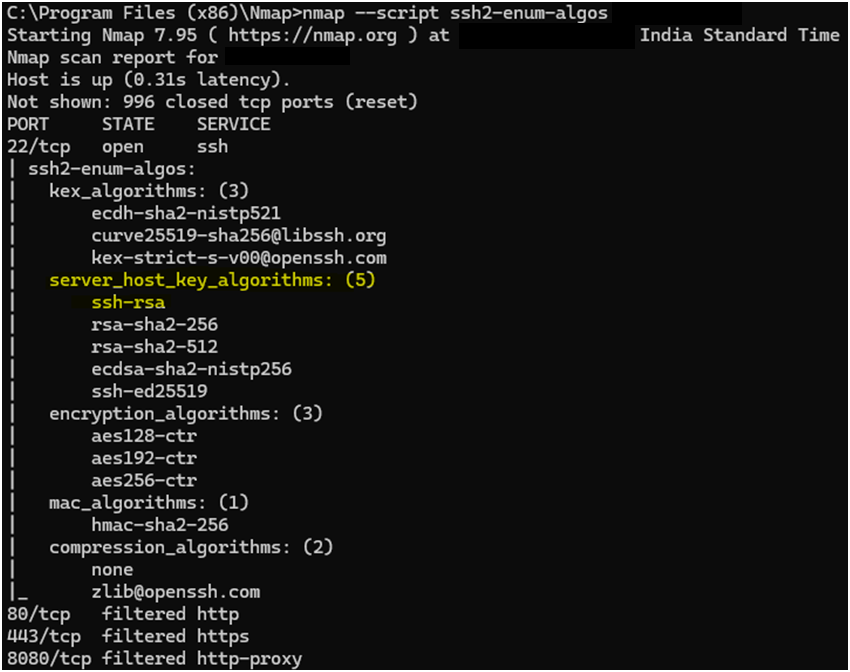
根本原因是伺服器主機密鑰的受支援演演演算法清單中存在 ssh-rsa 演演演算法,這被認為是弱且易受攻擊的。
Resolution
修正版本:修正的目標版本是 10.6.0.2。
因應措施:客戶可以使用更強大的主機金鑰演算法,例如 rsa-sha2-512 和 ssh-ed25519。
後續步驟:使用 HostKeyAlgorithms 選項延伸 IP ssh 伺服器 CLI,以設定預設演算法。
範例記錄
nmap --script ssh2-enum-algos <switch ip address>
Starting Nmap 7.80 ( https://nmap.org ) at 2024-11-25 11:47 IST
Nmap scan report for 100.104.93.82
Host is up (0.0034s latency).
Not shown: 999 closed ports
PORT   STATE SERVICE
22/tcp open  ssh
ssh2-enum-algos:
  kex_algorithms: (4) curve25519-sha256 curve25519-sha256@libssh.org ecdh-sha2-nistp384 kex-strict-s-v00@openssh.com
  server_host_key_algorithms: (5) ssh-rsa rsa-sha2-256 rsa-sha2-512 ecdsa-sha2-nistp256 ssh-ed25519
  encryption_algorithms: (2) aes256-ctr aes256-gcm@openssh.com
  mac_algorithms: (3) umac-128@openssh.com hmac-sha2-256 hmac-sha2-512
  compression_algorithms: (2) none zlib@openssh.com
Nmap done: 1 IP address (1 host up) scanned in 0.47 seconds
針對 OS10 交換器使用 NMAP 輸出:
Additional Information
相關的 KB 000242118 - 如何從執行 OS10 韌體的 Dell 交換器移除 SSH RSA 主機金鑰。
Article Properties
Article Number: 000275289
Article Type: Solution
Last Modified: 17 Sep 2025
Version: 2
Find answers to your questions from other Dell users
Support Services
Check if your device is covered by Support Services.