Les écrans externes affichent une vidéo incomplète après la combinaison d’écrans dans Intel Graphics Command Center
Summary: Informations sur l’échec de l’affichage de la fonction Intel Graphic Command Center sur les écrans externes de la fonction de moissonneuse-batteuse Intel Graphic Command Center.
This article applies to
This article does not apply to
This article is not tied to any specific product.
Not all product versions are identified in this article.
Symptoms
Lors de l’utilisation de la fonction de combinaison ou de dissociation dans Intel Graphic Command Center, il peut arriver que les moniteurs externes affichent des images incomplètes. La fonction combinée permet à deux écrans externes de s’afficher comme un seul écran.
Systèmes concernés :
- Dell 16 Premium DA16250
Cause
Le centre de commande graphique Intel est à l’origine de ce problème.
Resolution
Intel Graphics Software
Intel a publié une nouvelle application Intel Graphics Software, cette nouvelle version n’a aucun problème lors de l’utilisation de la fonction de moissonneuse-batteuse. La nouvelle application Intel Graphics Software peut être téléchargée à partir du Microsoft Store.
- Accédez au Microsoft Store.
- Recherchez « Intel Graphic Software » dans la zone de recherche .
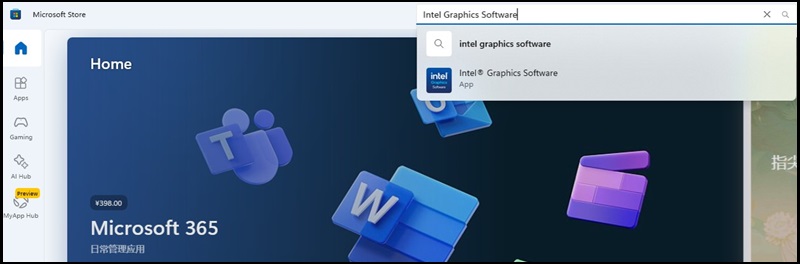
- Cliquez sur le bouton « Obtenir » pour installer l’application.

Affected Products
Dell 16 Premium DA16250Article Properties
Article Number: 000340466
Article Type: Solution
Last Modified: 15 Sep 2025
Version: 2
Find answers to your questions from other Dell users
Support Services
Check if your device is covered by Support Services.