Eksterne skærme viser ufuldstændig video efter kombination af skærme i Intel Graphics Command Center
Summary: Oplysninger om mejetærskerfunktionen Intel Graphic Command Center, der ikke viser komplet video på eksterne skærme.
This article applies to
This article does not apply to
This article is not tied to any specific product.
Not all product versions are identified in this article.
Symptoms
Når du bruger kombinations- eller frakoblingsfunktionen i Intel Graphic Command Center, kan der være tilfælde, hvor de eksterne skærme viser ufuldstændige billeder. Kombinationsfunktionen gør det muligt at vise to eksterne skærme som én skærm.
Berørte systemer:
- Dell 16 Premium DA16250
Cause
Intel Graphic Command Center er årsag til dette problem.
Resolution
Intel-grafiksoftware
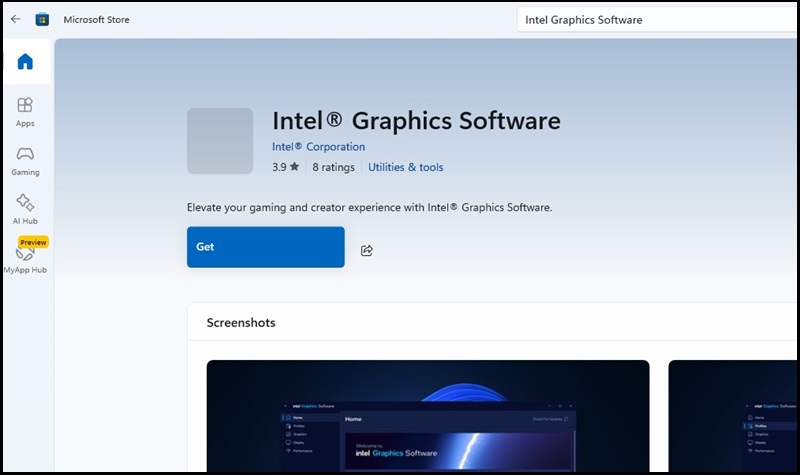
Intel har udgivet en ny Intel Graphics Software-app, denne nye version har ikke noget problem, når du bruger kombinationsfunktionen. Den nye Intel Graphics Software-app kan downloades fra Microsoft Store.
- Gå til Microsoft Store.
- Søg efter "Intel Graphic Software" i søgefeltet.
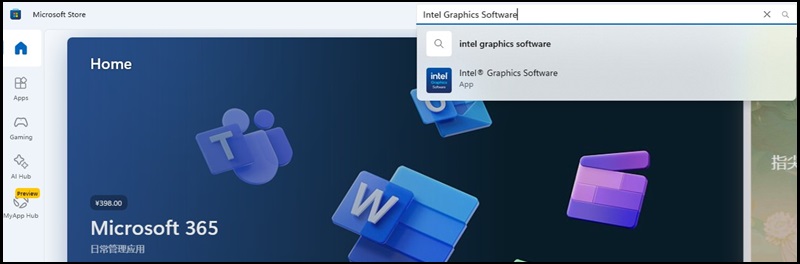
- Klik på knappen "Hent" for at installere appen.
Affected Products
Dell 16 Premium DA16250Article Properties
Article Number: 000340466
Article Type: Solution
Last Modified: 15 Sep 2025
Version: 2
Find answers to your questions from other Dell users
Support Services
Check if your device is covered by Support Services.