Data Domain:如何啟用 Data Domain 的法規遵循或治理
Summary: 本文說明在 Data Domain 上設定法規遵循或治理模式的程序。設置過程中面臨的挑戰以螢幕截圖逐步顯示。
This article applies to
This article does not apply to
This article is not tied to any specific product.
Not all product versions are identified in this article.
Instructions
建立安全性使用者 (CLI):創建具有安全角色的使用者,因為合規性操作需要此角色。
user add <username> role security啟用安全性授權 (CLI):使用具有「安全性」角色指派給使用者的登入資料登入,以啟用授權。
authorization policy set security-officer enabled檢查相容性為啟用或停用。
system retention-lock compliance status
設定系統相容性 (CLI):執行系統層級相容性組態,這需要安全性使用者認證。
system retention-lock compliance configure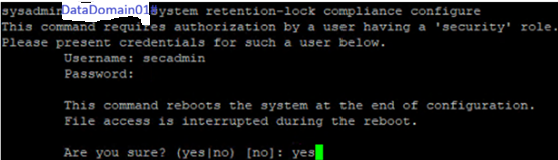
注意:在此程序中,系統會自動重新開機。
建立整合式 Dell Remote Access Controller 使用者以啟用法規遵循模式,其中兩個具有操作員角色,兩個唯讀。記下密碼。
user iDrac create
啟用相容性模式 (CLI):重新開機後,請啟用法規遵循模式。針對系統日期變更限制和日期變更頻率,預設選項為否 。
system retention-lock compliance enable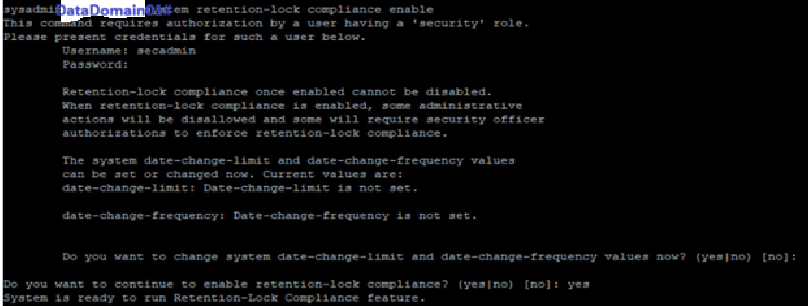
如果我們選取 「是 」,則必須設定 DD 上的強化參數,其中一個零件為日期變更頻率。
啟用 MTree Retention Lock (CLI):啟用特定 MTree 上的鎖定。
mtree retention-lock enable mode compliance mtree <mtree-path>
Additional Information
啟用 Data Domain 法規遵循或治理模式
Affected Products
Data DomainArticle Properties
Article Number: 000427580
Article Type: How To
Last Modified: 02 Mar 2026
Version: 1
Find answers to your questions from other Dell users
Support Services
Check if your device is covered by Support Services.