Data Domain:如何在 Data Domain 上实现合规性或治理
Summary: 本文介绍在 Data Domain 上设置法规遵从性或治理模式的过程。设置过程中面临的挑战通过屏幕截图逐步显示。
This article applies to
This article does not apply to
This article is not tied to any specific product.
Not all product versions are identified in this article.
Instructions
创建安全用户 (CLI):创建具有安全角色的用户,因为合规性作需要此角色。
user add <username> role security启用安全授权 (CLI):使用为用户分配有安全角色的凭据登录以启用授权。
authorization policy set security-officer enabled检查合规性是已启用还是已禁用。
system retention-lock compliance status
配置系统合规性 (CLI):运行系统级合规性配置,这需要安全用户凭据。
system retention-lock compliance configure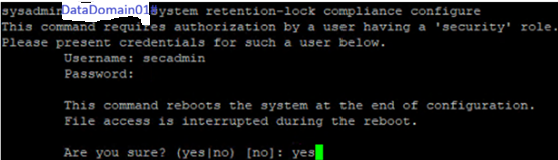
提醒:在此过程中,系统将自动重新启动。
创建 integrated Dell Remote Access Controller 用户以启用合规性模式,其中两个用户具有角色,两个用户具有只读角色。记下密码。
user iDrac create
启用合规性模式 (CLI):重新引导后,启用合规性模式。对于系统日期更改限制和日期更改频率,使用默认选项否 。
system retention-lock compliance enable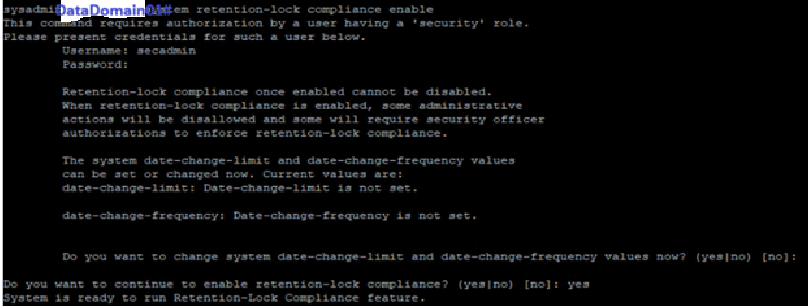
如果选择 Yes ,则必须在 DD 上配置强化参数,其中一部分是日期更改频率。
启用 MTree Retention Lock (CLI):在特定 MTree 上启用锁定。
mtree retention-lock enable mode compliance mtree <mtree-path>
Additional Information
Data Domain 合规性或治理模式启用
Affected Products
Data DomainArticle Properties
Article Number: 000427580
Article Type: How To
Last Modified: 02 Mar 2026
Version: 1
Find answers to your questions from other Dell users
Support Services
Check if your device is covered by Support Services.