Dell Security Management Server Virtual 無法升級,並傳回指出 Postgresql 套裝未經驗證的錯誤
Summary: 本文說明如何解決在升級 Dell Security Management Server Virtual 期間,指出無法驗證 postgresql-contrib-9.5 套裝的錯誤訊息。
Symptoms
受影響的產品:
- Dell Security Management Server Virtual
受影響的版本:
- v10.1.0 及更新版本
Cause
執行升級至 Dell Security Management Server Virtual 時,可能會出現警告或錯誤,表示 postgresql-contrib-9.5, postgresql-client-9.5 和 postgresql-9.5 套件無法正確驗證。
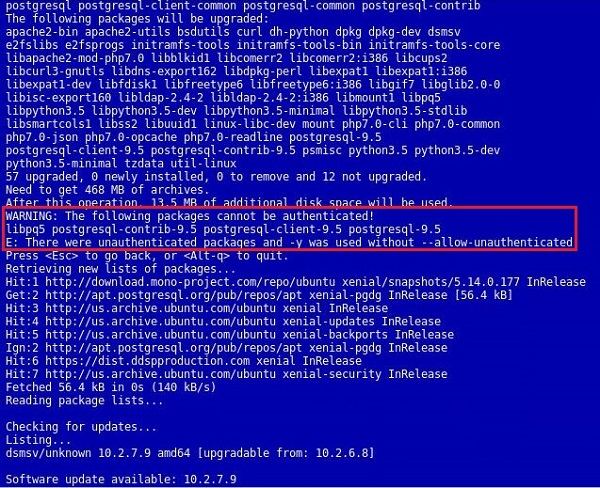
圖 1:(僅限英文) 此警告和錯誤會顯示在更新的使用者介面中
Resolution
發生此錯誤是因為用於簽署 postgresql 套裝的金鑰已更新,但不存在於 Ubuntu 的預設儲存庫中。必須在 Dell Security Management Server Virtual 上手動更新用於驗證的金鑰,才能解決此錯誤。若要更新金鑰,請執行以下步驟。
- 使用以下功能登入主控台
delluser帳戶 (預設密碼:delluser)。

圖 2:(僅限英文) 登入主控台
- 前往啟動 Shell 選項。

圖 3:(僅限英文) 選取「啟動 Shell」
- 將使用者切換至
dellsupport使用命令su dellsupport(預設密碼:dellsupport)。

圖 4:(僅限英文) 切換使用者
- 執行命令
sudo apt-get update && sudo apt-key update。

圖 5:(僅限英文)執行命令 sudo apt-get update && sudo apt-key updat
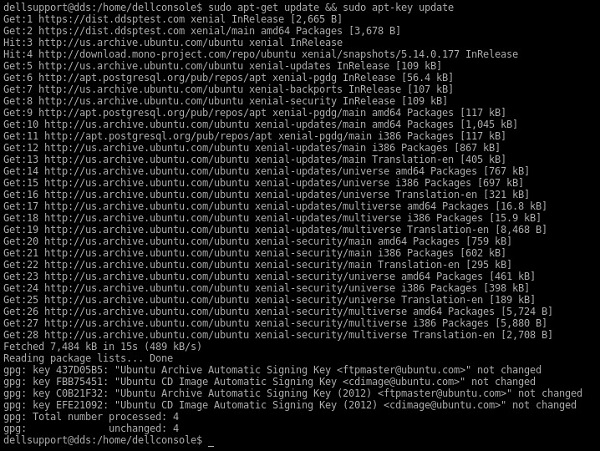
圖 6:(僅限英文) 命令在畫面上的輸出範例
- 在出現 ONIE 提示時,執行下列命令:
sudo apt-get install curl ca-certificates gnupg並接受提示,詢問是否適用于我們額外的磁碟空間。
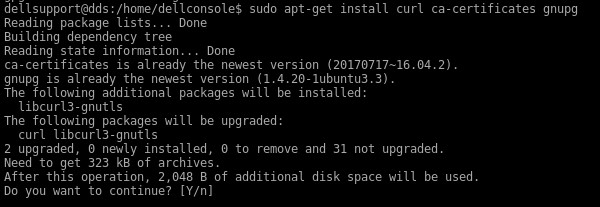
圖 7:(僅限英文)運行 sudo apt-get install curl ca-certificates gnupg
- 在出現 ONIE 提示時,執行下列命令:
curl https://www.postgresql.org/media/keys/ACCC4CF8.asc | sudo apt-key add -.

圖 8:(僅限英文)運行 curl https://www.postgresql.org/media/keys/ACCC4CF8.asc | sudo apt-key add -
如果這些命令失敗,請參閱下方的附錄 A。
- 結束
dellsupport輸入使用者內容exit。 - 輸入以返回主控台
exit再次。 - 前往基本組態以重新執行更新,然後前往更新 Dell Security Management Server Virtual...。
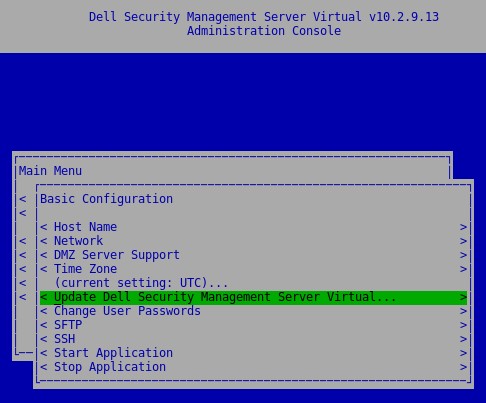
圖 9:(僅限英文) 重新執行更新
附錄 A
如果更新 PostgreSQL 的金鑰失敗,可以叫用一種方法直接從 Ubuntu keyservers,雖然此方法略過金鑰的驗證。
在 Shell 內,並以身分登入 dellsupport 執行下列命令。此命令要區分大小寫。
sudo apt-key adv --keyserver keyserver.ubuntu.com --recv-keys 7FCC7D46ACCC4CF8

圖 10:(僅英文) 執行 sudo apt-key adv --keyserver keyserver.ubuntu.com --recv-keys 7FCC7D46ACCC4CF8
這應該會使金鑰在本機金鑰存放區內更新,並允許涉及 PostgreSQL 的更新繼續進行。以下範例是已匯入 PostgreSQL 金鑰的範例。成功匯入時,會匯入多個金鑰。

圖 11:(僅限英文) 已匯入 PostgreSQL 金鑰的範例
如要聯絡支援部門,請參閱 Dell Data Security 國際支援電話號碼。
請前往 TechDirect,以線上產生技術支援要求。
如需更多深入見解與資源,請加入 Dell 安全性社群論壇。