IDPA: PowerProtect DP Rapid Upgrade Checker ha segnalato un errore di verifica preliminare dell'aggiornamento del firmware
Summary: Appliance serie PowerProtect Data Protection (DP) e IDPA: PowerProtect DP Rapid Upgrade Checker (RUCK) ha segnalato un controllo preliminare dell'aggiornamento del firmware non riuscito. The cached response with Node Event Service is disabled. Node Event Service è in uno stato danneggiato, iDRAC Service Module non è attualmente disponibile/attivo. Check iDRAC Service Module/iDRAC status. Ciò può essere causato da un firmware obsoleto della scheda NVMe PM1735 nello slot 4 dell SSD PCIe. ...
Symptoms
PowerProtect Data Protection Rapid Upgrade Checker (RUCK) ha esito negativo con il seguente errore:
+-----------+--------------------+--------+-----------------------------------------------+-----------------------------------------------+
| Component | Check              | Status | Message                                       | Remedy                                        |
+-----------+--------------------+--------+-----------------------------------------------+-----------------------------------------------+
| ESXi      | firmware_readiness | FAILED | Firmware pre-upgrade checks failed. [ xxx.xxx.| Use KB https://www.dell.com/support/kbdoc/191 |
|           |                    |        | xxx.xxx ]: The cached response with Node Event| 627 to fix the issue.                         |
|           |                    |        | Service is disabled. Node Event Service is in |                                               |
|           |                    |        |  a degraded state,iDRAC Service Module is not |                                               |
|           |                    |        |  available/active at this time. Check iDRAC S |                                               |
|           |                    |        | ervice Module/iDRAC status.                   |                                               |
+-----------+--------------------+--------+-----------------------------------------------+-----------------------------------------------+
[ERROR] Firmware pre-upgrade checks failed. [ <ESXi IP Address> ]: The cached response with Node Event Service is disabled. Node Event Service is in a degraded state, iDRAC Service Module is not available/active at this time. Check iDRAC Service Module/iDRAC status.
Il modello hardware dell'unità SSD PCIe nello slot 4 è una scheda Dell Enterprise NVMe AGN MU AIC da 1,6 TB (NVMe PM1735) e il firmware è inferiore alla versione 2.3.0.
Il modello della scheda SSD PCIe e la versione del firmware sono disponibili su iDRAC. Dischi fisici di > sistema > Dispositivo PCIe - SSD PCIe nello slot 4 disco 1
In questo esempio, la scheda SSD PCIe è PM1725b. Pertanto, la soluzione alternativa non è applicabile in questo caso:
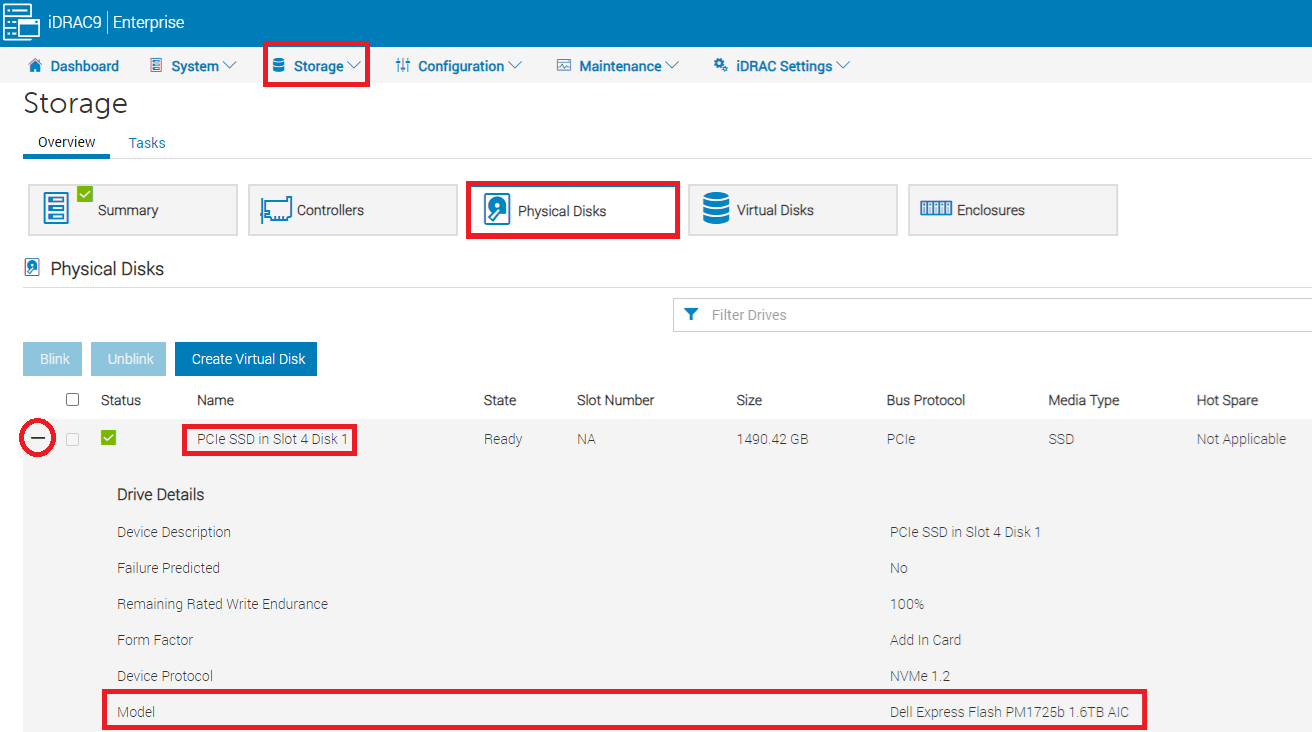
Figura 1. Come trovare la scheda SSD PCIe dall'interfaccia utente di iDRAC.
Dal registro del report di supporto tecnico (TSR) di Dell iDRAC, la scheda SSD PCIe è denominata "Dell Ent NVMe AGN MU AIC 1.6TB":
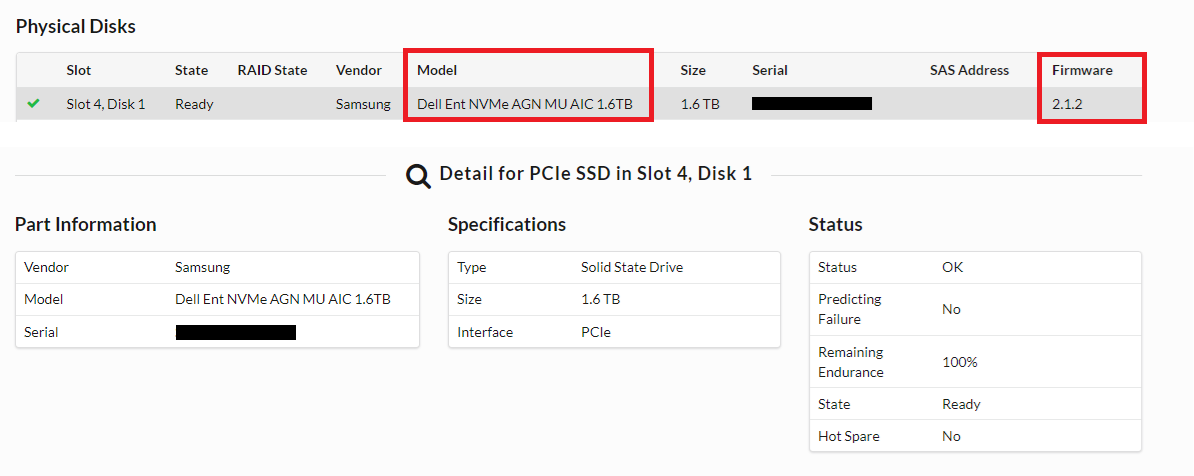
Figura 2. Dal registro TSR, la scheda NVMe PM1735 è denominata Dell Ent NVMe AGN MU AIC 1.6 TB.
Nell'interfaccia utente di iDRAC, iDRAC Service Module (iSM) viene visualizzato come Running:

Figura 3. Lo stato iSM è in esecuzione.
Dell PT Agent e iSM sono in esecuzione e il problema persiste dopo il riavvio:
[root@ESXi:/opt/dell/DellPTAgent/tools] /etc/init.d/DellPTAgent status
DellPTAgent is running
[root@ESXi:/opt/dell/DellPTAgent/tools] /etc/init.d/DellPTAgent stop
Stopping DellPTAgent...
watchdog-DellPTAgent: Terminating watchdog process with PID 7447869
DellPTAgent stopped
[root@ESXi:/opt/dell/DellPTAgent/tools] /etc/init.d/DellPTAgent start
Starting DellPTAgent...
DellPTAgent started
[root@ESXi:/opt/dell/DellPTAgent/tools] /etc/init.d/DellPTAgent status
DellPTAgent is running
[root@ESXi:/opt/dell/DellPTAgent/tools]

[root@ESXi:/opt/dell/DellPTAgent/tools] /etc/init.d/dcism-netmon-watchdog status
iSM is active (running)
[root@ESXi:/opt/dell/DellPTAgent/tools] /etc/init.d/dcism-netmon-watchdog stop
Module dcism_module successfully unloaded
[root@ESXi:/opt/dell/DellPTAgent/tools] /etc/init.d/dcism-netmon-watchdog start
[root@ESXi:/opt/dell/DellPTAgent/tools] /etc/init.d/dcism-netmon-watchdog status
iSM is active (running)
[root@ESXi:/opt/dell/DellPTAgent/tools]
Cause
Da ACM, la cache iDRAC è danneggiata:
ACM:/tmp # dpacli -agentinfo
{"Agent Info": [{"ESXiHost-xxx.xxxx.xxx.xxx": {
    "ptagentversion": "2.4.1-3",
    "uptime": "54 seconds ( 54 seconds )",
    "ism_version": "3.6.0",
    "system_uuid": "618axxxx-xxxx-xxxx-xxxx-xxxxxxxxdd70",
    "process_id": "7440642",
    "host_epoch_time": "1646617738.156490 (secs.usecs)",
    "model": "DP4400",
    "name": "<ESXi_hostname>",
    "mfr": "Dell Inc.",
    "domain": "<ESXi FQDN>",
    "servicetag": "XXXXXXX",
    "os": "VMWare ESXi",
    "os_version": "6.7.0 build-17700523",
    "rest_endpoints": "https://127.0.0.1:8086,https://192.168.100.101:8086",
    "api_blocking_enabled": "false",
    "TPM Present": "false",
    "MarvellLibraryVersion": "5.0.13.1109",
    "libstorelib.so": "07.07",
    "libstorelibir-3.so": "15.03-0",
    "libstorelibit.so": "07.05",
    "idrac_pass_thru_ip": "169.254.0.1",
    "idrac_ethernet_ip": "xx.xxx.xxx.x",
    "host_pass_thru_ip": "169.254.0.2",
    "default_server_cert": "true",
    "status": {
        "idraccache": "Degraded",
        "idracConnection": "OK",
        "iSM": "N/A",
        "agent": "Degraded"
    }
}}]}
ACM:/tmp #
E le stesse informazioni vengono visualizzate quando si estrae da ESXi:
[root@ESXi:~] /opt/dell/DellPTAgent/tools/pta_call get agent/info
Request sent to DellPTAgent @ https://192.168.100.101:8086
{
    "TPM Present": "false",
    "MarvellLibraryVersion": "5.0.13.1109",
    "uptime": "344 seconds ( 5 minutes 44 seconds )",
    "system_uuid": "618axxxx-xxxx-xxxx-xxxx-xxxxxxxxdd70",
    "host_pass_thru_ip": "169.254.0.2",
    "servicetag": "XXXXXXX",
    "domain": "<ESXi FQDN>",
    "default_server_cert": "true",
    "libstorelibir-3.so": "15.03-0",
    "model": "DP4400",
    "idrac_ethernet_ip": "xxx.xxx.xxx.xxx",
    "os": "VMWare ESXi",
    "rest_endpoints": "https://127.0.0.1:8086,https://192.168.100.101:8086",
    "mfr": "Dell Inc.",
    "api_blocking_enabled": "false",
    "libstorelib.so": "07.07",
    "ptagentversion": "2.4.1-3",
    "ism_version": "3.6.0",
    "host_epoch_time": "1646618523.10088 (secs.usecs)",
    "os_version": "6.7.0 build-17700523",
    "libstorelibit.so": "07.05",
    "idrac_pass_thru_ip": "169.254.0.1",
    "name": "<ESXi_hostname>",
    "process_id": "7441193",
    "status": {
        "idraccache": "Degraded",
        "idracConnection": "OK",
        "agent": "Degraded",
        "iSM": "N/A"
    }
}
Response: status: 200 [OK], size: 1067 bytes, latency: 0.145 seconds.
[root@ESXi:~]
In questo caso, PT Agent non è riuscito a trovare il componente "PhysicalDisk" in hwInventory perché ha problemi a interrogare i dati dalla scheda NVMe PM1735 nello slot 4.
Da ESXi /scratch/log/pta_debug.log, viene visualizzato il messaggio di errore:
2022/03/07 04:51:03[UTC] [7459005:193227584] WARN  - WSManClient::isValidResponse: Http request to host: 169.254.0.1, failed with status code: -5
2022/03/07 04:51:03[UTC] [7459005:193227584] WARN  - getComponentFromInventory: Cannot find component 'PhysicalDisk' in hwInventory:
{
    "Message": "Read timed out!",
    "ReturnValue": -5
}
2022/03/07 04:52:57[UTC] [7459005:189000512] WARN  - NvmeDiscoveredDevice::setIntAttrFromDescriptor: Cannot convert string <ie> to int.
2022/03/07 04:52:57[UTC] [7459005:189000512] WARN  - NvmeDiscoveredDevice::setIntAttrFromDescriptor: Failed to read <bay> from <PCIe Slot 4>
Pertanto, si consiglia di aggiornare il firmware NVMe 1735 alla versione 2.3.0, fornito in bundle nel documento "PowerProtect Data Protection Appliance-IDPA Firmware Gen14 December 2021". Il file del firmware richiesto è: Express-Flash-PCIe-SSD_Firmware_RP8RC_WN64_2.3.0_A03.EXE
Resolution
Per aggiornare il firmware NVMe 1735 alla versione 2.3.0:
-
Scaricare "PowerProtect Data Protection Series Appliance-IDPA Firmware Gen14 December 2021" dal web di supporto Dell , quindi estrarre il file del firmware richiesto
Express-Flash-PCIe-SSD_Firmware_RP8RC_WN64_2.3.0_A03.EXE. -
Arrestare Integrated Data Protection Appliance dall'interfaccia utente web di ACM.
-
Dopo aver verificato che ESXi è spento, accedere all'interfaccia utente di iDRAC, quindi caricare manualmente il file del firmware in iDRAC:
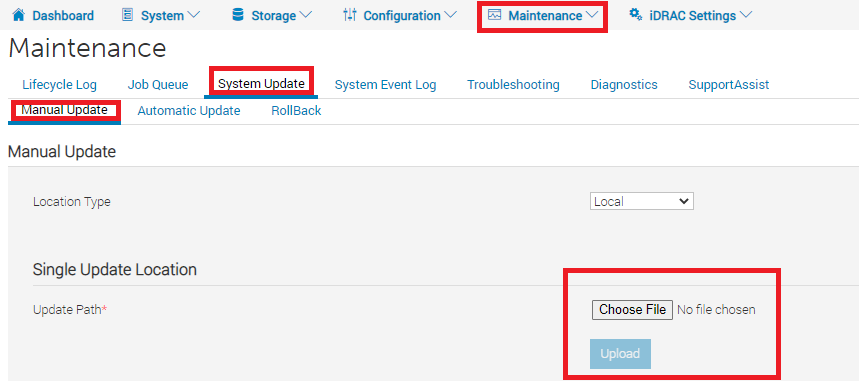
Figura 4. Come caricare il firmware nell'interfaccia utente di iDRAC -
Selezionare l'icona
Express-Flash-PCIe-SSD_Firmware_RP8RC_WN64_2.3.0_A03.EXEe cliccare su Installa e riavvia. Quindi iDRAC installa il firmware e si riavvia.
Figura 5. Come applicare il firmware -
Dopo il riavvio, è possibile verificare la versione del firmware in iDRAC >System > Inventory >Firmware Inventory:

Figura 6. Come rivedere il firmware dall'inventario dei firmware - Monitoraggio dell'avvio del sistema DP4400 e successiva all'avvio corretto delle macchine virtuali.
- Eseguire nuovamente il comando
dpaclicomando di nuovo in ACM e verificare che ilidraccachee lo stato dell'agente dovrebbe cambiare in OK:
ACM:~ # dpacli -agentinfo
{"Agent Info": [{"ESXiHost-xxx.xxxx.xxx.xxx": {
    "ptagentversion": "2.4.1-3",
    "uptime": "595 seconds ( 9 minutes 55 seconds )",
    "ism_version": "3.6.0",
    "system_uuid": "618axxxx-xxxx-xxxx-xxxx-xxxxxxxxdd70",
    "process_id": "2100391",
    "host_epoch_time": "1646800495.522825 (secs.usecs)",
    "model": "DP4400",
    "name": "<ESXi_hostname>",
    "mfr": "Dell Inc.",
    "domain": "<ESXi FQDN>",
    "servicetag": "XXXXXXX",
    "os": "VMWare ESXi",
    "os_version": "6.7.0 build-17700523",
    "rest_endpoints": "https://127.0.0.1:8086,https://192.168.100.101:8086",
    "api_blocking_enabled": "false",
    "TPM Present": "false",
    "MarvellLibraryVersion": "5.0.13.1109",
    "libstorelib.so": "07.07",
    "libstorelibir-3.so": "15.03-0",
    "libstorelibit.so": "07.05",
    "idrac_pass_thru_ip": "169.254.0.1",
    "idrac_ethernet_ip": "xxx.xxx.xxx.xxx",
    "host_pass_thru_ip": "169.254.0.2",
    "default_server_cert": "true",
    "status": {
        "idraccache": "OK",
        "idracConnection": "OK",
        "iSM": "N/A",
        "agent": "OK"
    }
}}]}
ACM:~ #
-
Eseguire nuovamente lo strumento di controllo integrità RUCK per verificare se il problema è stato risolto.
Additional Information
Il pacchetto firmware "PowerProtect DP Series Appliance-IDPA Firmware Gen14 December 2021" può essere scaricato dalla pagina web del supporto Dell: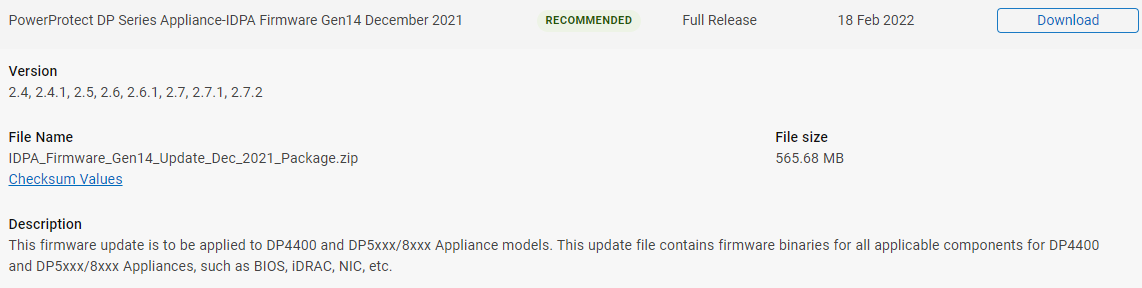
Figura 7: Il firmware "PowerProtect DP Series Appliance-IDPA Firmware Gen14 December 2021" è disponibile nella pagina web del supporto Dell.
Per estrarre il firmware da IDPA_Firmware_Gen14_Update_Dec_2021_Package.zip, estrai tutti i file del pacchetto: "dpafw-2.312.rpm" > "dpafw-2.312-0.noarch.cpio" > "IDPA-2.312-2.312.tar.gz" > "IDPA-2.312-2.312.tar",> il file del firmware è disponibile in DUPS > NVME: Figura 8: Esempio di estrazione del firmware NVMe PM1735 dal pacchetto firmware "PowerProtect DP Series Appliance-IDPA Firmware Gen14 December 2021".